13
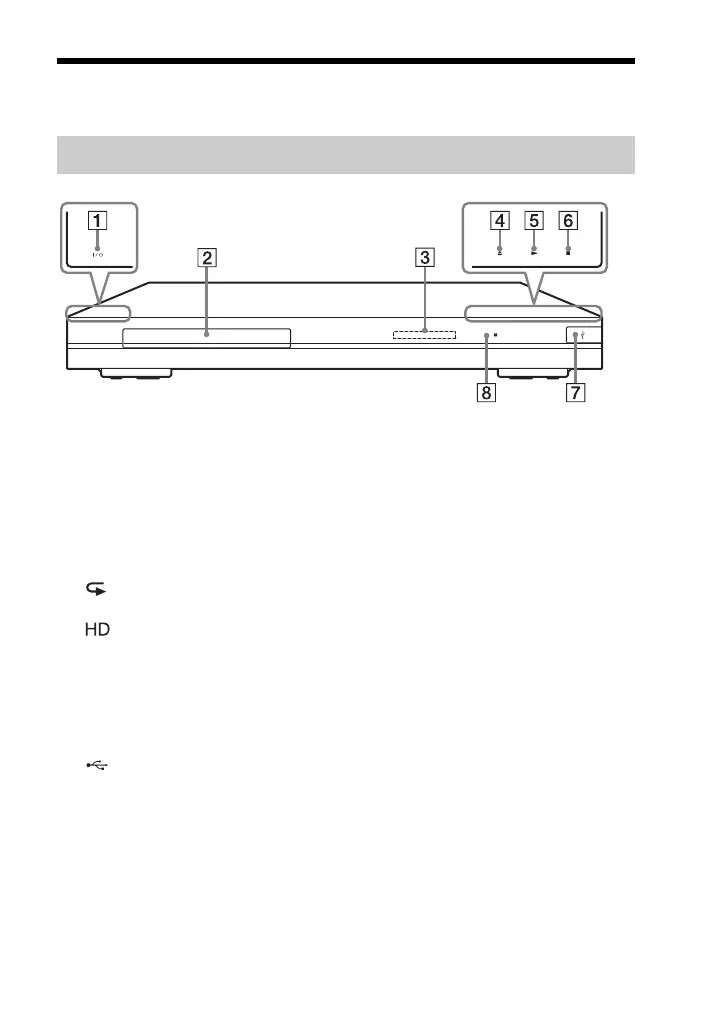
Guide to Parts and Controls
A [/1 (on/standby)
Turns on the player, or sets to
standby mode.
B Disc tray
C Front panel display
N, X: Lights up during playback
or pause.
: Lights up when enabling the
repeat setting.
: Lights up when outputting
720p/1080i/1080p video signals.
D Z (open/close)
E N (play)
F x (stop)
G (USB) jack
Connect a USB device to this jack.
H Remote sensor
To lock the disc tray (Child Lock)
You can lock the disc tray to prevent it
being opened by mistake.
When the player is turned on, hold down
N on the player for more than 10
seconds. The disc tray is locked or
unlocked.
About soft-touch buttons/indicators
These buttons, 4, 5 and 6, function
when the soft-touch button indicators are
lit.
You can turn on/off the indicators by
setting [Dimmer] in the [System
Settings] setup (page 31).
b
These buttons work when you touch them
lightly. Do not press them with excessive
force.
z
These buttons still work, even if you turn off
the indicators by setting [Dimmer] to [Off].
Front panel



 To Next Page