23
Playback
instruction manual supplied with the
disc.
z
Refer also to the instruction manuals supplied
with your TV and the connected device.
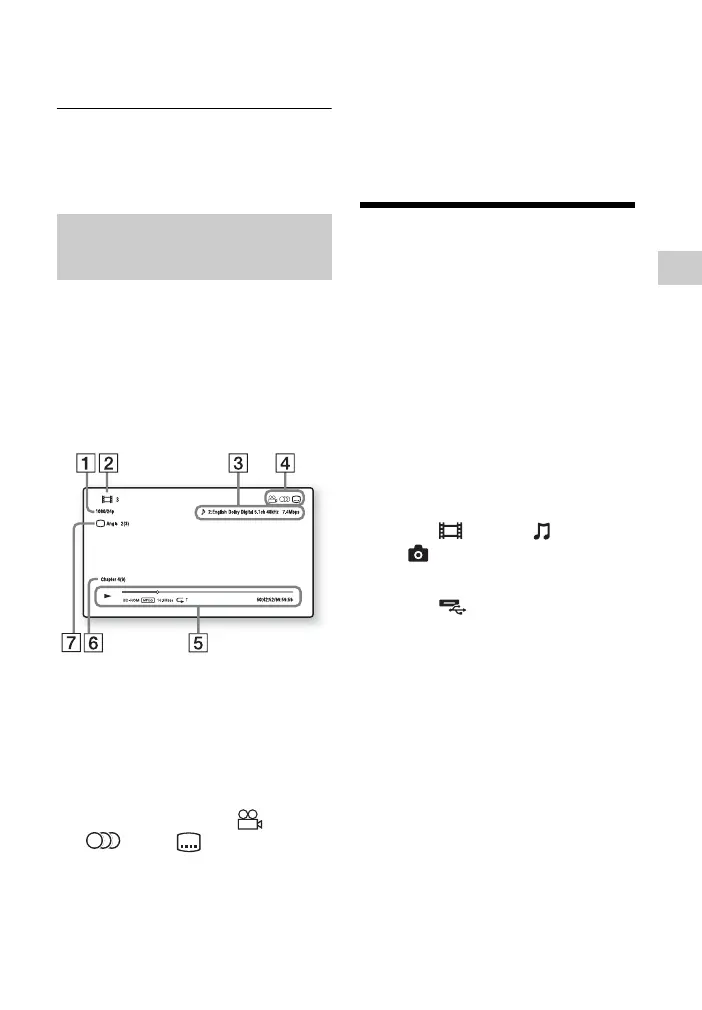
You can check playback information,
etc., by pressing DISPLAY.
The displayed information differs
depending on the disc type and player
status.
Example: when playing a BD-ROM
A Output resolution/Video
frequency
B Title number or name
C The currently selected audio
setting
D Available functions ( angle,
audio, subtitle)
E Playback information
Displays the Play mode, Playing
status bar, Disc type, Video codec,
Bitrate, Repeat type, Elapsed time,
and Total playing time.
F Chapter number
G The currently selected angle
Playing from a USB
Device
You can play video/music/photo files on
the connected USB device.
For playable USB devices, see “Playable
types of files” (page 39).
1 Connect the USB device to the
USB jack on the player (page 13).
Refer to the instruction manual
supplied with the USB device before
connecting.
2 Select [Video], [Music],
or [Photo] on the home menu
using </,.
3 Select [USB device (front)]
using M/m, and press ENTER.
Displaying the play
information



 To Next Page