Guide
to
Parts
and
Controls
For more information, see the pages
in
parentheses.
rn
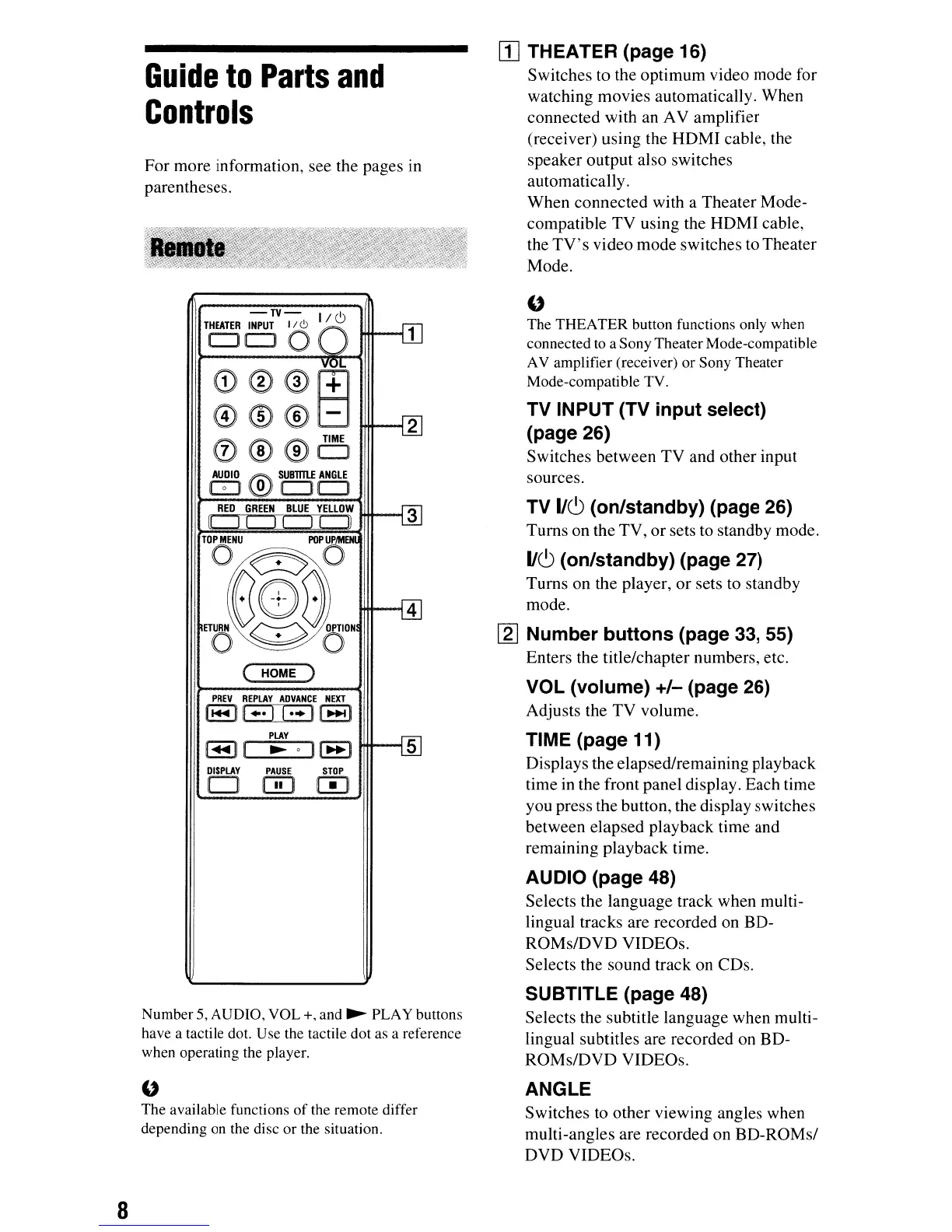
THEATER (page 16)
Switches to the optimum video mode for
watching movies automatically. When
connected with an AV amplifier
(receiver) using the HDMJ cable, the
speaker output also switches
automatically.
When connected with a Theater Mode-
compatible TV using the HDMJ cable,
the
TV's
video mode switches to Theater
Mode.
PREV
REPLAY
ADVANCE
NElCT
l
...
lI"·II··II~1
"
The THEATER button functions only when
connected to a Sony Theater Mode-compatible
AV amplifier (receiver)
or
Sony Theater
Mode-compatible TV.
TV INPUT (TV
input
select)
(page 26)
Switches between TV and other input
sources.
TV 1/6 (on/standby) (page 26)
Turns on the TV,
or
sets to standby mode.
1/6
(on/standby) (page 27)
Turns on the player,
or
sets to standby
mode.
[gJ
Number
buttons
(page 33, 55)
Enters the title/chapter numbers, etc.
VOL (volume)
+/-
(page 26)
Adjusts the
TV
volume.
TIME (page 11)
Displays the elapsed/remaining playback
time
in
the front panel display. Each time
you press the button, the display switches
between elapsed playback time and
remaining playback time.
2
PLAY
-TV-
I I
THEATER
INPUT
II
e>
/ C)
ClOO
,
....
n • 0
II~I
DISPLAY
PAUSE
STDP
o W
[TI
G)@@[±]
0®®B
0®®o
AUDIO
t!i\'t.
SU8l11lf
ANGLE
G:J
~
CJCJ
RED
GREEN
BLUE
YELLOW
II
I!
II
II
II
TOONU
~
POPOEN
m~e~am~
O~O
( HOME )
AUDIO (page 48)
Selects the language track when multi-
lingual tracks are recorded on BD-
ROMs/DVD VIDEOs.
Selects the sound track on CDs.
Number 5, AUDIO,
VOL+,
and
~
PLAY buttons
have a tactile dot. Use the tactile dot as a reference
when operating the player.
"
The available functions
of
the remote differ
depending on the disc or the situation.
SUBTITLE (page 48)
Selects the subtitle language when multi-
lingual subtitles are recorded on BD-
ROMs/DVD VIDEOs.
ANGLE
Switches to other viewing angles when
multi-angles are recorded on BD-ROMs/
DVD VIDEOs.
8



 To Next Page