9
Hookups and Settings
Hookups and Settings
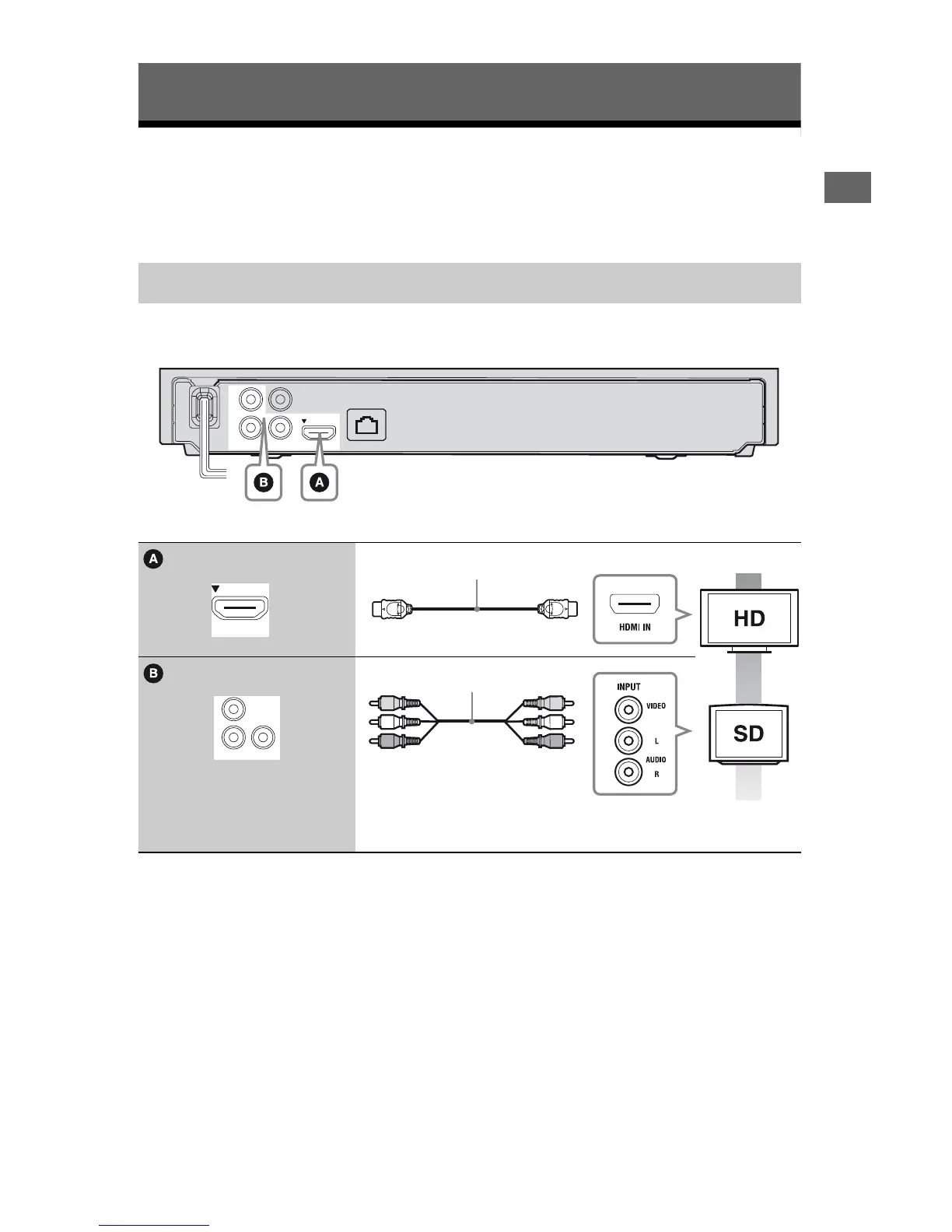
Step 1: Connecting the Player
Do not connect the AC power cord until you have made all the connections.
For supplied accessories, see page 21.
Select one of the following connection methods according to the input jacks on your TV.
Match the color of the plug to that of the jack when connecting.
* See “Supplied accessories” (page 21)
b
Do not connect the player through a VCR. Video signals fed through VCRs may be affected by copyright
protection systems and the picture will be distorted on the television.
Connecting to your TV
High quality
Standard
quality
HDMI OUT
LINE OUT
AUDIO
LAN(100)
PCM/DTS/
DOLBY DIGITAL
VIDEO
COAXIAL
R
L
DIGITAL OUT
HDMI OUT
HDMI cable
*
LINE OUT
AUDIO
VIDEO
R
L
Audio/video cable (supplied)



 To Next Page