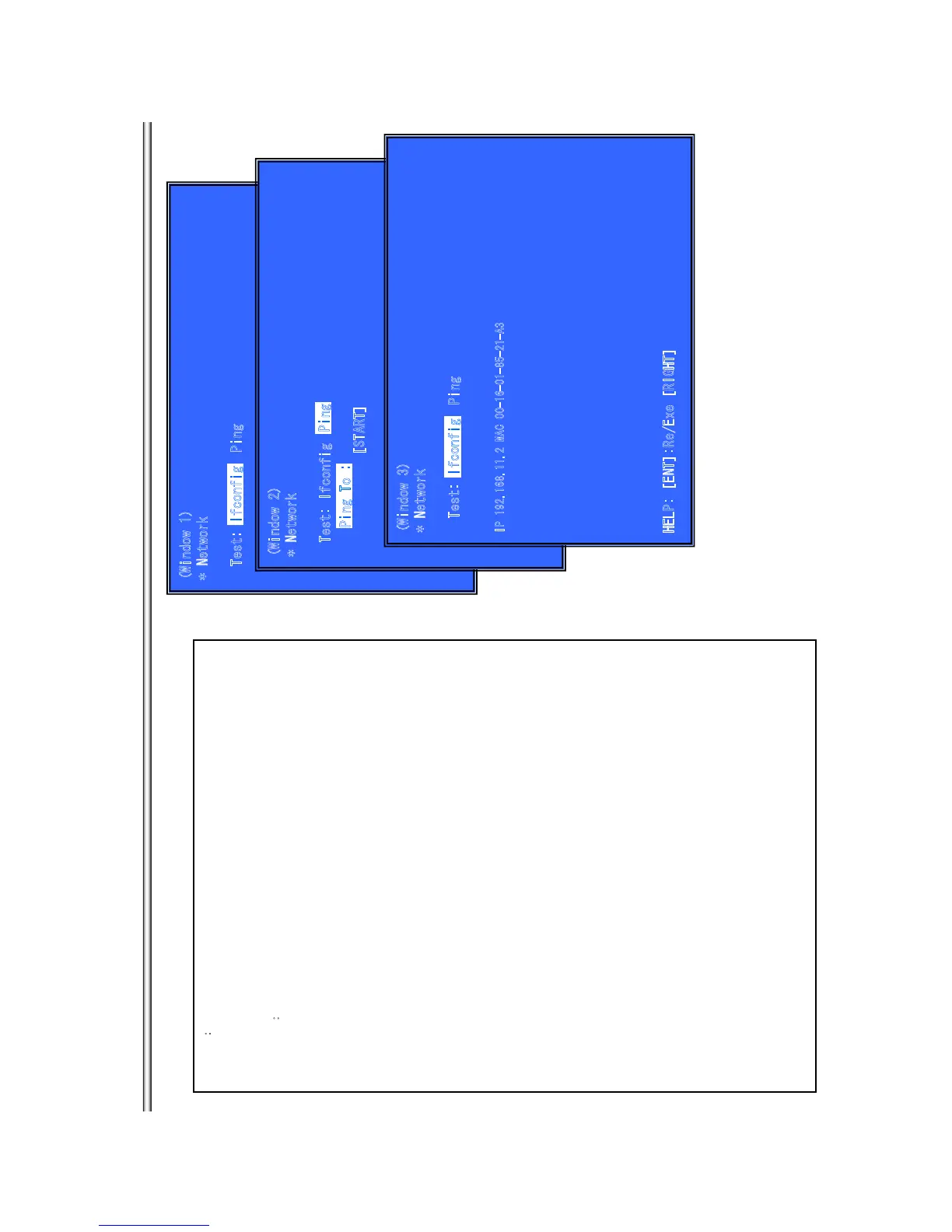
Network Ô0GVYQTM6GUV: +HEQPHKIÕ
(
Window 1)
* Network
Test: Ping
Outlineæ
Network Menu for the wired Ethernet.
(Window1)Ifconfig Test
Operationæ
[ENT] Activate Ifconfig
Ô
Display network setting
Õ
[RIGHT] Select Ping Test.
[RET] Return to Service Top Menu.
(Window 2)Ping Test
Operation:
[LEFT] Select Ifconfig Test.
[RET] Return to Service Top Menu.
(The details of a Ping test are nest page)
(Window 3)Ifconfig Test Active
Display Ifconfig command results.
Operation
:
[ENT] Ifconfig retry
[RIGHT] Select Ping Test.
[RET] Return to Service Top Menu.
(W
ind
ow
2
)
* Network
Test: Ifconfig
Ping To :
[START]
Ping To :
Ping
Ifcon
f
i
g
(Window 3)
*
N
etw
o
rk
Test: Ping
IP 1
9
2.16
8
.11
.
2 MA
C
00
-
16-0
1
-85
-
21-A
3
H
E
L
P
:
[ENT]:
R
e
/Ex
e [RIGHT]
Ifconf
ig
BX18/S185/S186
7-10



 To Next Page