Network Ô0GVYQTM6GUV: 2KPIÕ
Outline
æ
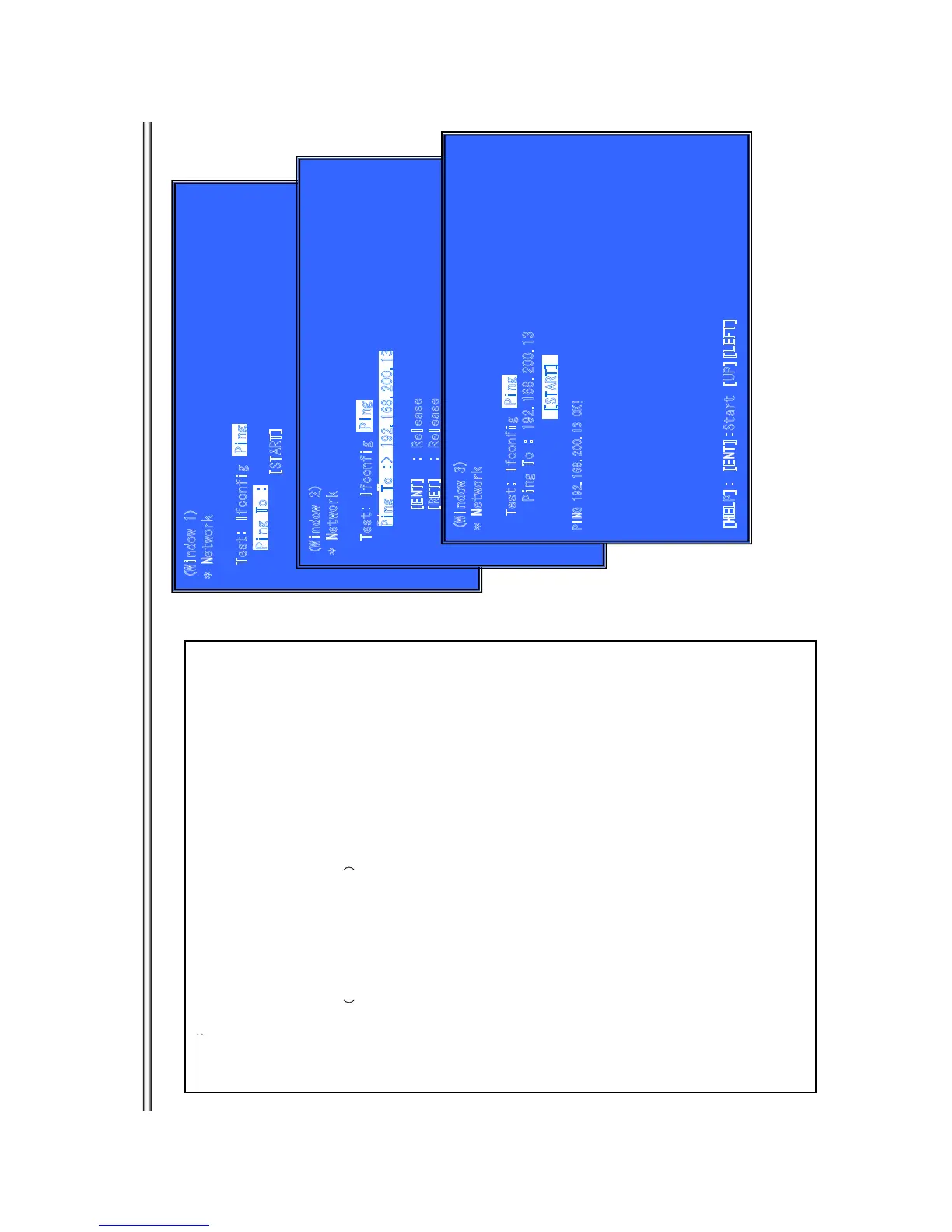
Ping Test for the wired Ethernet.
(Window 1)Ping Test
Operation:
[LEFT] Select Ifconfig Test.
[DOWN] Ping execution preparation.
[RET] Return to Service Top Menu.
(Window 2) The IP address of the Ping point is set up.
Ô
IP address input mode
Õ
When “Ping to :>” is reversed, [ENT] is pushed and IP is inputted.
Operation:
[ENT] Finish to input.
[RET] Finish to input.
[LEFT] Finish to input and Select Ifconfig Test.
[(NUM)] Input Character sting ‘0-9’
[TIME] Input Character sting ’.’
[CLEAR] Backspace
(Windows3): Ping Test Active
When [START] is reversed, [ENT] is pushed and execute ping .
Operation:
[ENT] Activate Ping Test
[UP] The IP address of the Ping point is set up.
[RET] Return to Service Top Menu.
(Window 1
)
* Network
Test: Ifconfig
Pi
ng To
:
[ST
A
R
T]
P
i
ng T
o
:
Ping
(Window 2)
* Network
T
est: I
f
c
onf
ig
Ping To
:
[ENT]
:
Release
[RET] : Release
[LEFT] : Ifconfig Test
[(NUM)]: ‘0-9’
[TIME] : ‘.’
[
C
LEAR
]
:
Bac
kspace
Ping To :> 192.168.200.13
P
in
g
(Windo
w
3
)
* Network
Tes
t
: Ifconfig
Ping To : 192.168.200.13
P
I
N
G
19
2.
168
.
2
0
0
.1
3 O
K
!
[HELP
]
: [ENT]:Star
t [
UP][LEFT]
Pi
ng
[START]
BX18/S185/S186
7-11



 To Next Page