'
•••
.of
' ....
'
•••
.of
'"
.'"
' ...
'"
'
•••
.of
-...-
•
.....
.....
:.::
:.:
·
:
:::
:
.....
·
.....
:
:::
:
:.;;:.:
;.:::.
:
:
...
: :
...
:
-I-
t
.....
...
..
.
....
.
....
:
.,.:
:
...
:
:
...
:
·
:
..
, :
:
...
:
·
:
:::
:
i.~!.:.
i
..... ..... ..... ..... .....
•
.
...
:
....
.
.
...
:.~
.
.
.
.•.
:.~
.
·
.
....
:.~
.
.
..
:.:.~
.
·
:.'.:
...
:
.
!Il
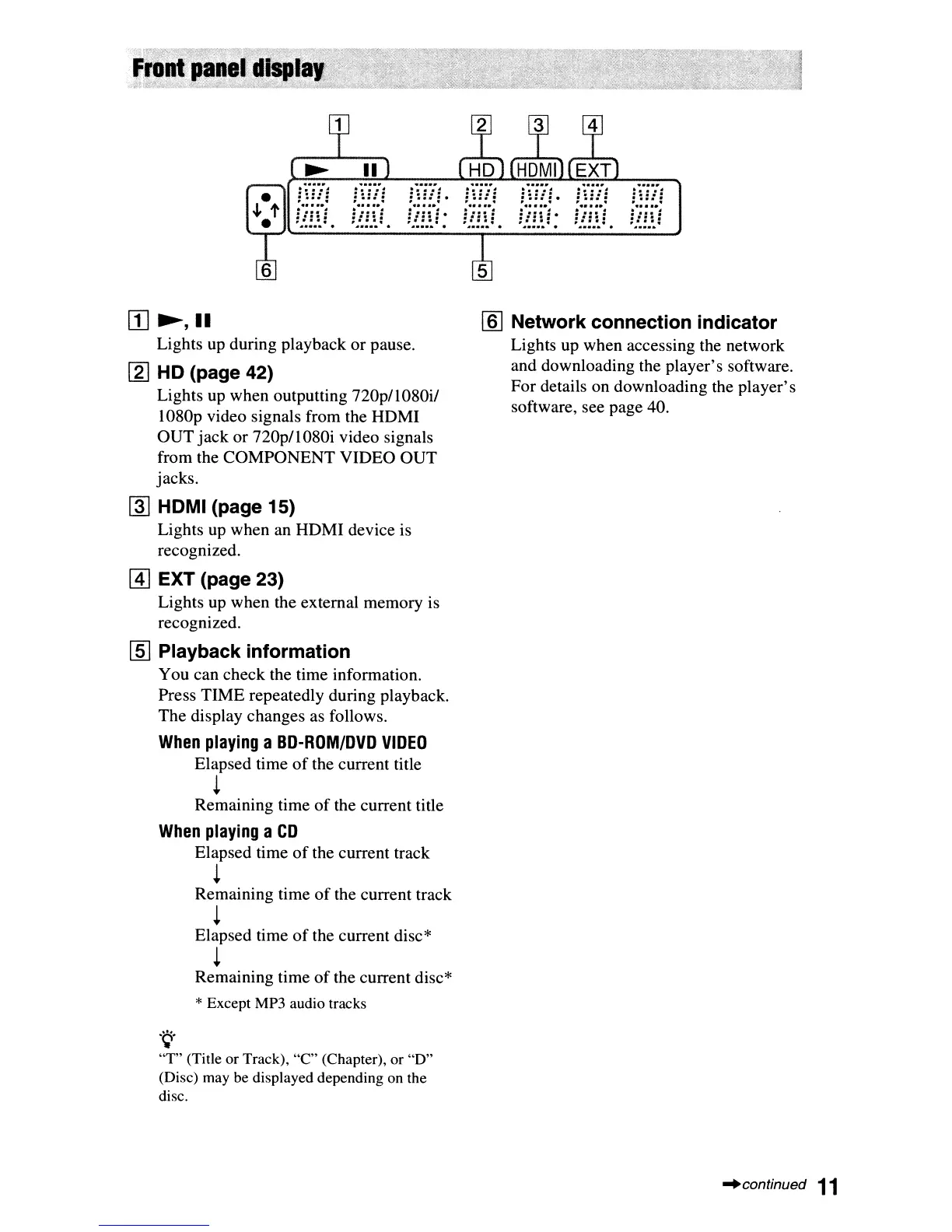
~,II
Lights up during playback
or
pause.
[2]
HD (page 42)
Lights up when outputting
nOp/1080i/
1080p video signals from the HDMI
OUT
jack
or
nOp/1080i
video signals
from the
COMPONENT
VIDEO
OUT
jacks.
@]
HDMI (page 15)
Lights up when an HDMI device is
recognized.
@]
EXT (page 23)
Lights up when the external memory is
recognized.
[ID
Playback information
You can check the time information.
Press TIME repeatedly during playback.
The display changes as follows.
When
playing
a
BD-ROM/DVD
VIDEO
Elapsed time
of
the current title
t
Remaining time
of
the current title
When
playing
a
CD
Elapsed time
of
the current track
t
Remaining time
of
the current track
t
Elapsed time
of
the current disc*
t
Remaining time
of
the current disc*
* Except MP3 audio tracks
.~.
"T"
(Title or Track),
"C"
(Chapter), or
"0"
(Disc) may be displayed depending on the
disc.
[§J
Network connection indicator
Lights up when accessing the network
and downloading the player's software.
For details on downloading the player's
software, see page 40.
~continued
11


 To Next Page