Audio
Output
Signals
and
Player
Settings
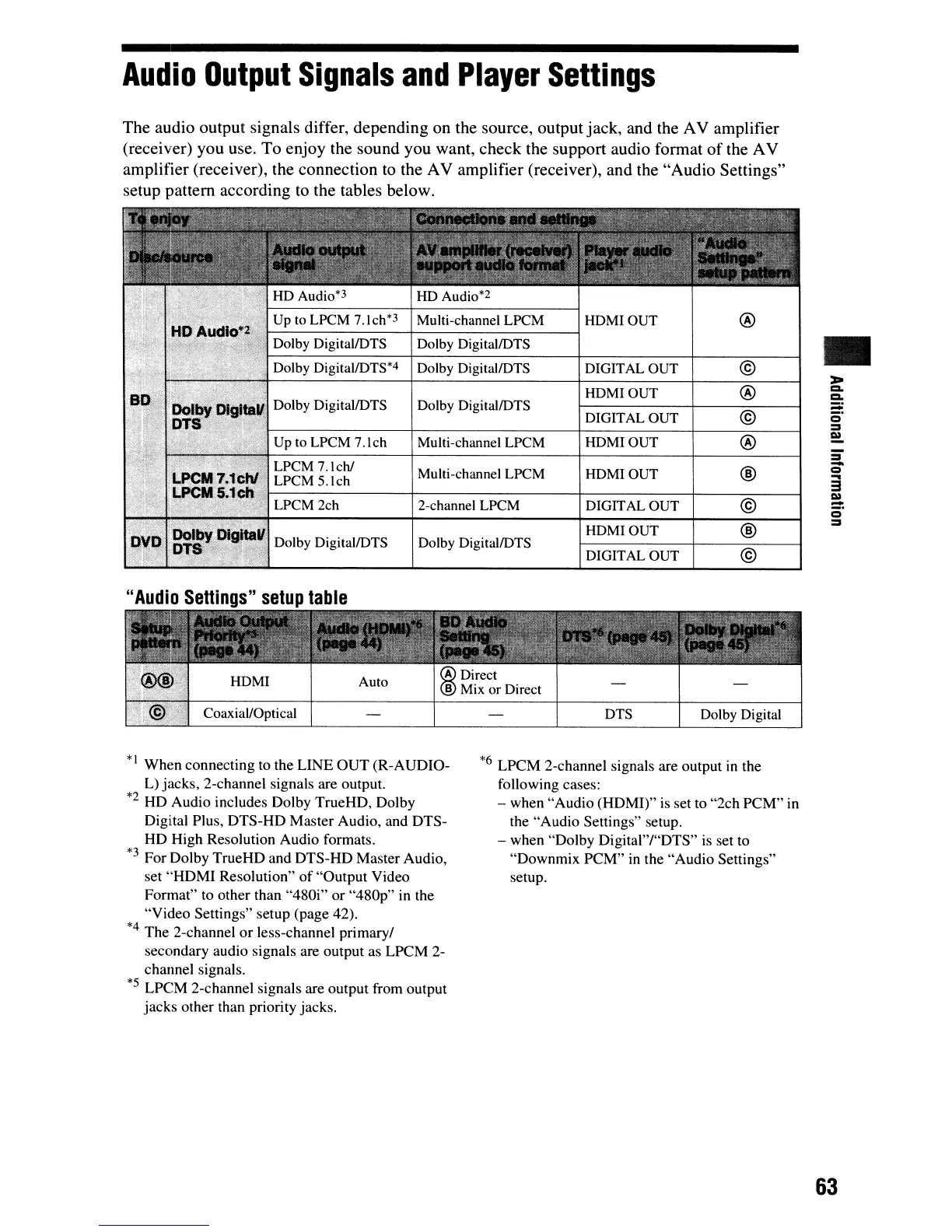
The audio output signals differ, depending on the source, output jack, and the AV amplifier
(receiver) you use. To enjoy the sound you want, check the support audio format
of
the AV
amplifier (receiver), the connection
to
the AV amplifier (receiver), and the "Audio Settings"
setup pattern according to the tables below.
Up
to
LPCM
7.1ch*3
Multi-channel LPCM HDMIOUT
@
Dolby DigitallDTS
Dolby DigitallDTS
•
Dolby DigitallDTS*4
Dolby DigitallDTS
DIGITAL OUT
©
~
HDMIOUT
@
Co
Co
Dolby DigitallDTS Dolby DigitallDTS
:::;:
DIGITAL OUT
©
o'
=
Up
to
LPCM 7.1ch Multi-channel LPCM
HDMIOUT
@
l»
=
LPCM 7.lch/
®
-
Multi-channel LPCM
HDMIOUT
Q
LPCM 5.lch
....
3
©
l»
LPCM 2ch 2-channel LPCM DIGITAL OUT
:=:
Q
®
=
HDMIOUT
Dolby DigitallDTS Dolby DigitallDTS
DIGITAL OUT
©
"Audio
Settings"
setup
table
Auto
Coaxial/Optical
DTS
Dolby Digital
*' When connecting to the LINE
OUT
(R-AUDIO-
L) jacks, 2-channel signals are output.
*2
HD Audio includes Dolby TrueHD, Dolby
Digital Plus, DTS-HD Master Audio, and DTS-
HD High Resolution Audio formats.
*3
For Dolby TrueHD and DTS-HD Master Audio,
set
"HDMI
Resolution"
of
"Output Video
Format" to other than "480i" or
"480p"
in the
"Video Settings" setup (page 42).
*4
The 2-channel
or
less-channel primary/
secondary audio signals are output as LPCM 2-
channel signals.
*5
LPCM 2-channel signals are output from output
jacks other than priority jacks.
*6
LPCM 2-channel signals are output in the
following cases:
- when "Audio (HDM!)" is set to "2ch
PCM"
in
the "Audio Settings" setup.
- when "Dolby Digital"/"DTS"
is
set to
"Downmix PCM"
in
the "Audio Settings"
setup.
63



 To Next Page