11
Getting Started
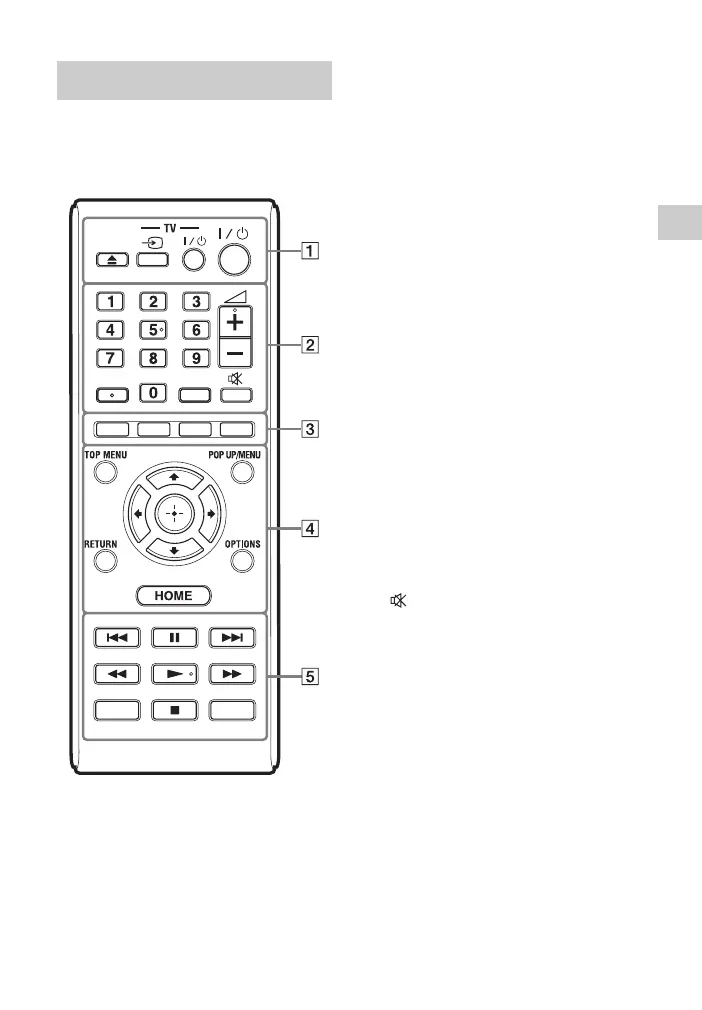
The available functions of the remote are
different depending on the disc or the
situation.
z
Number 5, AUDIO, 2 +, and N buttons
have a tactile dot. Use the tactile dot as a
reference when operating the player.
A Z (open/close)
Opens or closes the disc tray.
-TV- t (TV input select)
Switches between TV and other
input sources.
-TV- [/1 (TV on/standby)
Turns on the TV, or sets to standby
mode.
[/1 (on/standby)
Turns on the player, or sets to
standby mode.
B Number buttons (0 - 9)
Enters the title/chapter numbers, etc.
2 (volume) +/–
Adjusts the TV volume.
AUDIO (page 27)
Selects the language track when
multi-lingual tracks are recorded on
BD-ROMs/DVD VIDEOs.
Selects the sound track on CDs.
SUBTITLE (page 27)
Selects the subtitle language when
multi-lingual subtitles are recorded
on BD-ROMs/DVD VIDEOs.
(muting)
Turns off the sound temporarily.
C Colour buttons (red/green/
yellow/blue)
Shortcut keys for interactive
functions.
D TOP MENU
Opens or closes the BD’s or DVD’s
Top Menu.
POP UP/MENU
Opens or closes the BD-ROM’s
Pop-up Menu, or the DVD’s menu.
OPTIONS (page 21)
Displays the available options on the
screen.
Remote
DISPLAY
SEN
AUDIO SUBTITLE



 To Next Page