48
GB
To delete data in the external
memory
You can delete unnecessary data.
1 If a disc is inserted, remove the disc
from the unit.
2 Press HOME.
3 Press C/c to select [Video].
4 Press X/x to select [BD Data], then
press .
5 Select the disc name, then press
OPTIONS.
6 Select [Erase], then press .
7 Select [OK], then press .
The data of the selected disc will be deleted.
Note
• Depending on the BD-ROM, the disc name may not
be displayed.
Ti
• To delete all data in the external memory at once,
select [Erase All] in Step 6.
•Press
instead of OPTIONS in Step 5 to skip Step
6.
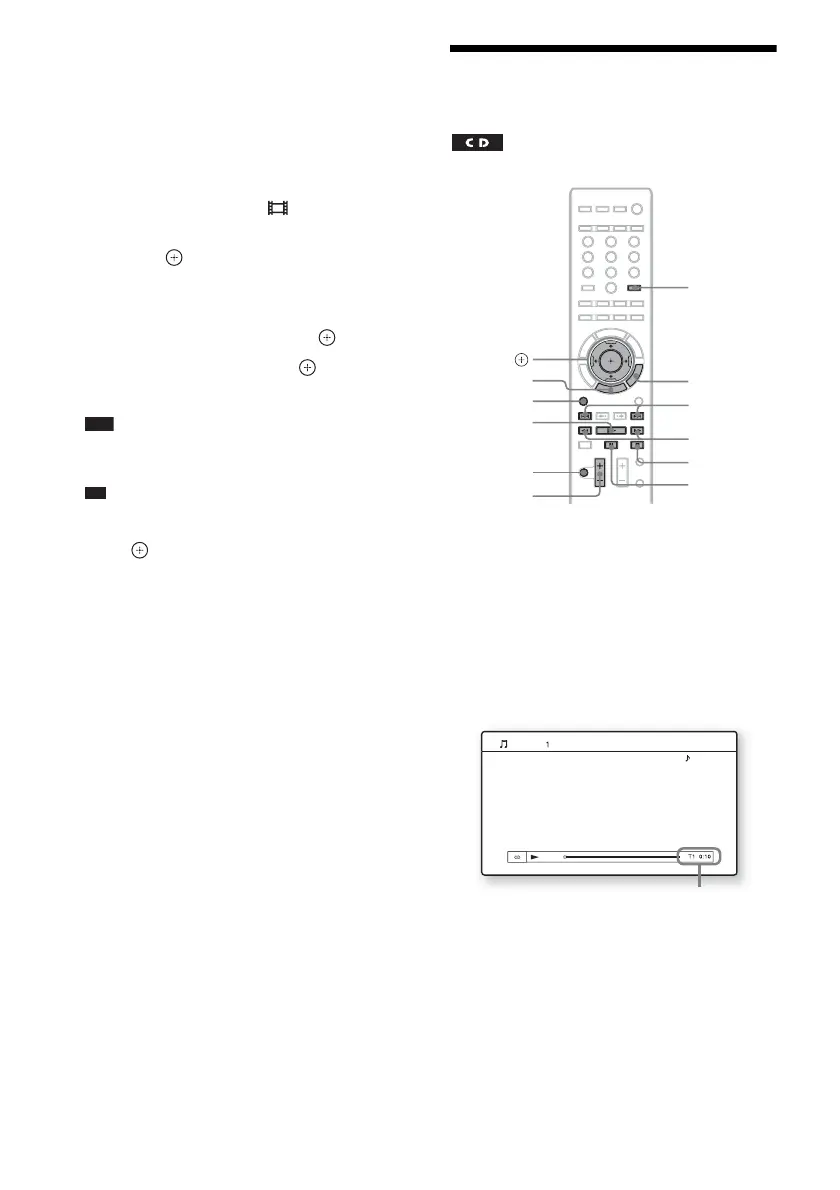
Playing a CD
1 Press FUNCTION repeatedly until “BD/
DVD” appears in the front panel
display.
2 Insert a CD.
The Music Player screen appears.
3 Press N.
Playback starts.
4 Adjust the volume by using 2 +/–.
The volume level appears on the TV screen
and in the front panel display.
FUNCTION
X
N
x
./>
MUTING
2 +/–
m/M
C/X/x/c,
HOME
OPTIONS
TIME
Music CD
Stereo
Current track number and elapsed time



 To Next Page