32
GB
Getting Started
Step 3: Performing the
Easy Setup
Follow the Steps below to make the basic
adjustments for using the system.
Displayed items vary depending on the country
model.
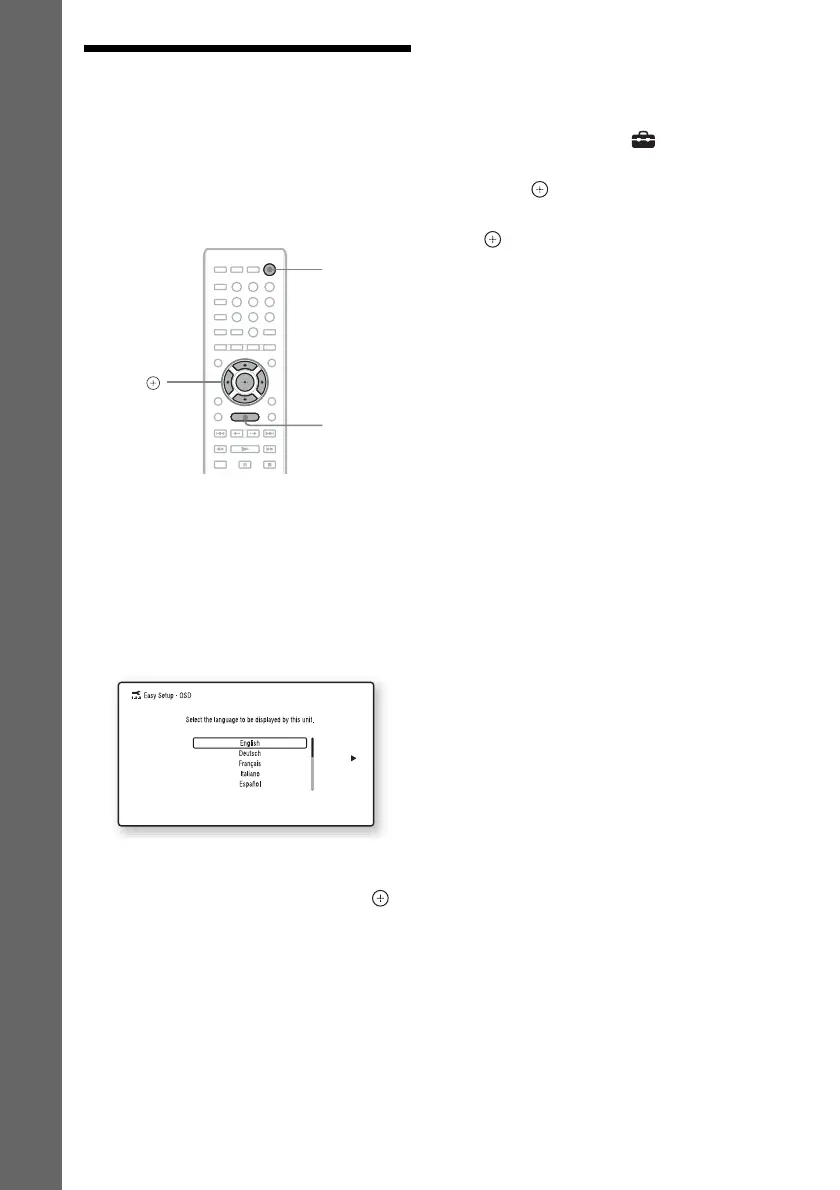
1 Turn on the TV.
2 Press [/1.
3 Switch the input selector on your TV so
that the signal from the system
appears on the TV screen.
The Easy Setup Display for OSD language
selection appears.
4 Perform the [Easy Setup]. Follow the
on-screen instructions to make the
basic settings using C/X/x/c and .
Depending on the connection method
(page 19), perform the following setting.
• HDMI cable connection: Follow the
instructions that are displayed on the TV
screen.
• Video cord connection: Select [16:9] or
[4:3] so that the picture is displayed
correctly.
To recall the Easy Setup Display
1 Press HOME.
The home menu appears on the TV screen.
2 Press C/c to select [Setup].
3 Press X/x to select [Easy Setup], then
press .
4 Press C/c to select [Start], then press
.
The Easy Setup Display appears.
8
0
97
564
231
C/X/x/c,
HOME
"/1



 To Next Page