16
GB
Getting Started
Step 1: Installing the System
You can select from one of three positions for installing the main unit: in a vertical position, in a
horizontal position, or on a wall. For details, see “Selecting the installation position of the main unit”
(page 27).
You can also install the front speakers on a wall. For details, refer to the supplied “Speaker Installation
Guide.”
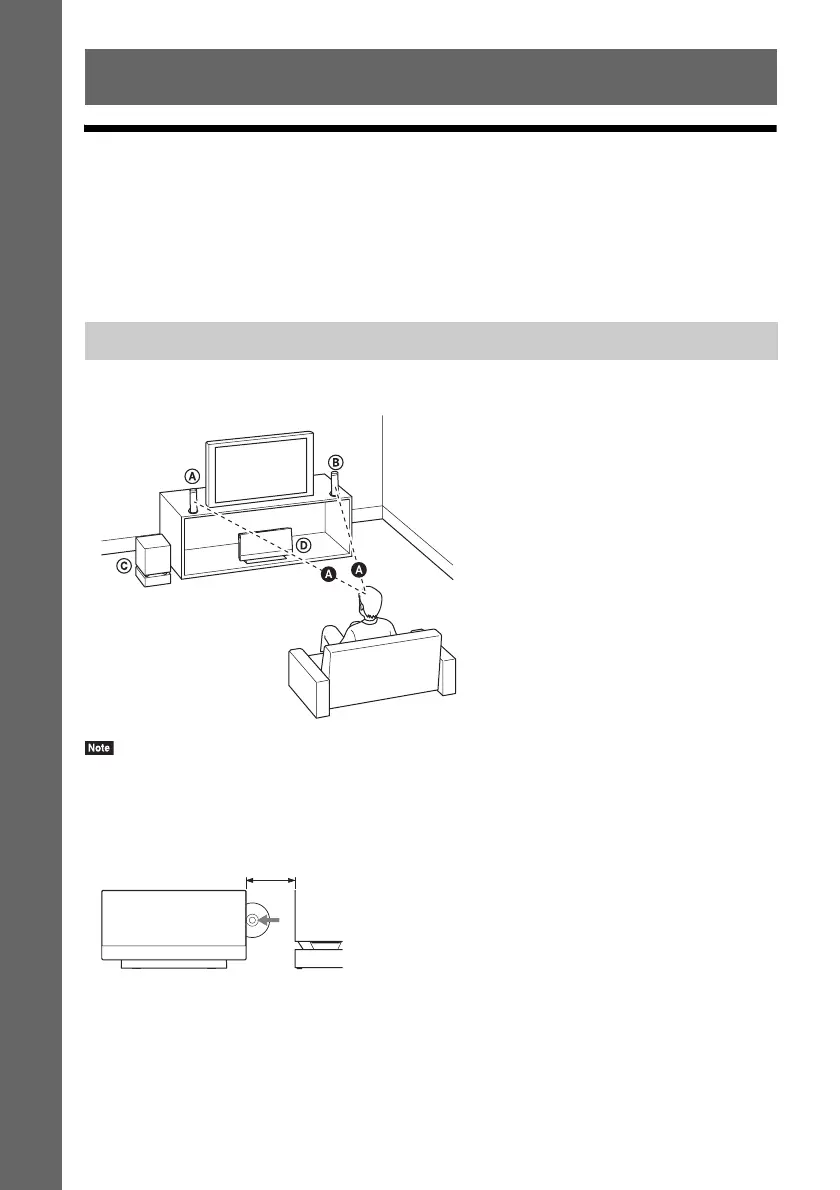
Install the system by referring to the illustration below.
• Use caution when placing the speakers and/or speaker stands attached to the speakers on a specially treated (waxed,
oiled, polished, etc.) floor, as staining or discoloration may result.
• Leave a space for inserting/ejecting the disc (approximately 15 cm) to the right (disc slot) side of the main unit when
placing an object nearby.
• Do not lean or hang on a speaker, as it may fall down.
• Image distortion on the TV screen may occur depending on the location of the subwoofer. In this case, place the
subwoofer away from the TV.
• Do not block the ventilation openings of the main unit (page 10).
• Place both front speakers the same distance apart from the listening position (A).
• The front speakers should be placed at least 0.6 m apart.
Getting Started
How to position the system
A Front speaker (L (left))
B Front speaker (R (right))
C Subwoofer
D Main unit
Approximately 15 cm



 To Next Page