56
GB
•[Auto]: Normally select this. The system
automatically selects the better channel
for transmission.
• [1], [2], [3]: The system transmits sound
by fixing the channel for transmitting.
Select the channel with the better
transmission.
• The transmission may be improved by changing the
transmission channel (frequency) of the other
wireless system(s). For details, refer to the operating
instructions of the other wireless system(s).
Setting up the Network
[Internet Settings]
Before setting, connect the system to the
network. For details, see “Connecting to the
network” (page 23).
To open the setting display
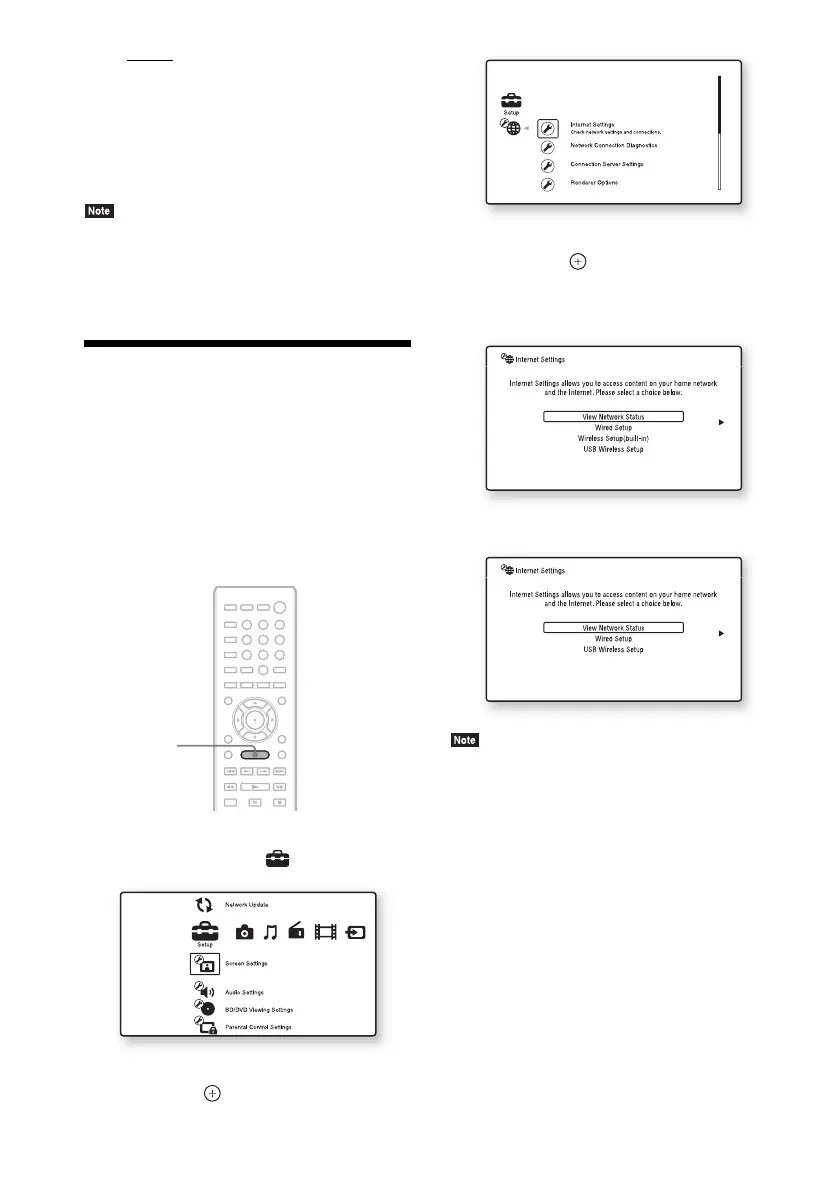
1 Press HOME.
The home menu appears on the TV screen.
2 Press C/c to select [Setup].
3 Press X/x to select [Network Settings],
then press .
4 Press X/x to select [Internet Settings],
then press .
The [Internet Settings] display appears.
For BDV-L800/BDV-L800M
For BDV-L600
• The [Internet Settings] items are necessary to connect
to the Internet. Enter the respective (alphanumeric)
values for your broadband router or Wireless LAN
router. The items that need to be set may differ,
depending on the Internet service provider or the
router. For details, refer to the instruction manuals
that have been provided by your Internet service
provider or supplied with the router.
• For more information, go to the following URL.
For customers in Europe:
http://support.sony-europe.com
For customers in other countries/regions:
http://www.sony-asia.com/support
8
0
97
564
231
HOME



 To Next Page