12
GB
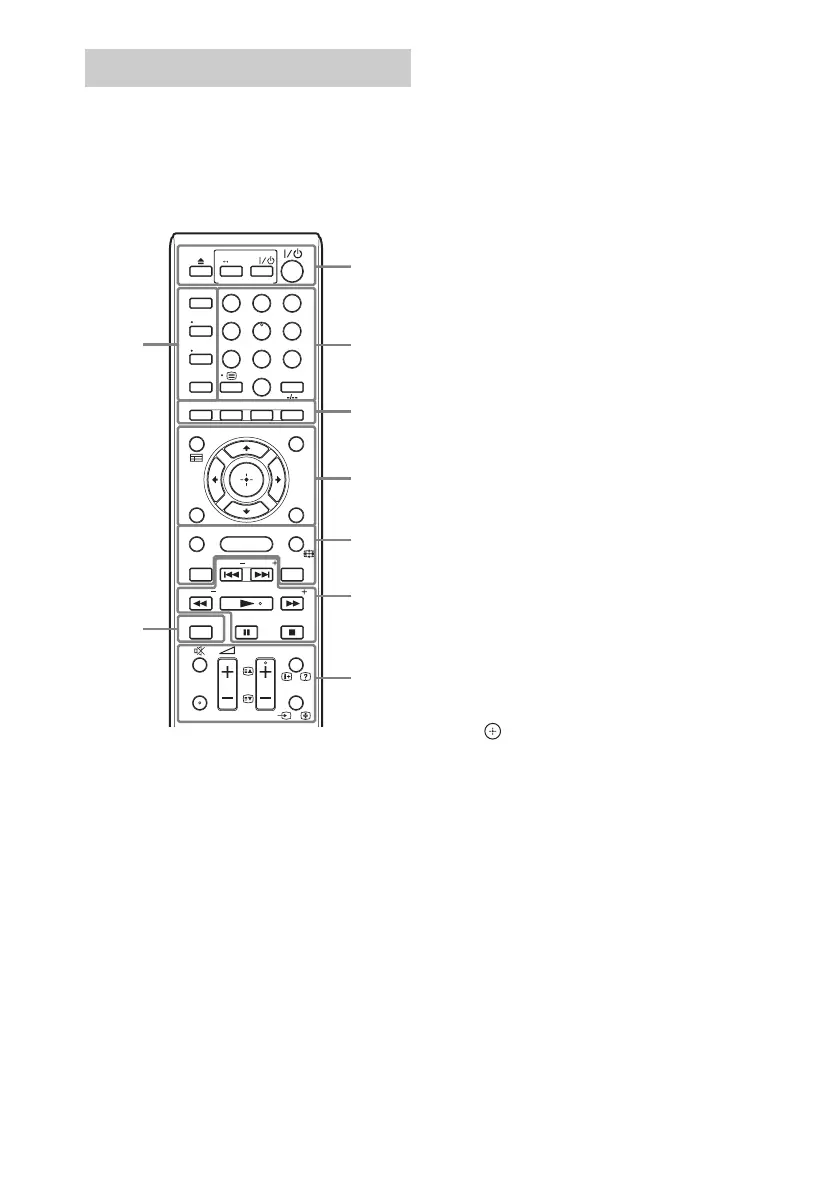
The buttons for system operation only are
described below. See “Controlling Your TV or
Other Components with the Supplied Remote”
(page 37) for the buttons for operation of the
connected components.
• Number 5, AUDIO, PROG +, and N buttons
have a tactile dot. Use the tactile dot as a
reference when operating the remote.
• Names of buttons that work after pressing the
TV or STB operation mode buttons are
indicated with yellow or green label.
A Z (eject)
SPEAKERS TVyAUDIO
Selects whether TV sound is output from
the system’s speakers or the TV’s
speaker(s). This function works only when
you set [Control for HDMI] to [On]
(page 45).
AV "/1 (on/standby) (page 37)
Turns on the TV or other component, or sets
it to standby mode.
"/1 (on/standby) (pages 21, 33)
Turns on the system or sets it to standby
mode.
B Number buttons (pages 33, 37)
Enters the title/chapter numbers, preset
station number, etc.
ENTER
Enters the selected item.
C Color buttons (red/green/yellow/blue)
Short cut keys for selecting items on some
BD menus (can also be used for Java
interactive operations on BDs).
D TOP MENU
Opens or closes the BD’s or DVD’s Top
Menu.
POP UP/MENU
Opens or closes the BD-ROM’s Pop-up
Menu, or the DVD’s menu.
OPTIONS (pages 23, 30, 39)
Displays the options menu on the TV screen
or in the front panel display. (The location
differs based on the selected function.)
RETURN
Returns to the previous display.
C/X/x/c
Moves the highlight to a displayed item.
(enter)
Enters the selected item.
E FUNCTION (pages 22, 33)
Selects the playback source.
By setting [External Input Settings]
(page 46), you can skip unused inputs when
selecting a function.
HOME (pages 21, 33, 35, 39, 41)
Enters or exits the system’s home menu.
SOUND MODE (page 23)
Selects the sound mode.
3D
Converts 2D content into simulated 3D
content when connected to a 3D compatible
device.
Remote control
TUNING
DISPLAY
SLEEP
PROG
TOP MENU
TOOLS
MENU
POP UP/ MENU
RETURN OPTIONS
FUNCTION
HOME
SOUND MODE
AV
SPEAKERS
TV
AUDIO
8
0
97
564
231
TUNING
BRAVIA Sync
BD
TV
STB
ENTER
DIMMER
PRESETPRESET SEN
3D
AUDIO
SUBTITLE
1
9
2
3
4
5
6
7
8


 To Next Page