14
GB
Getting Started
Step 1: Installing the
System
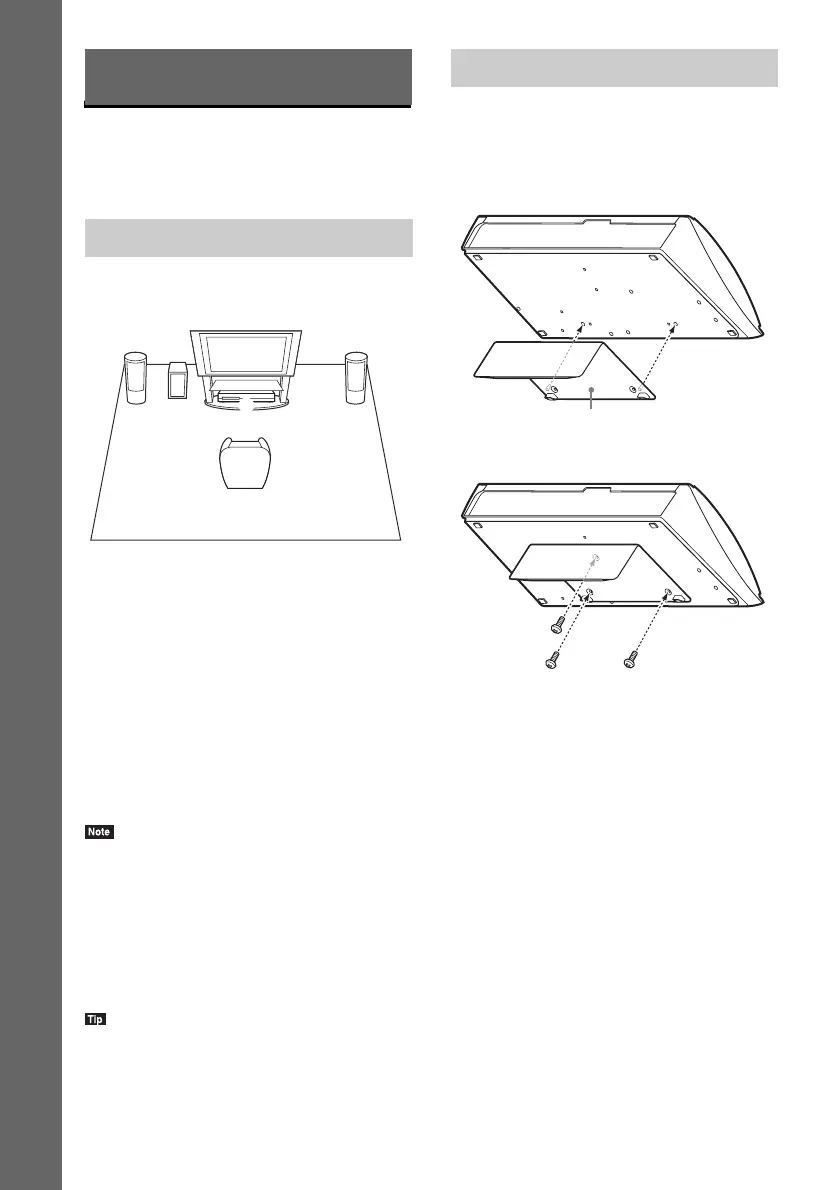
Install the system by referring to the illustration
below.
A Front speaker (L (left))
B Front speaker (R (right))
C Subwoofer
D Unit
Since the system is equipped with S-Force PRO
Front Surround* technology, you can enjoy
surround sound with the speakers in front of the
listening position.
* S-Force PRO Front Surround 3D reproduces a
convincing sense of distance and space, resulting in
a true surround sound experience without the need
for rear speakers.
• Use caution when placing the speakers and/or
speaker stands attached to the speakers on a specially
treated (waxed, oiled, polished, etc.) floor, as staining
or discoloration may result.
• Do not lean or hang on a speaker, as it may fall down.
• The speaker of this set is not anti-magnetic. This may
result in color unevenness when it is placed near a
CRT TV or projector.
• You can install the speakers on a wall. For details,
refer to the supplied “Speaker Installation Guide.”
You can install the unit in a raised position by
attaching the stand.
1 Insert the pins of the stand in the holes
on the bottom of the unit.
2 Secure the stand with the screws.
Getting Started
How to position the system
AB
D
C
Attaching the stand to the unit
Stand (supplied)
Screws (supplied)


 To Next Page