masterpage:Left
specdef v20080116
filename[I:\FM E_data\850138S_BDV-Z2\0527_data
up\4136891111\4136891111BDVZ7AEP\02-BDVZ7AEP\gb04gst.fm]
model name [BDV-Z7_GB]
[4-136-891-11(1)]
22
GB
Getting Started
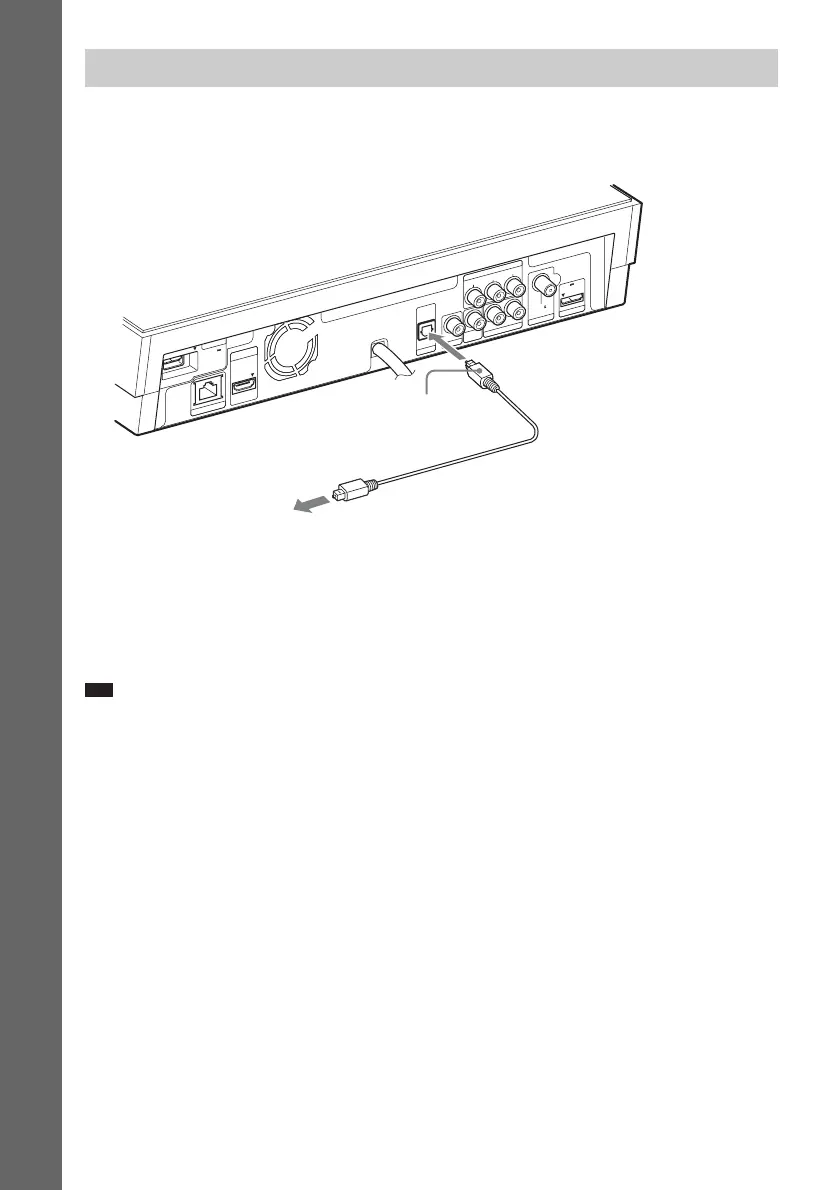
This connection sends an audio signal to the system from the TV. To listen to TV sound via the system,
perform this connection.
Digital optical cord (D) connection
With a digital audio connection, the system receives a Dolby Digital multiplex broadcast signal and
you can enjoy multiplex broadcast sound.
Note
• To achieve full use of the Control for HDMI function (page 58), connect the system and the TV with a digital optical
cord (D).
Connecting the TV (Audio connection)
DC5V
0.7A MAX
FM75
COAXIAL
L
AUDIO IN
DIGITAL IN
COAXIAL
DIGITAL IN
OPTICAL
DC5V
0.5A MAX
R
OUT
P
R
/C
R
P
B
/C
B
Y
E
X
T
LAN(100)
H
D
M
I
T
V
S
A
T
/C
A
B
L
E
V
ID
E
O
O
U
T
AUDIO
C
O
M
P
O
N
E
N
T
V
I
D
E
O
O
U
T
ANTENNA
DMPORT
To the digital optical
out jack of the TV.
D Digital optical
cord (not supplied)
Rear of the control unit


 To Next Page