masterpage:Left
specdef v20070110
filename[I:\FM E_data\850138S_BDV-Z2\0527_data
up\4136891111\4136891111BDVZ7AEP\02-BDVZ7AEP\gb03par.fm]
model name [BDV-Z7_GB]
[4-136-891-11(1)]
8
GB
Index to Parts and
Control
For more information, refer to the pages
indicated in parentheses.
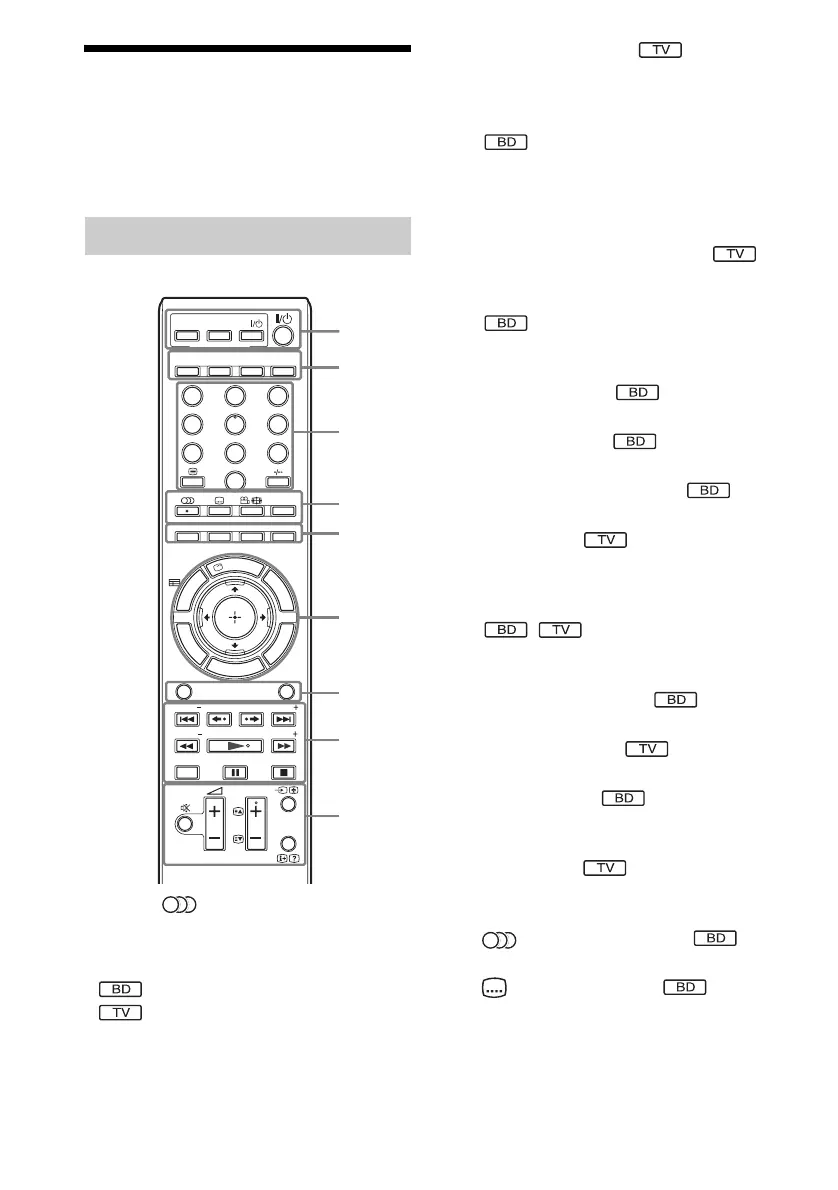
Number 5, /DIGITAL, PROG +, and N
buttons have a tactile dot. Use the tactile dot as
a reference when operating the remote.
• : For system operations
• : For TV operations
(For details, see “Controlling the TV with the
Supplied Remote” (page 62).)
A THEATRE (page 59)
Switches to the optimum video mode for
watching movies automatically.
ONE-TOUCH PLAY (pages 35, 59)
By only pressing the button, the TV turns
on, the TV is set for BD/DVD input
selector, and the system starts playing a disc
automatically.
TV "/1 (on/standby) (page 62)
Turns on the TV or sets it to standby mode.
"/1 (on/standby) (pages 28, 29, 35, 52)
Turns on the system or sets it to standby
mode.
B SLEEP (page 63)
Sets the sleep timer.
NIGHT (page 50)
Activates the night mode function.
DYNAMIC BASS (page 50)
Reinforces bass frequencies.
TV (page 62)
Changes to the TV operation mode for the
remote.
C Number buttons (pages 35, 53, 62)
Enters the title/chapter numbers, radio
frequencies, etc.
CLEAR (pages 40, 54)
Clears the entry field.
/ (text) (page 62)
Accesses text.
TIME (page 40)
Displays the elapsed/remaining playback
time in the front panel display.
-
(page 62)
- is for selecting a channel number greater
than 10.
D (audio) (pages 49, 50)
Selects the audio format/track.
(subtitle) (page 38)
Selects the subtitle language when multi-
lingual subtitles are recorded on a BD-
ROM/DVD VIDEO.
Remote control
321
654
987
0
THEATRE
NIGHT
DYNAMIC
BASS
TV
D.TUNING
FUNCTION
SOUND MODE
SYSTEM
MENU
CLEAR TIME
TV
ONE-TOUCH
PLAY
BRAVIA Sync
R
E
T
U
R
N
O
P
T
I
O
N
S
H
O
M
E
REPLAY ADVANCE
PRESET PRESET
TUNING
SCENE SEARCH
DISPLAY
PROG
TUNING
T
O
O
L
S
T
O
P
M
E
N
U
P
O
P
U
P
/
M
E
N
U
D
I
S
P
L
A
Y
SLEEP
ANALOGDIGITAL
1
2
3
4
5
6
7
8
9


 To Next Page