masterpage:Left
specdef v20070110
filename[I:\FM E_data\850138S_BDV-Z2\0527_data
up\4136891111\4136891111BDVZ7AEP\02-BDVZ7AEP\gb05ply.fm]
model name [BDV-Z7_GB]
[4-136-891-11(1)]
44
GB
Playing a CD
1 Press FUNCTION repeatedly until “BD/
DVD” appears in the front panel
display.
2 Place a CD.
The Music Player screen appears.
3 Press N.
Playback starts.
4 Press 2 +/– to adjust the volume.
The volume level appears on the TV screen
and in the front panel display.
To select a track
1 Press HOME.
2 Press C/c to select [Music].
3 Press .
The music list appears.
4 Press X/x to select a track, then press
N or .
The system plays the selected track.
Other operations
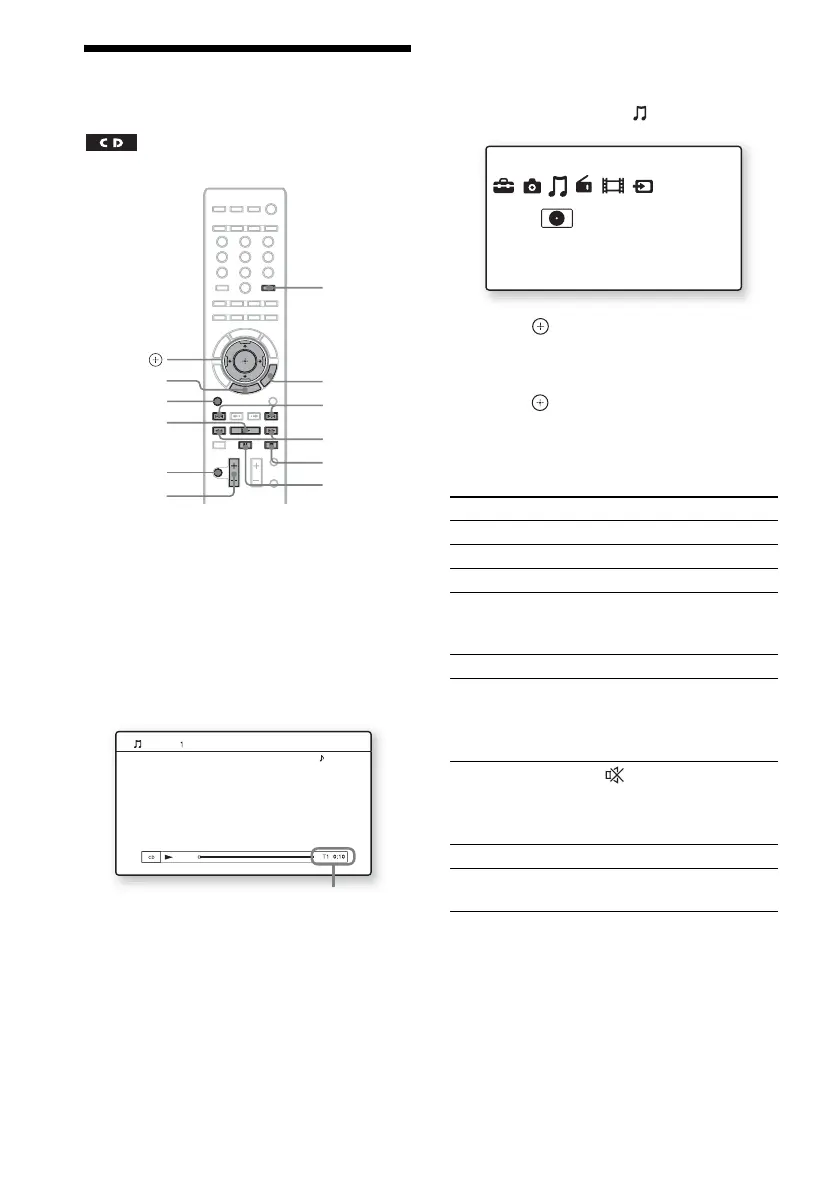
FUNCTION
X
N
x
./>
%
2 +/–
m/M
C/X/x/c,
HOME
OPTIONS
TIME
Music CD
Stereo
Current track number and elapsed time
To Press
Stop x
Pause X
Resume play after pause X or N
Start playback from the
point where you pressed
x.
N
Go to the next track >
Go back to the
preceding track
. twice in a second.
When you press . once,
you can go to the beginning
of the current track.
Turn off the sound
temporarily
To cancel, press it again or
2 + to adjust the sound
volume.
Remove the disc Z on the control unit.
Fast reverse/fast
forward
m or M during
playback.
Music
Music CD


 To Next Page