6
Installation
5 (for monitors except PVM-20S1WE/
20S1WU/20S1WA)
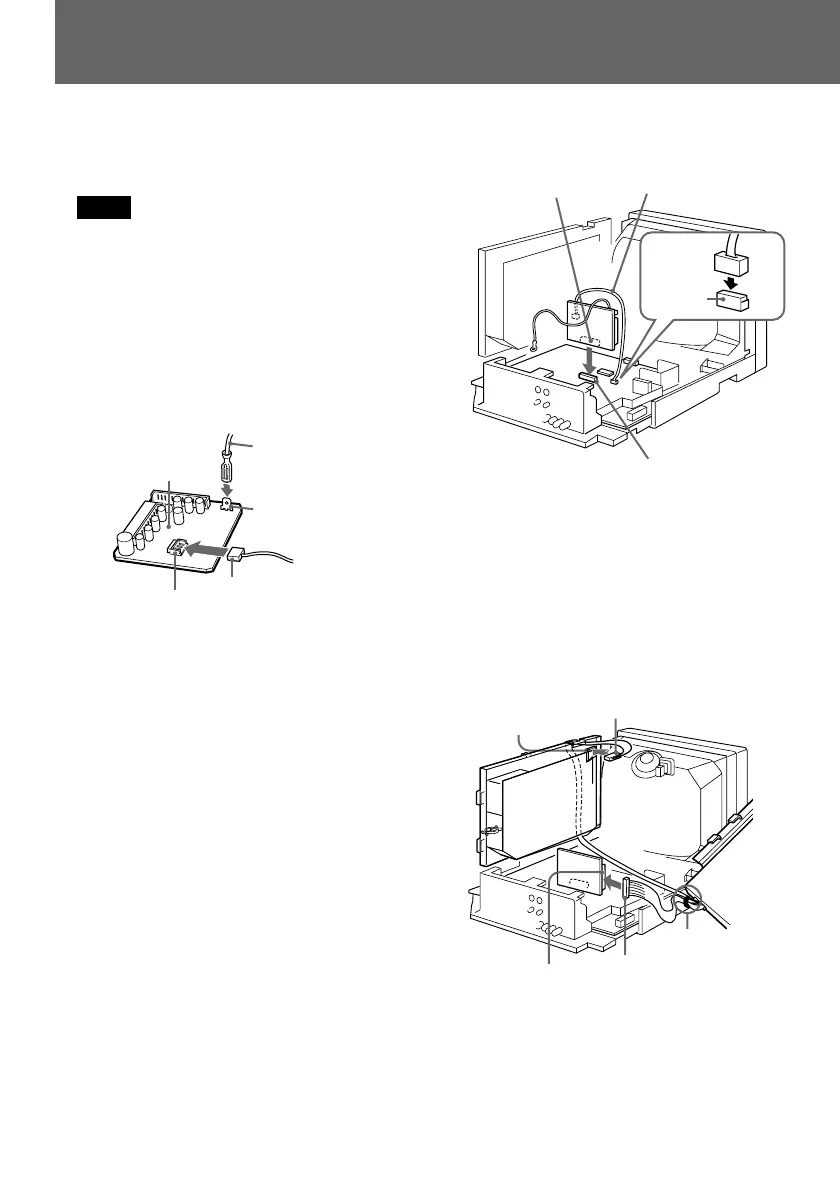
Connect the 12-pin connector of the SDI
module to the CN8 terminal (white) of
the BB board, and connect the 6-pin
connector of the SDI module to the
CN607 terminal (white) on the power
board.
CN607
(white)
6-pin
connector
CN8 (white)
12-pin
connector
Fasten the
cables from the
SDI module
with the cable
clamp.
7 Connect the SDI module and the supplied
BB board to the monitor board.
Note
Take care not to touch the pins of the
terminals.
1 Connect the connector of the supplied
3-pin connecting cable to the CN10
terminal (white) on the BB board.
2 Connect the connector of the supplied
ground wire (for the BB board) to the
TP310 terminal on the BB board.
3 Connect the CN9 terminal (grey) on the
BB board to the CN303 terminal (grey)
on the monitor board.
4 Connect the 3-pin connecting cable
(type B) to the CN505 terminal on the
monitor board.
Leave the ground wire from the BB board
as it is. It will be connected later, together
with the ground wires for the SDI
module.
BB board
CN10 (white)
3-pin connecting cable
(type B)
CN9 (grey) on the
BB board
3-pin connecting cable
(type B)
CN303 (grey)
3
4
Ground wire
TP310
2
1
CN505


 To Next Page