12
BVM Series
BVM-E Series Digital Cinema Features
The BVM-E Series – comprising BVM-E250 and BVM-E170 master monitors – offers digital cinema features which are
indispensable and ideal for high-quality creative digital cinema onset and post-production workflow.
2K (2048 x 1080, RGB/XYZ) Input
BVM-E250 and BVM-E170 master monitors are capable of
2K (2048 x 1080 resolution, RGB/XYZ) input. The 2K signal
is displayed in two ways as a full 2K image scaled into a
full-HD (1920 x 1080) screen, or as a 2K native display with an
image-slide function.
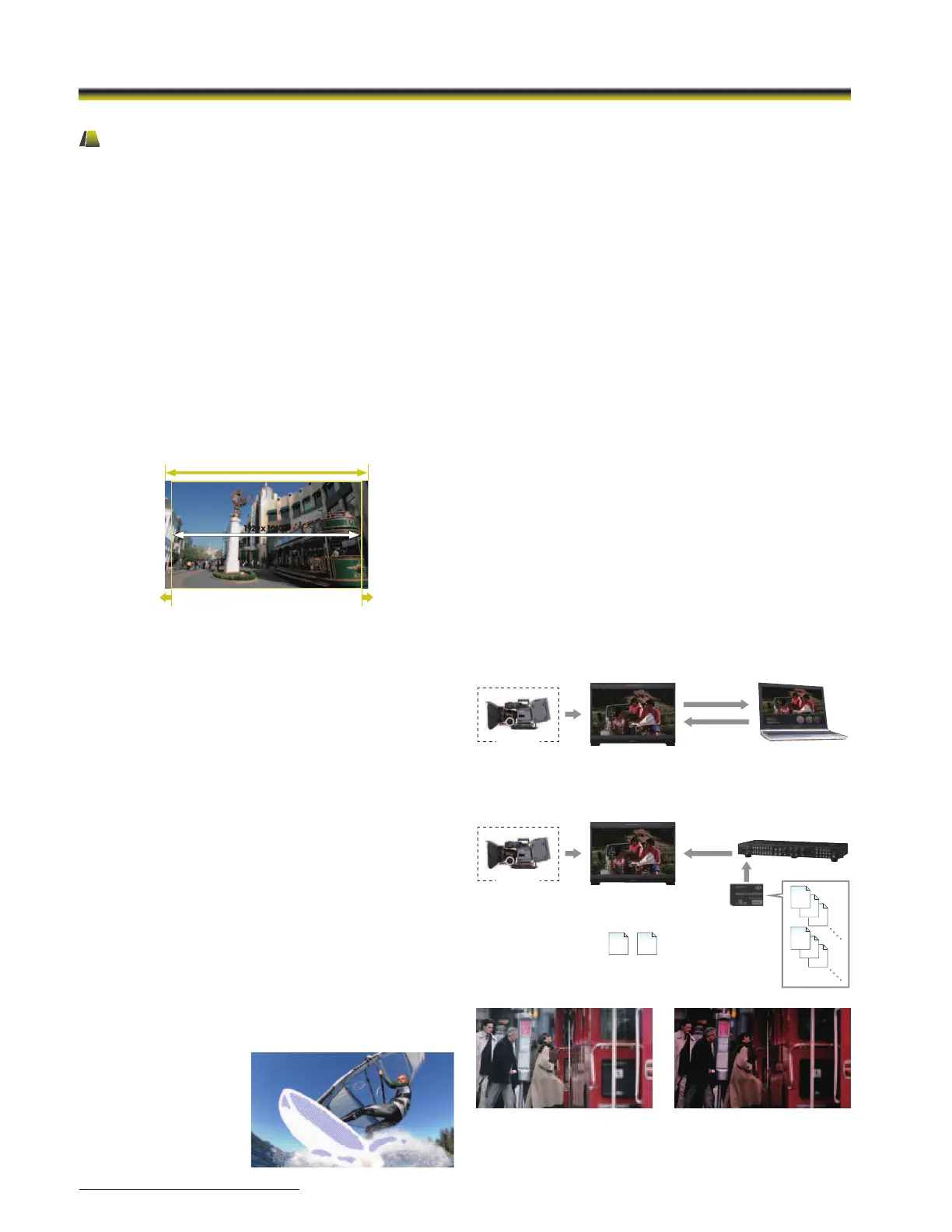
2048 Image-slide
The 2048 Image-slide function allows 2K resolution (2048 x 1080
pixels) images to be mapped, pixel-to-pixel, on the full-HD
(1920 x 1080 pixels) panel without picture degradation. When
the user needs to view the left or right edge of the picture
frame, they can scroll the image in a horizontal direction.
S-LOG Gamma
S-LOG gamma is a technique used in Sony’s digital
cinematography cameras that allows the full latitude of the
camera CCD to be maintained throughout the production
chain. Unlike conventional systems, in which highlight
contrast is compressed, S-LOG Gamma logarithmically
converts the video signal using characteristics similar to film
negatives.
This keeps the camera CCD dynamic range intact, even in
extreme highlight areas. Two display modes are offered:
1) S-LOG Full
This mode displays the full dynamic range of the video signal
captured from Sony’s digital cinematography cameras.
2) S-LOG Standard
This mode displays image exposure levels at the lower part
of the S-LOG gamma signal dynamic range, allowing image
areas of regular brightness to be viewed clearly. Higher
exposure levels are clipped in this mode.
Gamut Error Display
This function detects irregular signal input. When an irregular
signal is detected, these master monitors indicate this with a
zebra pattern over the relevant area of the picture.
Gamut Error Display is a
convenient feature that
instantly alerts viewers
to such signals without
requiring the use of a
waveform monitor.
1920 x 1080
2048 x 1080
The image can be horizontally scrolled
1920 x 1080
ASC CDL and User LUT Functions
BVM-E Series monitors support the ASC CDL (American
Society of Cinematographers Color Decision List) and User
LUT (Look-up Table) to emulate color grading.
Live images from camera onset can be altered after
importing an ASC CDL format, and/or previewed using a film
print emulation applied to the monitor using Look Creation
Workflow.*
1
Furthermore, once ASC CDL and User LUT data are created,
information*
2
can be saved to Memory Stick
®
media*
3
and
loaded onto the monitor from the BKM-16R controller. Up to
five items of ASC CDL and User LUT data can be imported to
BVM-E Series monitors, so users can easily compare different
color grading (see Look Application Workflow).
These features help with creative decision making and
improve workflow between onset and post-production.
*1 Requires BVM-E firmware V1.1 or later, and third-party software supporting
the BVM-E ASC CDL and User LUT functions (third party software sold
separately).
*2 Up to 1,000 data items.
*3 Can use a Memory Stick, Memory Stick PRO™, Memory Stick Duo™,
Memory Stick PRO Duo
®
, or (with optional adaptor) Memory Stick
Micro™.
ASC
CDL
User
LUT
Camera
BVM-E250/E170
ASC CDL/User LUT
Image
BVM-E250/E170
ASC CDL/User LUT
Image
2. Look creation
3. Apply
1. Capture
Camera
Apply
Preset les
(up to 5 each)
ASC
CDL
User
LUT
ASC
CDL
User
LUT
BKM-16R
Memory
Stick
Look Creation Workow
Look Applying Workow
ASC
CDL
User
LUT
Onset graded imageLive image from a camera
Simulated images


 To Next Page
 Loading...
