15
BVM Series
3D Signal Analyzing Functions
By installing the optional BKM-20TG 3G/HD-SDI input adaptor*, the BVM-E and BVM-F Series monitors can support a variety of
3D signal analyses. The 3D signals are displayed in 2D mode.
* Difference display” function require the BKM-20TG serial No. 7300001 or higher, and other functions require the BKM-20TG serial No. 7100001 or higher.
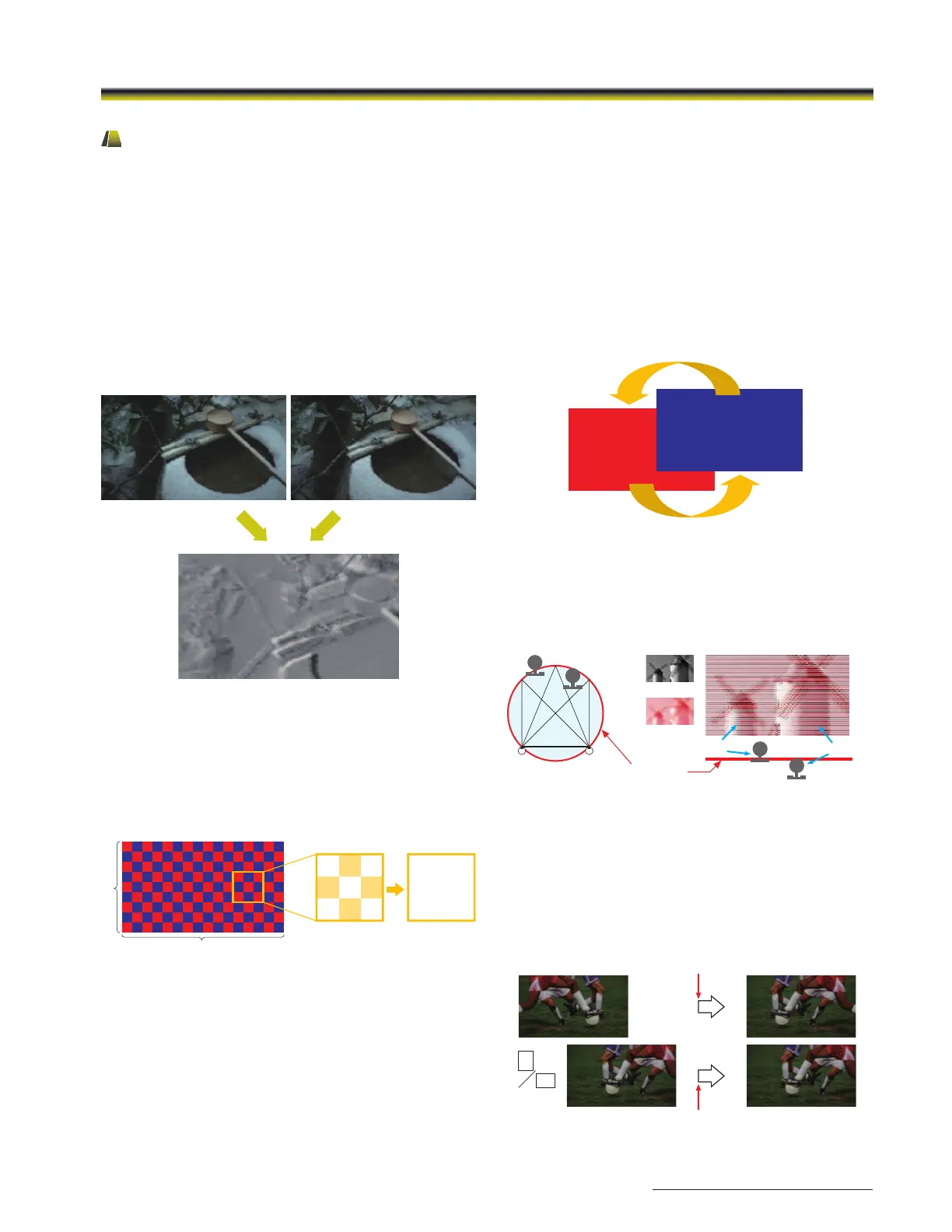
Difference Display
This function displays the difference between the luminance
signal of the left (L) and right (R) images of the 3D signal.
When the luminance levels of the two signals are the same,
the signals are displayed in gray. When they are different, a
monochrome image is displayed according to the variation
in luminance. This function is useful for checking the amount
of parallax.
Checker Board
Left and right input signals are displayed in a grid pattern on
screen. By comparing adjacent images, users can recognize
a difference in brightness and the color setting of the left
and right images, and thus easily adjust the camera’s white
balance and iris settings.
Horopter Check
This function helps users to perceive the subtle difference of
depth between different objects placed on the 3D screen
surface.
Horizontal Flip
When a half-mirror type of rig is used, either the left or right
signal may be reversed horizontally. The Horizontal flip
function turns the reversed image to the normal view.
* A delay in signal processing occurs, and both the left and right signals
synchronize to the delayed signal.
Delayed by Flip H process
Delayed for synchronization
L
R
L (Mono)
R (Red)
Simulated display image
Rear
Front
L-eye R-eye
Horopter
Image overview when viewed from above
L R L R L R L R L R L R L R L R
LR L R L R L R L R L R L R L R
L R L R L R L R L R L R L R L R
LR L R L R L R L R L R L R L R
L R L R L R L R L R L R L R L R
LR L R L R L R L R L R L R L R
L R L R L R L R L R L R L R L R
L R L R L R L R L R L R L R L R
LR L R L R L R L R L R L R L R
16
9
L R L
L R L
R L R
L R L
L R L
R L R
L
LinkA
R
LinkB
L/R Switch
Left and right signals can be swapped in a moment without
inserting black frames, simply by manually pushing a function
key. This instant-swap capability enables users to compare
the entire images and check for any sense of incongruity or
for unnatural images.
Simulated images


 To Next Page
 Loading...
