101
Additional Information / Información complementaria
CCD-TR2200E/TR3300E 3-856-204-12 (1)
Precaución
No utilice cassettes limpiadores de tipo húmedo
disponibles en las tiendas del ramo, ya que
pueden dañar los cabezales de vídeo.
Nota
Si el cassette limpiador V8-25CLH no se
encuentra disponible en su zona, póngase en
contacto con el proveedor Sony más próximo.
Eliminación del polvo del
interior de la videocámara (sólo
CCD-TR2200E)
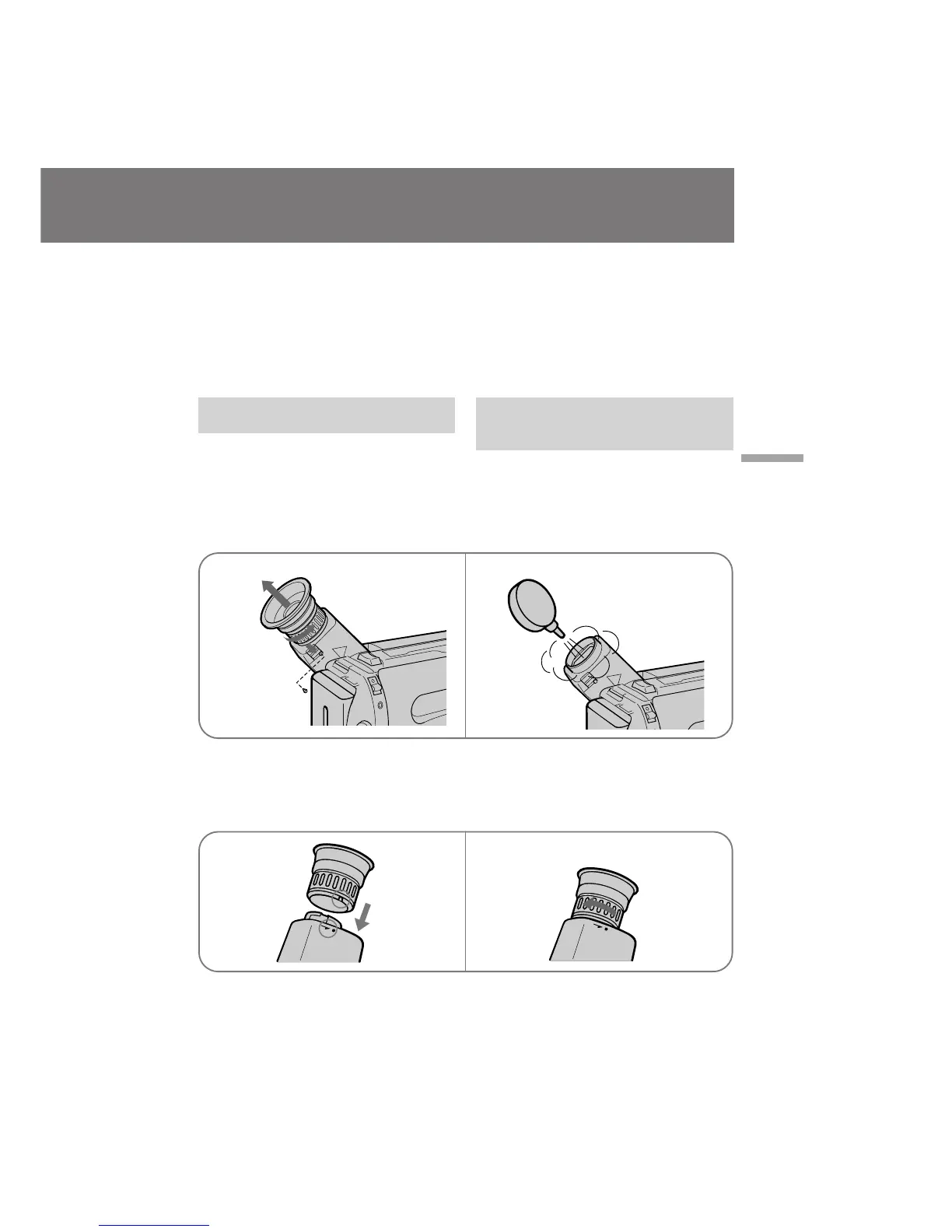
(1)Extraiga el tornillo con un destornillador (no
suministrado). A continuación, mientras
desliza el mando RELEASE, gire el ocular en
la dirección de la flecha y sáquelo.
(2)Limpie la superficie con un soplador
disponible en las tiendas del ramo.
Para volver a fijar el ocular
(1)Alinee la ranura del ocular con la marca • del
cilindro.
(2)Gire el ocular en la dirección de la flecha y, a
continuación, vuelva a colocar el tornillo.
Caution
Do not use a commercially available wet-type
cleaning cassette. It may damage the video
heads.
Note
If the V8-25CLH cleaning cassette is not available
in your area, consult your nearest Sony dealer.
Removing dust from inside the
viewfinder (CCD-TR2200E only)
(1)Remove the screw with a screwdriver (not
supplied). Then, while sliding the RELEASE
knob, turn the eyecup in the direction of the
arrow and pull it out.
(2)Clean the surface with a commercially
available blower.
To reattach the eyecup
(1)Align the groove on the eyecup with the •
mark on the barrel.
(2)Turn the eyecup in the direction of the arrow.
Then replace the screw.
12
12
1
2








 To Next Page