49
Advanced Operations / Operaciones avanzadas
CCD-TR2200E/TR3300E 3-856-204-12 (1)
Selecting the desired mode
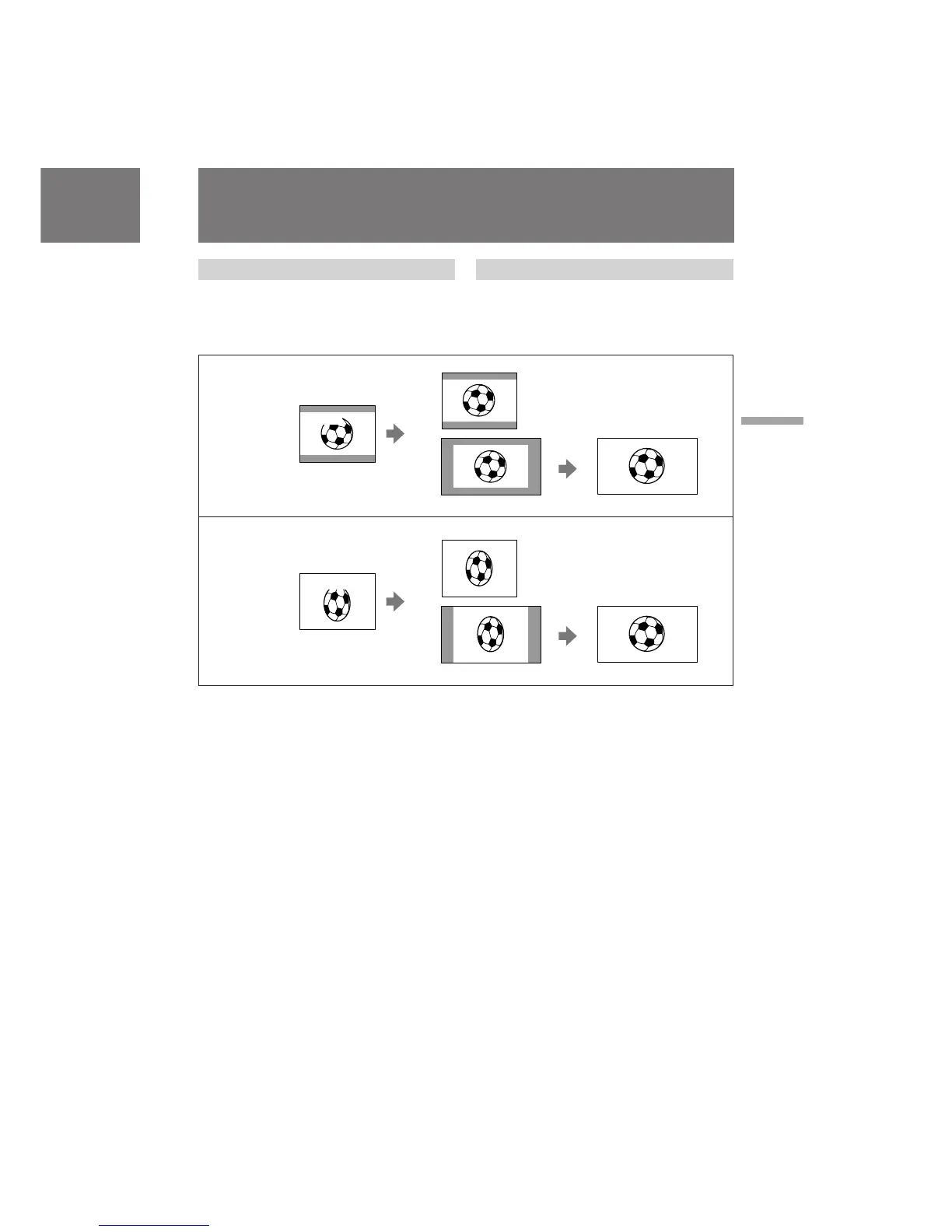
You can record a cinemalike picture (CINEMA)
or a 16:9 wide picture to watch on the 16:9 wide-
screen TV (16:9 FULL).
CINEMA
Black bands appear at the top and the bottom of
the screen, and the viewfinder [a] and a normal
TV screen [b] look wide. You can also watch the
picture without black bands on a wide-screen TV
[c].
16:9 FULL
The picture in the viewfinder [d] or on a normal
TV [e] is horizontally compressed. You can
watch the picture of normal images on a wide-
screen TV [f].
Selección del modo deseado
Es posible grabar imágenes similares a las de cine
(CINEMA) o imágenes panorámicas de 16:9 para
visualizarlas en un televisor de pantalla
panorámica de 16:9 (16:9 FULL).
CINEMA
Aparecen bandas negras en las partes superior e
inferior de la pantalla, mientras el visor
electrónico [a] y la pantalla normal del televisor
[b] aparecen con forma panorámica. También es
posible visualizar la imagen sin bandas negras en
un televisor de pantalla panorámica [c].
16:9 FULL
La imagen del visor electrónico [d] o de un
televisor normal [e] se comprime
horizontalmente. Es posible visualizar imágenes
normales en un televisor de pantalla panorámica
[f].
Uso de la función de
modo panorámico
Using the wide mode
function
[b]
CINEMA
[a]
[c]
[e]
[f]
CINEMA
16:9 FULL
16:9 FULL
[d]








 To Next Page