51
Advanced Operations / Operaciones avanzadas
CCD-TR2200E/TR3300E 3-856-204-12 (1)
Your camcorder has two modes besides normal
start/stop mode. These modes enable you to take
a series of quick shots resulting in a lively video.
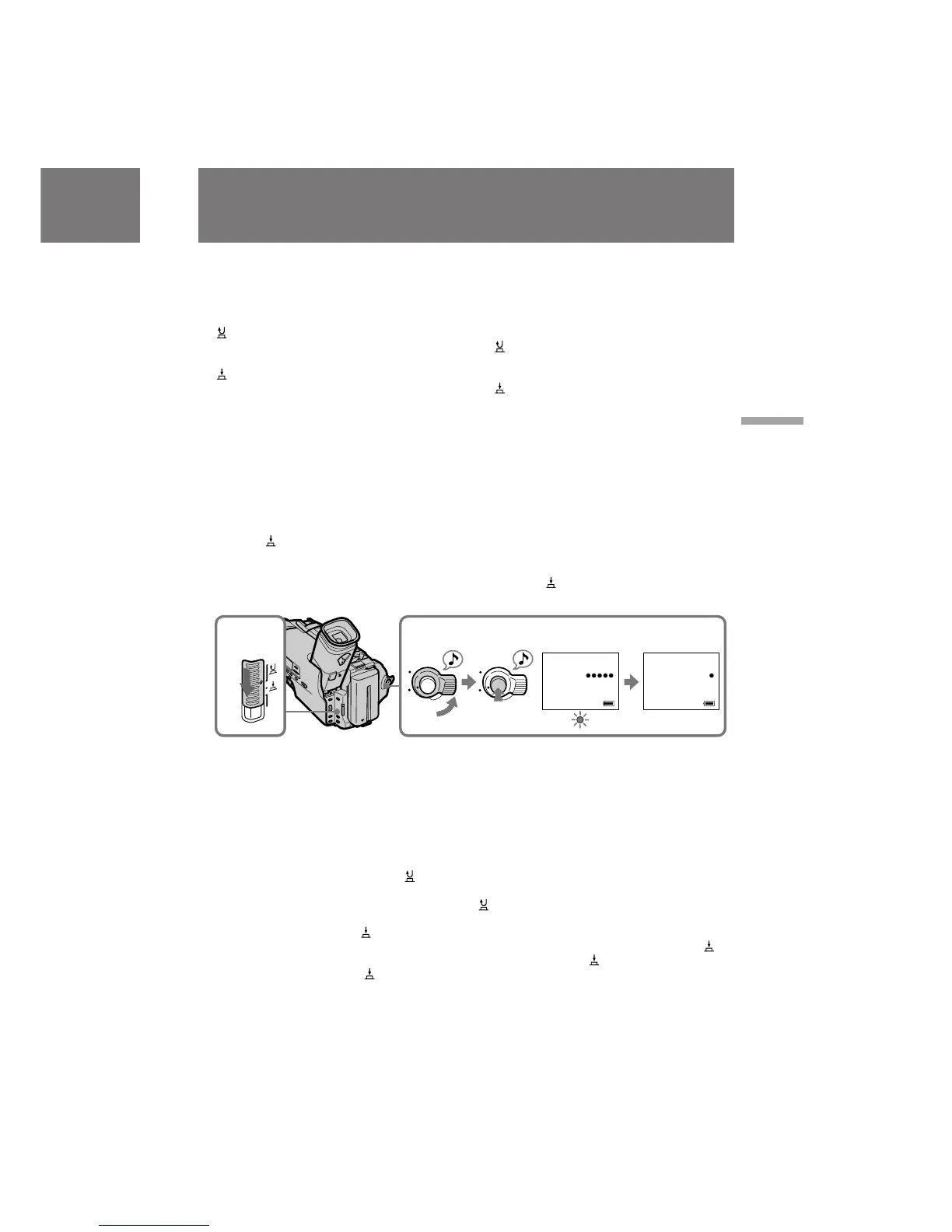
(1)Set the START/STOP MODE switch to the
desired mode.
: Recording starts when you press START/
STOP, and stops when you press it again
(normal mode).
: The camcorder records only while you
press down START/STOP.
5 SEC: When you press START/STOP, the
camcorder records for 5 seconds and
then stops automatically.
(2)Turn STANDBY up and press START/STOP.
Recording starts.
If you selected 5 SEC, five dots appear in the
viewfinder. The dots disappear at a rate of one
per second. When 5 seconds elapse and all the
dots disappear, the camcorder switches to
Standby mode automatically.
If you select , the camcorder records as long as
you hold down START/STOP.
To extend the recording time in 5
SEC mode
Press START/STOP again before all the dots
disappear. Recording continues for about 5
seconds from the moment you pressed START/
STOP.
To return to normal recording
Set the START/STOP MODE switch to . If you
set the switch while recording, recording
continues.
Note on 5 SEC recording and mode
You cannot use FADER/OVERLAP (only for
CCD-TR3300E) or FADER (only for CCD-
TR2200E) if you select 5 SEC or .
Selecting the START/
STOP mode
Selección del modo de
inicio/parada START/STOP
La videocámara dispone de dos modos además
del normal de inicio y detención. Estos modos
permiten realizar la filmación en varias tomas
rápidas para obtener un vídeo con ritmo.
(1)Ajuste el interruptor START/STOP MODE en
el modo que desee.
:La grabación se inicia al pulsar START/
STOP, y se detiene si vuelve a pulsarlo
(modo normal).
:La videocámara graba sólo mientras pulsa
START/STOP.
5 SEC: Si pulsa START/STOP, la videocámara
graba durante 5 segundos y, a
continuación, se detiene
automáticamente.
(2)Gire STANDBY hacia arriba y pulse START/
STOP. La grabación se iniciará.
Si ha seleccionado 5 SEC, aparecerán cinco
puntos en el visor electrónico, que desaparecerán
a un ritmo de uno por segundo. Si transcurren 5
segundos y desaparecen todos los puntos, la
videocámara introducirá automáticamente el
modo de espera.
Si selecciona , la videocámara grabará
mientras mantenga pulsado START/STOP.
Para aumentar el tiempo de
grabación en modo 5 SEC
Vuelva a pulsar START/STOP antes de que
desaparezcan todos los puntos. La grabación
continuará durante 5 segundos
aproximadamente a partir del momento en que
pulsó START/STOP.
Para volver a la grabación normal
Ajuste el interruptor START/STOP MODE en
. Si ajusta el interruptor durante la grabación,
ésta continuará realizándose.
Nota sobre la grabación 5 SEC y el modo
Si selecciona 5 SEC o , no es posible emplear
FADER/OVERLAP (sólo CCD-TR3300E) o
FADER (sólo CCD-TR2200E).
2
REC
0:00:00
L
S
T
A
N
D
B
Y
O
C
K
L
S
T
A
N
D
B
Y
O
C
K
1
5
SEC
START/
STOP
MODE
40min
REC
0:00:04
40min








 To Next Page