115
Additional Information / Información complementaria
CCD-TR2200E/TR3300E 3-856-204-12 (1)
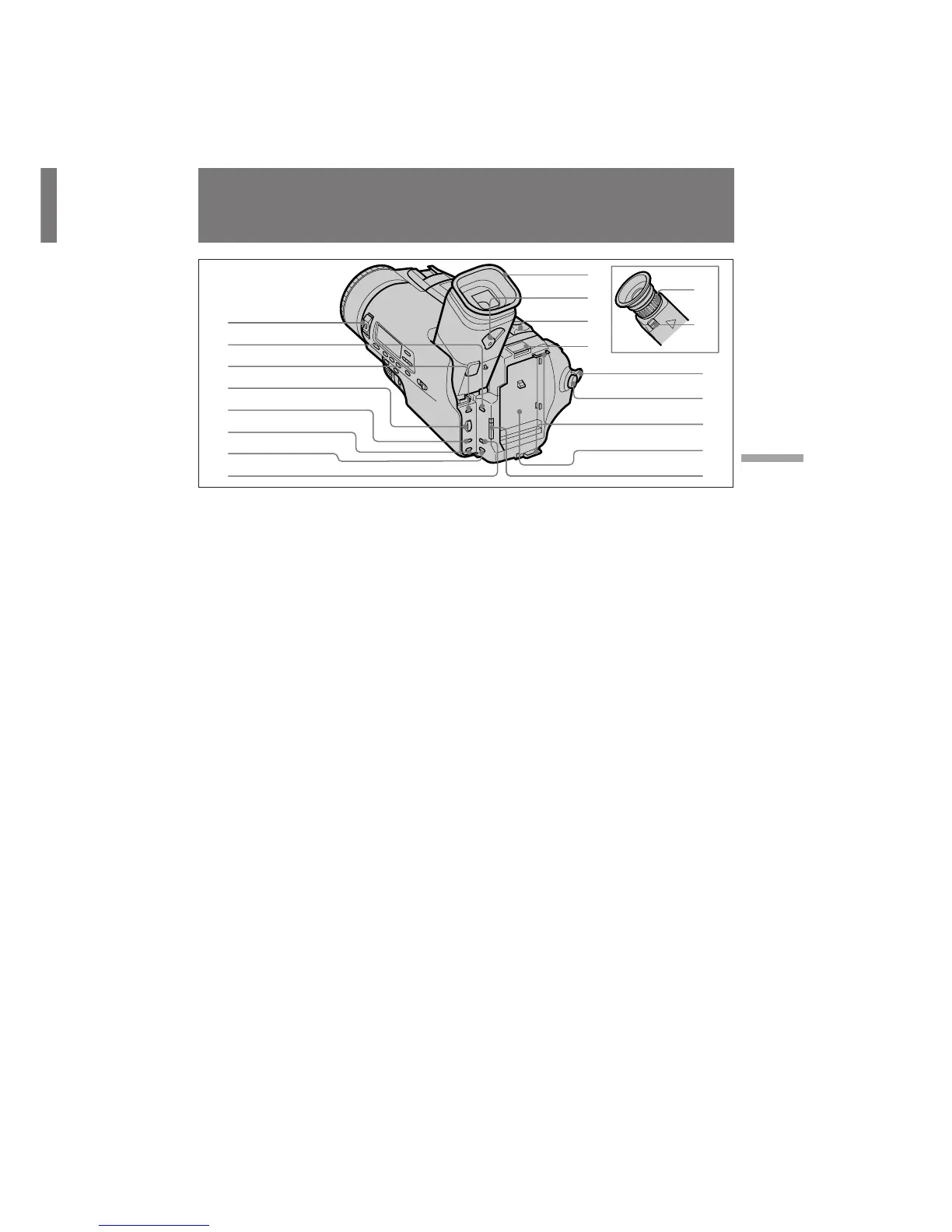
Identifying the parts
Identificación de los
componentes
1 POWER switch (p.13)
2 STEADY SHOT switch (p.56)
3 MENU button (p.31)
4 Control dial (p.31)
5 PICTURE EFFECT button (p.42)
6 DIGITAL EFFECT button (CCD-TR3300E only)
(p.43)
7 TITLE button (p.53)
8 16:9WIDE button (p.50)
9 Eyecup (p.18)
0 Viewfinder lens adjustment ring (CCD-
TR2200E only) (p.14)
!¡ RELEASE knob (CCD-TR2200E only) (p.101)
!™ Viewfinder lens adjustment lever (CCD-
TR3300E only) (p.14)
!£ Power zoom lever (p.16)
!¢ BATT (battery) PUSH button (p.11)
!∞ STANDBY switch (p.13, 14)
!§ START/STOP button (p.13, 14)
!¶ Hooks for shoulder strap (p.122)
!• Battery mounting surface
!ª START/STOP MODE switch (p.51)
1 Interruptor POWER (pág.13)
2 Interruptor STEADY SHOT (pág.56)
3 Botón MENU (pág.31)
4 Dial de control (pág.31)
5 Botón PICTURE EFFECT (pág.42)
6 Botón DIGITAL EFFECT (sólo CCD-TR3300E)
(pág.43)
7 Botón TITLE (pág.53)
8 Botón 16:9WIDE (pág.50)
9 Ocular (pág.18)
0 Anillo de ajuste del objetivo del visor
electrónico (sólo CCD-TR2200E) (pág.14)
!¡
Mando RELEASE (sólo CCD-TR2200E) (pág.101)
!™ Palanca de ajuste del objetivo del visor
electrónico (sólo CCD-TR3300E) (pág.14)
!£
Palanca de alimentación de zoom (pág.16)
!¢ Botón BATT (batería) PUSH (pág.11)
!∞ Interruptor STANDBY (pág.13, 14)
!§ Botón START/STOP (pág.13, 14)
!¶ Ganchos para el asa de hombro (pág.122)
!• Superficie de montaje de batería
!ª Interruptor START/STOP MODE (pág.51)
1
2
3
4
5
6
7
8
!§
!¶
!ª
!•
9
!™
0
!£
!¢
!∞
!¡








 To Next Page