91
Additional Information / Información complementaria
CCD-TR2200E/TR3300E 3-856-204-12 (1)
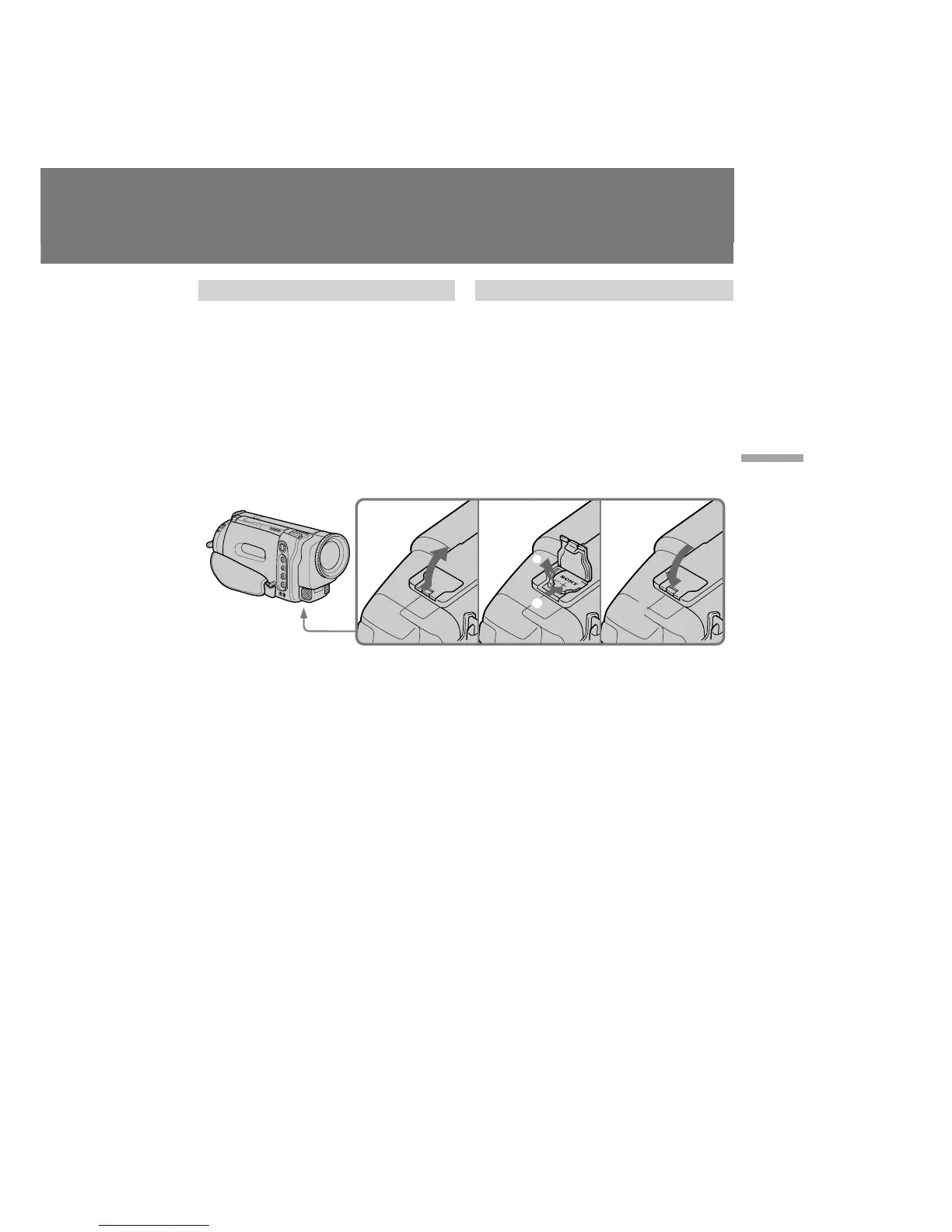
Changing the lithium battery
When replacing the lithium battery, keep the
battery pack or other power source attached.
Otherwise, you will need to reset the date, time
and other items in the menu system retained by
the lithium battery.
(
1
)Open the lid of the lithium battery
compartment.
(
2
)Push the battery down once and pull it out
from the holder.
(
3
)Install the lithium battery with the positive (+)
side facing out. Close the lid.
Sustitución de la pila de litio
Al sustituir la pila, mantenga conectado el
paquete de batería u otra fuente de alimentación.
En caso contrario, será necesario volver a ajustar
en el sistema de menú la fecha, hora y otros
elementos que se mantienen gracias a la pila de
litio.
(
1
)Abra la tapa del compartimiento de la pila de
litio.
(
2
)Presione hacia abajo la pila una vez y sáquela
del portapila.
(
3
)Instale la pila de litio con la cara positiva (+)
hacia fuera. Cierre la tapa.
123
1
2








 To Next Page