EasyManua.ls Logo

Sony CDP-608ESD - Page 34

Sony CDP-608ESD
81 pages
Print Icon
To Next Page IconTo Next Page
To Previous Page IconTo Previous Page
Loading...
Playing
in
a
Desired
Order
Lecture
dans
l’ordre
~-
Program
Play
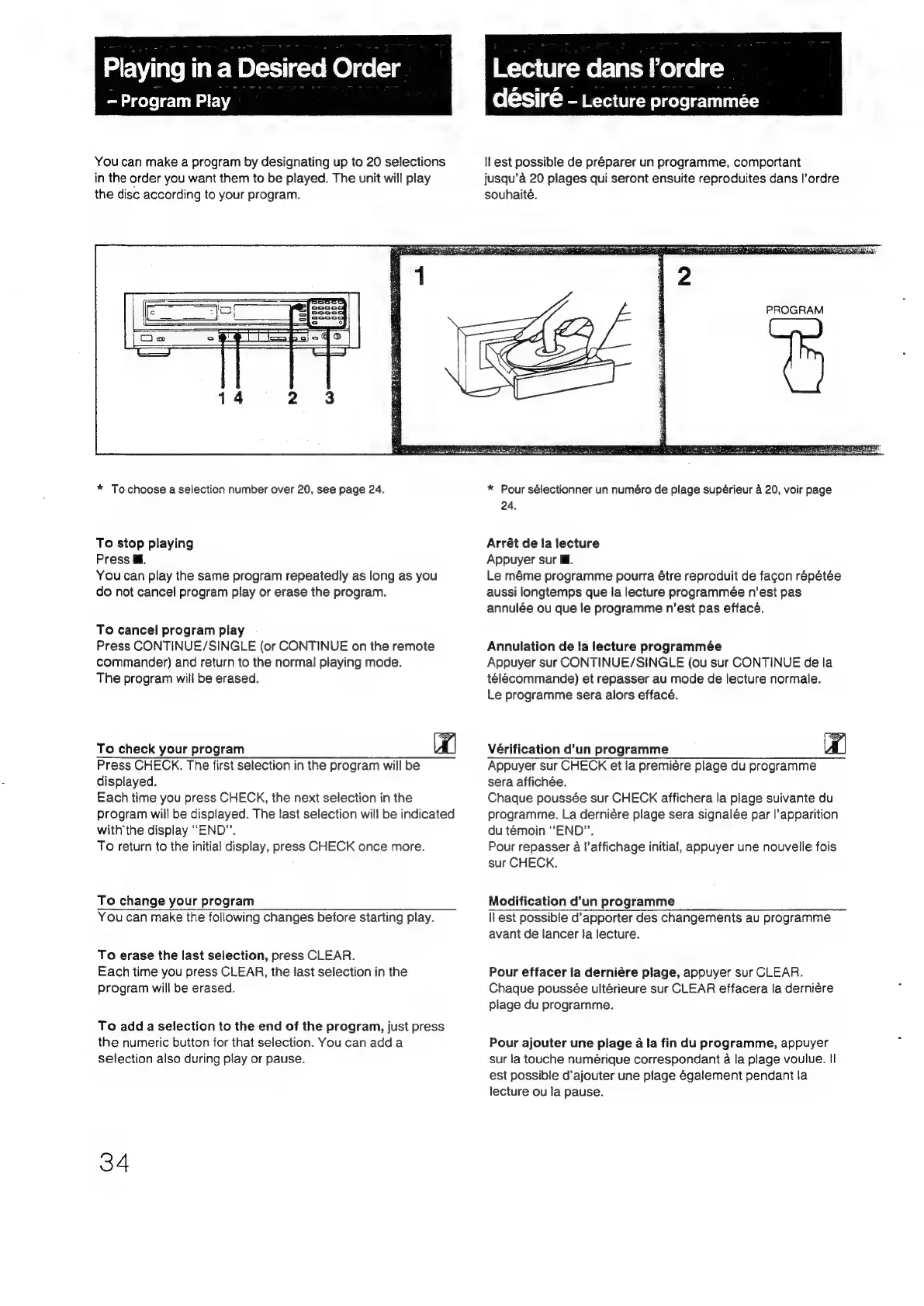
You
can
make
a
program
by
designating
up
to
20
selections
in
the
order
you
want
them
to
be
played.
The
unit
will
play
the
disc
according
to
your
program.
*
To
choose
a
selection
number
over
20,
see
page
24.
To
stop
playing
Press
@.
You
can
play
the
same
program
repeatedly
as
long
as
you
do
not
cancel
program
play
or
erase
the
program.
To
cancel
program
play
Press
CONTINUE/SINGLE
(or
CONTINUE
on
the
remote
commander)
and
return
to
the
normal
playing
mode.
The
program
will
be
erased.
To
check
your
program
Press
CHECK.
The
first
selection
in
the
program
will
be
displayed.
Each
time
you
press
CHECK,
the
next
selection
in
the
program
will
be
displayed.
The
last
selection
will
be
indicated
withthe
display
“END”.
To
return
to
the
initial
display,
press
CHECK
once
more.
To
change
your
program
désiré
-
Lecture
programmée
ILest
possible
de
préparer
un
programme,
comportant
jusqu’a
20
plages
qui
seront
ensuite
reproduites
dans
!’ordre
souhaité.
PROGRAM
*
Pour
sélectionner
un
numéro
de
plage
supérieur
a
20,
voir
page
24.
Arrét
de
la
lecture
Appuyer
sur
Ml.
Le
méme
programme
pourra
étre
reproduit
de
fagon
répétée
aussi
longtemps
que
la
lecture
programmée
n’est
pas
annulée
ou
que
le
programme
n’est
pas
effacé.
Annulation
de
fa
lecture
programmée
Appuyer
sur
CONTINUE/SINGLE
(ou
sur
CONTINUE
de
la
télecommande)
et
repasser
au
mode
de
lecture
normale.
Le
programme
sera
alors
effacé.
Vérification
d’un
programme
re
Appuyer
sur
CHECK
et
la
premiére
plage
du
programme
sera
affichée.
Chaque
poussée
sur
CHECK
affichera
la
plage
suivante
du
programme.
La
derniére
plage
sera
signalée
par
l’apparition
du
témoin
“END”.
Pour
repasser
a
l’affichage
initial,
appuyer
une
nouvelle
fois
sur
CHECK.
Modification
d’un
programme
You
can
make
the
following
changes
before
starting
play.
To
erase
the
last
selection,
press
CLEAR.
Each
time
you
press
CLEAR,
the
last
selection
in
the
program
will
be
erased.
To
add
a
selection
to
the
end
of
the
program,
just
press
the
numeric
button
for
that
selection.
You
can
adda
selection
also
during
play
or
pause.
34
ll
est
possible
d’apporter
des
changements
au
programme
avant
de
lancer
fa
lecture.
Pour
effacer
la
derniére
plage,
appuyer
sur
CLEAR.
Chaque
poussée
ultérieure
sur
CLEAR
effacera
la
derniére
plage
du
programme.
Pour
ajouter
une
plage
a
la
fin
du
programme,
appuyer
sur
la
touche
numérique
correspondant
a
la
plage
voulue.
II
est
possible
d’ajouter
une
plage
également
pendant
la
lecture
ou
la
pause.

Related product manuals