EasyManua.ls Logo

Sony CDP-997 - Electrical Block Checking Procedures; RF PLL Free-running Frequency Check; RF Level Check; E-F Balance Check

Sony CDP-997
37 pages
Print Icon
To Next Page IconTo Next Page
To Previous Page IconTo Previous Page
Loading...
|
CDP-997
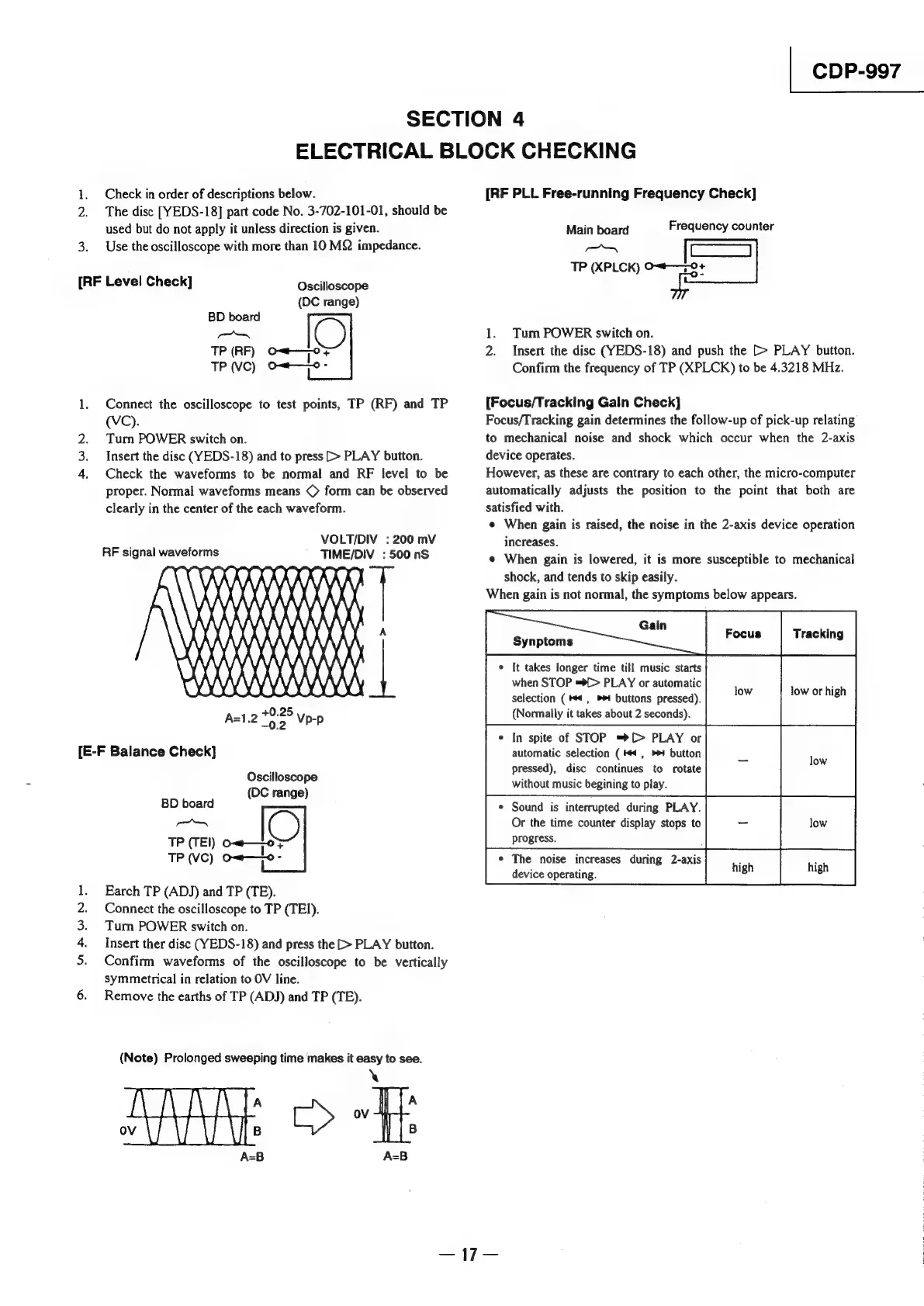
SECTION
4
ELECTRICAL
BLOCK
CHECKING
Check
in
order
of
descriptions
below.
2.
The
disc
[YEDS-18]
part
code
No.
3-702-101-01,
should
be
used
but
do
not
apply
it
unless
direction
is
given.
3.
Use
the
oscilloscope
with
more
than
10
MQ
impedance.
[RF
Level
Check]
Oscilloscope
(DC
range)
BD
board
aa
C)
TP
(RF)
on—0
+
TP
(VC)
Ow—0-
1.
Connect
the
oscilloscope
to
test
points,
TP
(RF)
and
TP
(VC).
2.
Tur
POWER
switch
on.
3.
Insert
the
disc
(YEDS-18)
and
to
press
[>
PLAY
button.
4.
Check
the
waveforms
to
be
normal
and
RF
level
to
be
proper.
Normal
waveforms
means
©
form
can
be
observed
clearly
in
the
center
of
the
each
waveform.
VOLT/DIV
:
200
mV
RF
signal
waveforms
TIME/DIV
:
500
nS
X\)
:
)
iy
mi)
ANY
M
WM
M
()
40.25
A=1.2
02
Vp-p
AA
4
[E-F
Balance
Check]
CS,
Gobo
Oscilloscope
(DC
range)
BD
board
eenee
OP
TP
(TE!)
om——o}
TP
(vc)
o-~w—lo-
Earch
TP
(ADJ)
and
TP
(TE).
Connect
the
oscilloscope
to
TP
(TEI).
Turn
POWER
switch
on.
Insert
ther
disc
(YEDS-18)
and
press
the
[>
PLAY
button.
Confirm
waveforms
of
the
oscilloscope
to
be
vertically
symmetrical
in
relation
to
OV
line.
Remove
the
earths
of
TP
(ADJ)
and
TP
(TE).
(Note)
Prolonged
sweeping
time
makes
it
easy
to
see.
\
A
A
ov
B
B
A=B
A=B
[RF
PLL
Free-running
Frequency
Check]
Main
board
Frequency
counter
SOR
ea
TP
(XPLCK)
O“#—9+
1.
Tum
POWER
switch
on.
2.
Insert
the
disc
(YEDS-18)
and
push
the
[>
PLAY
button.
Confirm
the
frequency
of
TP
(XPLCK)
to
be
4.3218
MHz.
[Focus/Tracking
Galn
Check]
Focus/Tracking
gain
determines
the
follow-up
of
pick-up
relating
to
mechanical
noise
and
shock
which
occur
when
the
2-axis
device
operates.
However,
as
these
are
contrary
to
each
other,
the
micro-computer
automatically
adjusts
the
position
to
the
point
that
both
are
satisfied
with.
e
When
gain
is
raised,
the
noise
in
the
2-axis
device
operation
increases.
¢
When
gain
is
lowered,
it
is
more
susceptible
to
mechanical
shock,
and
tends
to
skip
easily.
When
gain
is
not
normal,
the
symptoms
below
appears.
¢
In
spite
of
STOP
=®[>
PLAY
or
low
without
music
begining
to
play.
¢
It
takes
longer
time
till
music
starts
when
STOP
=*f>
PLAY
or
automatic
ine
inwerhiai
selection
(4,
buttons
pressed).
8
(Normally
it
takes
about
2
seconds).
automatic
selection
(4,
button
pressed),
disc
continues
to
rotate
¢
Sound
is
interrupted
during
PLAY.
Or
the
time
counter
display
stops
to
low
progress.
;
¢
The
noise
increases
during
2-axis
p
devi
;
high
evice
operating.

Other manuals for Sony CDP-997

Related product manuals