EasyManua.ls Logo

Sony CDP-C8ESD - General

Sony CDP-C8ESD
27 pages
Print Icon
To Next Page IconTo Next Page
To Previous Page IconTo Previous Page
Loading...
CDP-
C8ESD/C700/C800
SECTION
1
GENERAL
|
Molor-lilelam-lalemexelaiiae)
ts
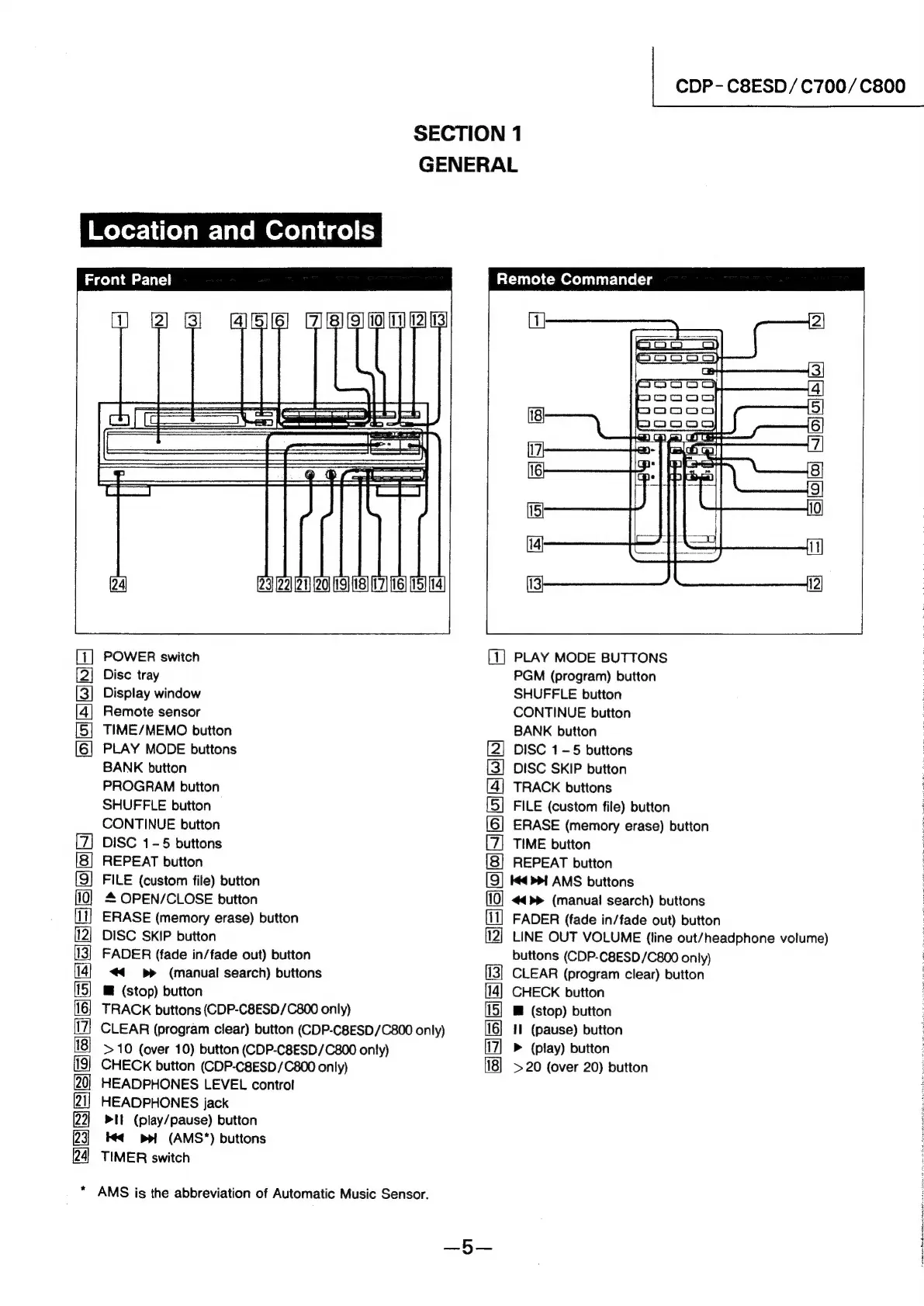
Front
Panel
[23]
[22]
21)
[20]
19]
{18}
[17]
(16)
[15] (14)
POWER
switch
Disc
tray
Display
window
Remote
sensor
TIME/MEMO
button
PLAY
MODE
buttons
BANK
button
PROGRAM
button
SHUFFLE
button
CONTINUE
button
DISC
1-5
buttons
REPEAT
button
FILE
(custom
file)
button
4
OPEN/CLOSE
button
ERASE
(memory
erase)
button
DISC
SKIP
button
FADER
(fade
in/fade
out)
button
<<
=p»
=(manual
search)
buttons
@
(stop)
button
TRACK
buttons
(CDP-C8ESD/C800
only)
CLEAR
(program
clear)
button
(CDP-C8ESD/C800
only)
>10
(over
10)
button
(CDP-C8ESD/C800
only)
CHECK
button
(CDP-C8ESD/C800
only)
HEADPHONES
LEVEL
control
HEADPHONES
jack
>It
(play/pause)
button
té¢
ppt
~(AMS"*)
buttons
TIMER
switch
GAS
25)
SI
=O)
o)N)
~
SSRSSGeSaeeeEsS
*
AMS
is
the
abbreviation
of
Automatic
Music
Sensor.
atures
Cmereiir-lale
(=a
(1
2
3
4
|
5
ia)
BS335]
6
m7
et
false
7
ire
|
rec
8
9]
(5)
10
(i4]
1]
Ww
1)
PLAY
MODE
BUTTONS
PGM
(program)
button
SHUFFLE
button
CONTINUE
button
BANK
button
DISC
1-5
buttons
DISC
SKIP
button
TRACK
buttons
FILE
(custom
file)
button
ERASE
(memory
erase)
button
TIME
button
REPEAT
button
[9]
4
>>1
AMS
buttons
oo
SO
ex
CATES
|
25/58)
=
3
>
J
Cc
9
~”
©
>
_
a
=a
=
ion
c
=
=
co)
a]
(77)
FADER
(fade
in/fade
out)
button
LINE
OUT
VOLUME
(line
out/headphone
volume)
buttons
(CDP-C8ESD/C800
only)
CLEAR
(program
clear)
button
CHECK
button
B@
(stop)
button
Il
(pause)
button
>
(play)
button
>20
(over
20)
button
SES
fe
i
ai]
3)
cia
a
a
ag
a
a
tn
al
ee
GN
Se
ne
ae
Sere
te
Ae
ie
ot
Tie
wine
ke
ta
a
et
a
tag

Related product manuals