EasyManua.ls Logo

Sony CDP-C8ESD - Electrical

Sony CDP-C8ESD
27 pages
Print Icon
To Next Page IconTo Next Page
To Previous Page IconTo Previous Page
Loading...
CDP-
C8ESD/C700/
C800
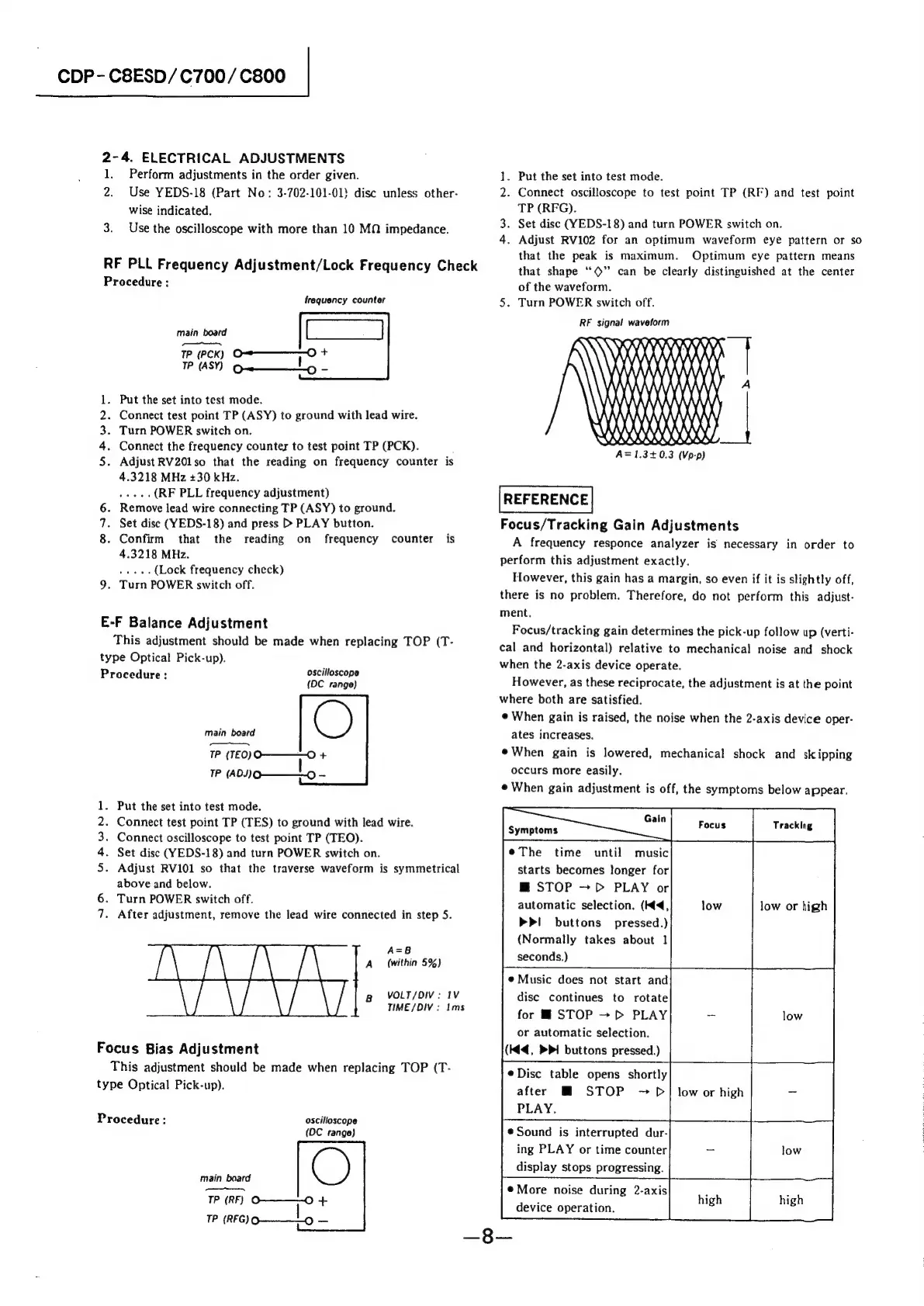
2-4.
ELECTRICAL
ADJUSTMENTS
1.
Perform
adjustments
in
the
order
given.
1.
Put
the
set
into
test
mode.
2.
Use
YEDS-18
(Part
No:
3-702-101-01}
disc
unless
other-
2.
Connect
oscilloscope
to
test
point
TP
(RF)
and
test
point
wise
indicated.
TP
(RFG).
ad
Set
disc
(YEDS-18)
and
turn
POWER
switch
on.
4.
Adjust
RV102
for
an
optimum
waveform
eye
pattern
or
so
that
the
peak
is
maximum.
Optimum
eye
pattern
means
3.
Use
the
oscilloscope
with
more
than
10
MQ
impedance.
RF
PLL
Frequency
Adjustment/Lock
Frequency
Check
that
shape
‘‘©”
can
be
clearly
distinguished
at
the
center
Procedure:
of
the
waveform.
frequency
counter
5.
Turn
POWER
switch
off.
RF
signal
waveform
ITN
\
WR
|
MAXX
AXA
Nt
main
board
e07-e—C—
TP
(PCK)
oF
+
TP
(ASY)
Qe——L
-
Put
the
set
into
test
mode.
Connect
test
point
TP
(ASY)
to
ground
with
lead
wire.
Turn
POWER
switch
on.
Connect
the
frequency
counter
to
test
point
TP
(PCK).
Adjust
RV201so
that
the
reading
on
frequency
counter
is
4.3218
MHz
+30
kHz.
eae
(RF
PLL
frequency
adjustment)
REFERENCE
Remove
lead
wire
connecting
TP
(ASY)
to
ground.
E
AXA
100000
\)
YXXXXK
XK)
A=1.3+0.3
(Vp-p)
AkWN
6.
7.
Set
disc
(YEDS-18)
and
press
>
PLAY
button.
Focus/Tracking
Gain
Adjustments
8.
Confirm
that
the
reading
on
frequency
counter
is
A
frequency
responce
analyzer
is
necessary
in
order
to
4.3218
MHz.
perform
this
adjustment
exactly.
However,
this
gain
has
a
margin,
so
even
if
it
is
slightly
off,
there
is
no
problem.
Therefore,
do
not
perform
this
adjust-
ment.
Focus/tracking
gain
determines
the
pick-up
follow
up
(verti-
cal
and
horizontal)
relative
to
mechanical
noise
and
shock
when
the
2-axis
device
operate.
pon
Seog
(Lock
frequency
check)
9.
Turn
POWER
switch
off.
E-F
Balance
Adjustment
This
adjustment
should
be
made
when
replacing
TOP
(T-
type
Optical
Pick-up).
Procedure
:
ioe
ena)
However,
as
these
reciprocate,
the
adjustment
is
at
the
point
where
both
are
satisfied.
C)
¢
When
gain
is
raised,
the
noise
when
the
2-axis
device
oper-
main
board
ates
increases.
TP
(TEO)O————O
+
@When
gain
is
lowered,
mechanical
shock
and
skipping
TP
(ADO
|
oe
occurs
more
easily.
When
gain
adjustment
is
off,
the
symptoms
below
appear.
1.
Put
the
set
into
test
mode.
2.
Connect
test
point
TP
(TES)
to
ground
with
lead
wire.
lieing
ee
|
erat
Paring
«|
3.
Connect
oscilloscope
to
test
point
TP
(TEO).
4.
Set
disc
(YEDS-18)
and
turn
POWER
switch
on.
¢The
time
until
music
5.
Adjust
RV101
so
that
the
traverse
waveform
is
symmetrical
starts
becomes
longer
for
above
and
below.
Turn
POWER
switch
off.
.
After
adjustment,
remove
the
lead
wire
connected
in
step
5.
M@
STOP
~
PD
PLAY
or
automatic
selection.
(4,
>Pi
buttons
pressed.)
(Normally
takes
about
1
seconds.)
low
low
or
high
Oo
A=8
A
(within
5%)
@
Music
does
not
start
and
disc
continues
to
rotate
for
@
STOP
PLAY
-
low
or
automatic
selection.
(Kd,
PI
buttons
pressed.)
Bg
VOLT/DIV:
IV
TIME
/DIV:
Ims
Focus
Bias
Adjustment
This
adjustment
should
be
made
when
replacing
TOP
(T-
type
Optical
Pick-up).
eDisc
table
opens
shortly
after
M
STOP
~p
PLAY.
low
or
high
=
Procedure:
oscilloscope
,
(DC
range)
Sound
is
interrupted
dur-
ing
PLAY
or
time
counter
=
display
stops
progressing.
main
board
;
Z
,
——s
@More
noise
during
2-axis
TP
(RF)
O————-O
+
high high
TP
(RFG)O-————_-o
device
operation.

Related product manuals