5
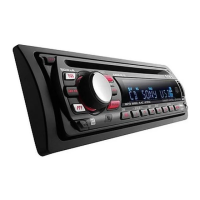
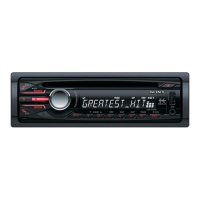
CDX-GT800D/GT805DX
SECTION 1
GENERAL
• LOCATION OF CONTROLS
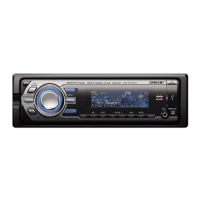
• CDX-GT800D
• CDX-GT805DX
6
Location of controls and basic operations
Main unit
Card remote commander
RM-X154
Refer to the pages listed for details. The
corresponding buttons on the card remote
commander control the same functions as those
on the unit.
A MODE button 8, 17
To select t
he radio band (FM/MW/LW)/
select the unit*
1
.
B OFF button
To pow e r off/stop the source.
C VOL (volume) control dial/SOUND
button 16
To adjust volume (rotate); select sound items
(press).
D Display window
E Disc slot 5
To insert the disc.
F SEEK control dial/ENTER button
To select items (rotate); complete a setting
(press).
CD:
To skip tracks or album/groups: press
(ENTER) repeatedly to select ./> or
“ALBM /GROUP,” then rotate the SEEK
control dial until the desired track or album/
group appears.
Radio:
To tune in stations: press (ENTER)
repeatedly to select “SEEK,” “MANUAL,”
or “PRESET,” then rotate the SEEK control
dial until the desired station appears.
G MENU button
To enter menu.
MODE
SEEK
VO L
+
–
IMAGE
MENU
ANGLE
OFF
REP SHUF PAUSE
6
SOURCE AF/TA1
2534
PUSH SOUND
PUSH ENTER
CDX-GT800D
12 3 4 6578
9
qaq; qs qd qf qg
OFF
DSPL/PTY
REP SHUF
MENU LIST
SCRL
SOURCE SOUND
MODE
PA U S E
132
465
AT T
VO L
+
–
+
–
ENTER
q;
wa
7
1
2
qh
qj
qk
w;
ql
qa
ws
wd
wf
7
H Z (eject)/ANGLE button 5
To eject the disc/slide down the front panel
(press); angle the front panel in 3 positions
(press and hold).
I (front panel release) button 4
J SOURCE button
To pow e r on/change the source (Radio/CD/
MD*
2
/AUX).
K Number buttons
Radio:
To receive stored stations (press); store
stations (press and hold).
CD/MD*
2
:
(1): REP 8, 18
(2): SHUF 8, 18
(6): PA U S E *
3
To pause playback. To cancel, press again.
L RESET button 4
M AF (Alternative Frequencies)/TA
(Traffic Announcement) button 10
To set AF and TA/T P in RDS.
N Receptor
To receive signals from the card remote
commander.
O IMAGE button 2
To select the display image.
Movie mode 1-3 t Spectrum analyzer
mode 1-5 t Space Producer mode t Wall
paper mode 1-3 t normal play/reception
mode
The following buttons on the card remote
commander have also different buttons/functions
from the unit.
qh ENTER button
To complete a setting.
qj </, (SEEK –/+) buttons
CD:
To skip tracks (press); skip tracks
continuously (press, then press again within
about 1 second and hold); fast-forward/
reverse a track (press and hold).
Radio:
To tune in stations automatically (press); find
a station manually (press and hold).
qk DSPL (display)/PTY (Programme
Type) button 8, 10
To change display items; to select PTY in
RDS.
ql VOL (volume) +/– button
To adjust volume.
w; ATT (attenuate) button
To attenuate the sound. To cancel, press
again.
wa SOUND button
To select sound items.
ws LIST button 9, 18
To list up.
wd M/m (+/–) buttons
To select preset stations/skip groups (press);
skip groups continuously (press and hold).
wf SCRL (scroll) button 8
To scroll the display item.
*1
When a CD/MD changer is connected.
*2
When an MD changer is connected.
*3
When playing back on this unit.
Note
If the unit is turned off and the display disappears, it
cannot be operated with the card remote commander
unless
(SOURCE)
on the unit is pressed, or a disc is
inserted to activate the unit first.
Tip
For details on how to replace the battery, see
“Replacing the lithium battery of the card remote
commander” on page 21.
6
Location of controls and basic operations
Main unit
Card remote commander
RM-X152
Refer to the pages listed for details. The
corresponding buttons on the card remote
commander control the same functions as those
on the unit.
A MODE button 8, 15
To select t
he radio band (FM/AM)/select the
unit*
1
.
B OFF button
To pow e r off/stop the source.
C VOL (volume) control dial/SOUND
button 14
To adjust volume (rotate); select sound items
(press).
D Display window
E Disc slot 5
To insert the disc.
F SEEK control dial/ENTER button
To select items (rotate); complete a setting
(press).
CD:
To skip tracks or album/groups: press
(ENTER) repeatedly to select ./> or
“ALBM /GROUP,” then rotate the SEEK
control dial until the desired track or album/
group appears.
Radio:
To tune in stations: press (ENTER)
repeatedly to select “SEEK,” “MANUAL,”
or “PRESET,” then rotate the SEEK control
dial until the desired station appears.
G MENU button
To enter menu.
MODE
SEEK
VO L
+
–
IMAGE
MENU
ANGLE
OFF
REP SHUF PAUSE
6
SOURCE
DSPL
1
2534
PUSH SOUND
PUSH ENTER
CDX-GT805DX
12 3 4 6578
9
qaq; qs qd qf qg
OFF
DSPL
REP SHUF
MENU
SCRL
SOURCE SOUND
MODE
PA U S E
132
465
AT T
VO L
+
–
+
–
ENTER
LIST/
CAT
q;
wa
7
w;
2
1
qj
qh
qd
ql
qk
qa
ws
wd
7
H Z (eject)/ANGLE button 5
To eject the disc/slide down the front panel
(press); angle the front panel in 3 positions
(press and hold).
I (front panel release) button 4
J SOURCE button
To pow e r on/change the source (Radio/CD/
MD*
2
/AUX/SAT*
3
).
K Number buttons
Radio:
To receive stored stations (press); store
stations (press and hold).
CD/MD*
2
:
(1): REP 8, 16
(2): SHUF 8, 16
(6): PA U S E *
4
To pause playback. To cancel, press again.
L RESET button 4
M DSPL (display) button 8
To change display items.
N Receptor
To receive signals from the card remote
commander.
O IMAGE button 2
To select the display image.
Movie mode 1-3 t Spectrum analyzer
mode 1-5 t Space Producer mode t Wall
paper mode 1-3 t normal play/reception
mode
The following buttons on the card remote
commander have also different buttons/functions
from the unit.
qh ENTER button
To complete a setting.
qj </, (SEEK –/+) buttons
CD:
To skip tracks (press); skip tracks
continuously (press, then press again within
about 1 second and hold); fast-forward/
reverse a track (press and hold).
Radio:
To tune in stations automatically (press); find
a station manually (press and hold).
qk VOL (volume) +/– button
To adjust volume.
ql ATT (attenuate) button
To attenuate the sound. To cancel, press
again.
w; SOUND button
To select sound items.
wa LIST/CAT*
3
button 9, 16
To list up.
ws M/m (+/–) buttons
To select preset stations/skip groups (press);
skip groups continuously (press and hold).
wd SCRL (scroll) button 8
To scroll the display item.
*1
When a CD/MD changer is connected.
*2
When an MD changer is connected.
*3
When the SAT tuner is connected.
*4
When playing back on this unit.
Note
If the unit is turned off and the display disappears, it
cannot be operated with the card remote commander
unless
(SOURCE)
on the unit is pressed, or a disc is
inserted to activate the unit fi
rst.
Tip
For details on how to replace the battery, see
“
Replacing the lithium battery of the card remote
commander” on page 19.
This section is extracted
from instruction manual.


 To Next Page
 Loading...