EasyManua.ls Logo

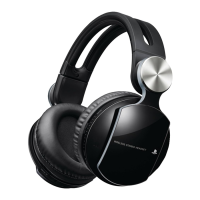
Sony CECHYA-0075 - User Manual

Sony CECHYA-0075
15 pages
Print Icon
To Next Page IconTo Next Page
Loading...
Bluetooth
®
Headset
User’s Guide
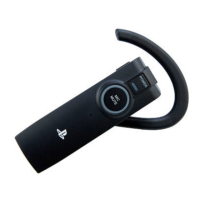
Wireless Headset
CECHYA-0075
BEFORE USING THIS PRODUCT, CAREFULLY READ THE SUPPLIED DOCUMENTATION.

Other manuals for Sony CECHYA-0075

Questions and Answers

Summary

WARNINGS

BEFORE USE

Safety

Observe all warnings and instructions, including CHOKING HAZARD for small parts.

CHARGING YOUR HEADSET

Using the charging cradle

Connect the charging cradle to a USB device to charge the headset.

Charging without the cradle

PAIRING YOUR HEADSET

Pairing with the PS3 system: automatic mode

Pair headset with PS3™ system using USB cable for advanced features.

Pairing with the PS3 system: Bluetooth discovery mode

Pair headset as standard Bluetooth device with PS3™ system.

Pairing with a mobile phone

Pair headset with Bluetooth®-enabled mobile phones for basic call functions.

TURNING YOUR HEADSET ON AND OFF

CONNECTING YOUR HEADSET TO BLUETOOTH DEVICES

TESTING AND CONFIGURING THE HEADSET

WEARING YOUR HEADSET

HEADSET FEATURES FOR YOUR PS3 M SYSTEM

Notifications

HQ mode

USING YOUR HEADSET WITH A MOBILE PHONE

HEADSET CONTROLS

HEADSET INDICATORS

Headset tones

TROUBLESHOOTING

My headset quit responding.

Steps to resolve headset unresponsiveness by re-pairing with the PS3™ system.

The PS3 systems advanced headset features do not work.

Ensuring PS3™ system software is updated and automatic mode is used for advanced features.

My headset does not work with my phone

Steps to ensure headset is charged, phone supports Bluetooth®, and pairing is correct.

Summary

WARNINGS

BEFORE USE

Safety

Observe all warnings and instructions, including CHOKING HAZARD for small parts.

CHARGING YOUR HEADSET

Using the charging cradle

Connect the charging cradle to a USB device to charge the headset.

Charging without the cradle

PAIRING YOUR HEADSET

Pairing with the PS3 system: automatic mode

Pair headset with PS3™ system using USB cable for advanced features.

Pairing with the PS3 system: Bluetooth discovery mode

Pair headset as standard Bluetooth device with PS3™ system.

Pairing with a mobile phone

Pair headset with Bluetooth®-enabled mobile phones for basic call functions.

TURNING YOUR HEADSET ON AND OFF

CONNECTING YOUR HEADSET TO BLUETOOTH DEVICES

TESTING AND CONFIGURING THE HEADSET

WEARING YOUR HEADSET

HEADSET FEATURES FOR YOUR PS3 M SYSTEM

Notifications

HQ mode

USING YOUR HEADSET WITH A MOBILE PHONE

HEADSET CONTROLS

HEADSET INDICATORS

Headset tones

TROUBLESHOOTING

My headset quit responding.

Steps to resolve headset unresponsiveness by re-pairing with the PS3™ system.

The PS3 systems advanced headset features do not work.

Ensuring PS3™ system software is updated and automatic mode is used for advanced features.

My headset does not work with my phone

Steps to ensure headset is charged, phone supports Bluetooth®, and pairing is correct.

Sony CECHYA-0075 Specifications

General IconGeneral
Model NumberCECHYA-0075
TypeOver-ear
ConnectivityWireless
Wireless TechnologyBluetooth
Audio OutputStereo
Frequency Response20 Hz - 20 kHz
Driver Unit40 mm
CompatibilityPlayStation 3, PlayStation Vita
Impedance32 Ohm
Charging TimeApprox. 3 hours

Related product manuals