Setting Up
CFD-646/656.E.3-856-825-1X.U/CA
21
Setting Up
Setting Up
Hooking up the
system
Make sure you turn off the
power before making any
connections.
continued
Right
speaker
CFD-656
Left speaker
Tips
• To detach the speakers,
slide the speaker box all
the way up and away
from the player.
• Connect the speakers
for this unit only to the
speaker terminals of
this unit. If you connect
any other speakers or
equipment,
malfunction may occur.
Note
When transporting, make
sure to carry the player.
Do not carry the speakers
since they are not locked.
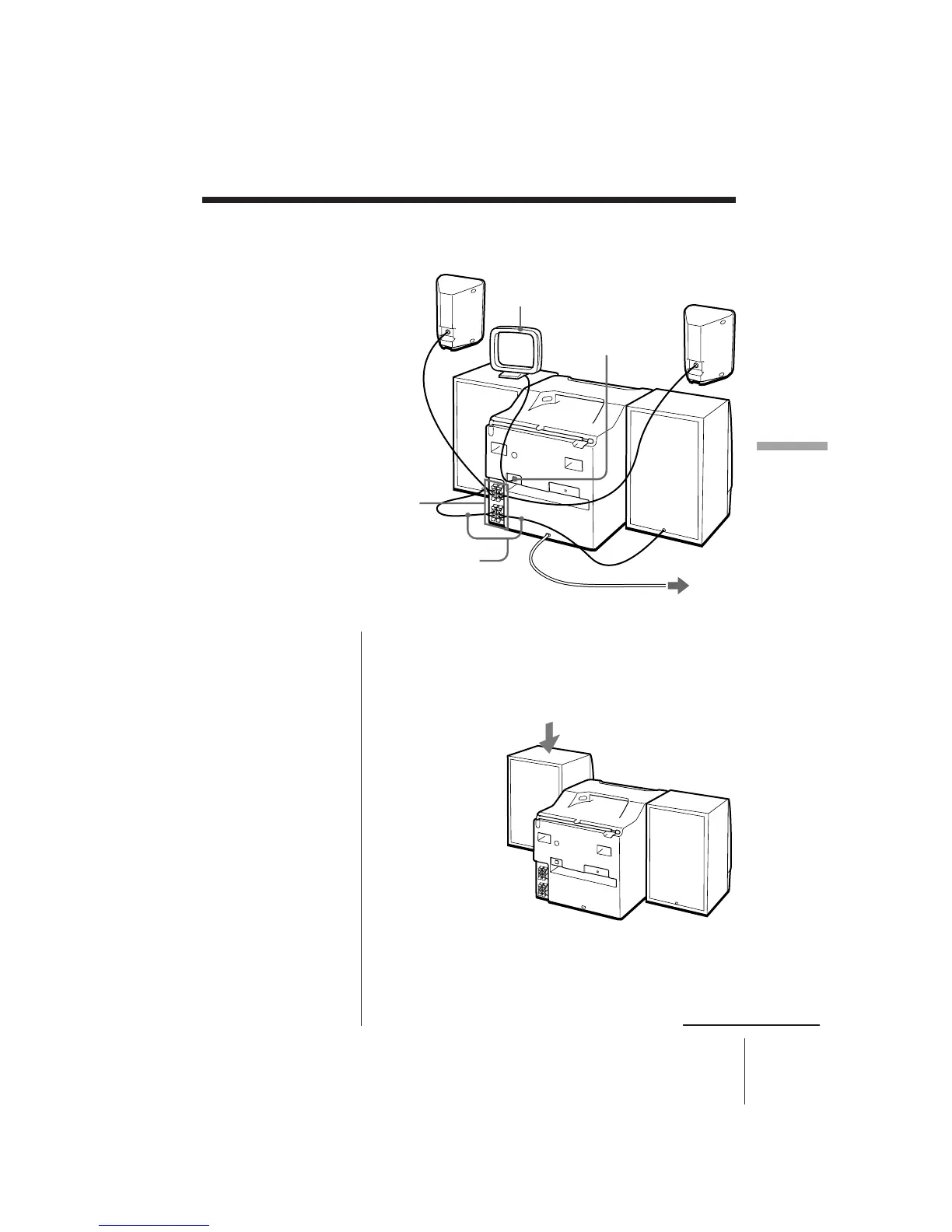
1 Hooking up the speakers
1 Align the grooves and slide the speaker box down
until it snaps into place.
AM loop
aerial
Surround speaker
(CFD-656 only)
Speaker cords
Surround speaker
(CFD-656 only)
2 AM aerial terminal
3 To a wall outlet
1 Speaker terminals



 To Next Page