CD – Play
7
GB
You can play all the tracks or a single track on a
disc.
Press REPEAT/FM MODE on the remote
during playback until “REPEAT” or
“REPEAT 1” appears.
REPEAT: For all the tracks on the disc up to five
times.
REPEAT 1: For a single track only.
To cancel Repeat Play
Press REPEAT/FM MODE on the remote
repeatedly until both “REPEAT” and “REPEAT
1” disappear.
You can make a program of up to 30 steps.
You can synchro record the programed tracks
onto a cassette tape (page 12).
1
Press CD N on the remote (or CD
NX on the unit) to switch the function
to CD, then press x.
2
Press PLAY MODE/DIRECTION in stop
mode repeatedly until “PGM” appears.
3
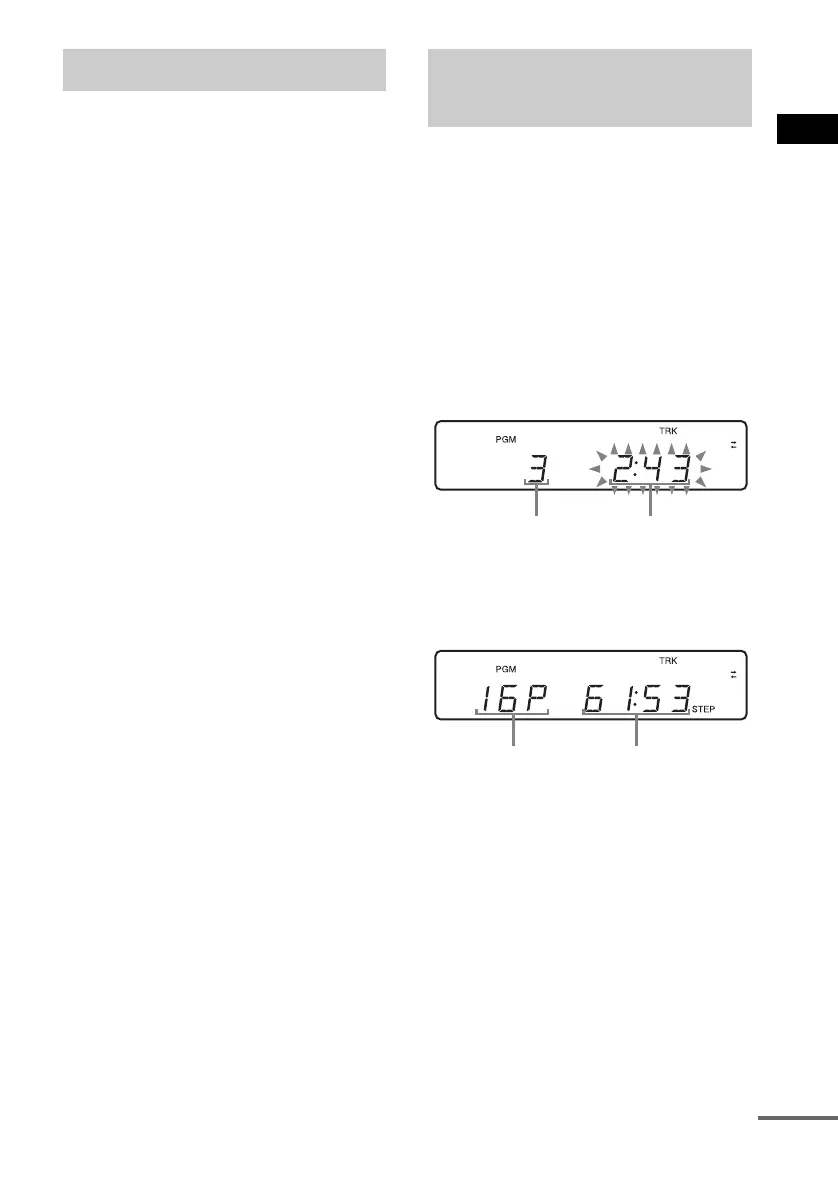
Press ./> repeatedly until the
desired track number appears.
4
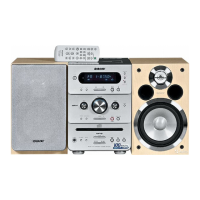
Press PLAY MODE/DIRECTION.
The track is programed.
The total number of program steps appears.
5
To program additional tracks, repeat
steps 3 and 4.
6
Press CD N on the remote (or CD
NX on the unit).
Program Play starts.
Playing repeatedly
— Repeat Play
Creating your own
program
—Program Play
Selected track
number
Total playing time
of the program
Total number of
program steps
Total playing time of
the program
continued



 To Next Page