6
D:\###sagyou\0622-yama\386765711CPDE200EAEP\01GB03BAS-AEP.fm
masterpage:Left
CPD-E200E
3-867-657-11 (1)
Setup
Before using your monitor, check that the following accessories
are included in your carton:
• Power cord (1)
• Windows Monitor Information Disk (1)
• Warranty card (1)
• Notes on cleaning the screen’s surface (1)
• This instruction manual (1)
Step 1:Connect your monitor to
your computer
Turn off the monitor and computer before connecting.
Note
Do not touch the pins of the video cable connector as this might bend the
pins.
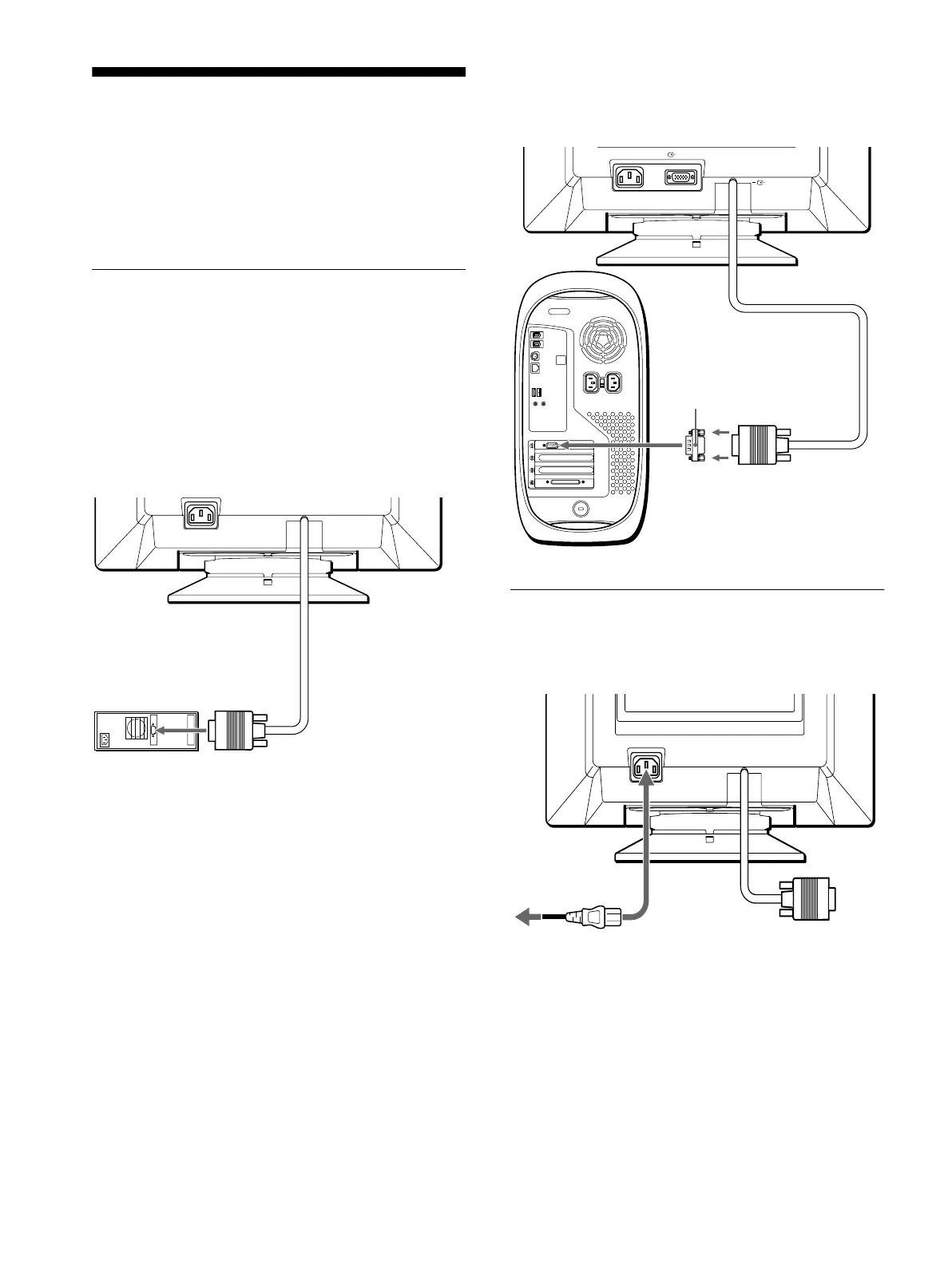
x
Connecting to an IBM PC/AT or compatible
computer
x
Connecting to a Macintosh or compatible
computer
Step 2:Connect the power cord
With the monitor and computer switched off, first connect the
power cord to the monitor, then connect it to a power outlet.
AC IN
IBM PC/AT or
compatible computer
to video output
You will need a Macintosh adapter (not supplied).
Macintosh adapter (not supplied)
Macintosh or compatible computer
to video output
to AC IN
to a power outlet
power cord (supplied)
01GB01COV-AEP.book Page 6 Monday, June 21, 1999 7:09 PM




 To Next Page