Getting started
9
Charging the battery pack
You cannot charge the battery pack while your camera is turned on. Be sure to turn
off your camera before charging.
Battery remaining indicator
The LCD screen on the camera shows the remaining time for which you can still
record or play back images.
This indication may not be entirely accurate depending on the conditions of use and
the operating environment.
Auto power-off function
If you do not operate the camera for about three minutes during recording, the camera
turns off automatically to prevent wearing down the battery. To use the camera again,
slide down the POWER switch to turn on the camera again.
1
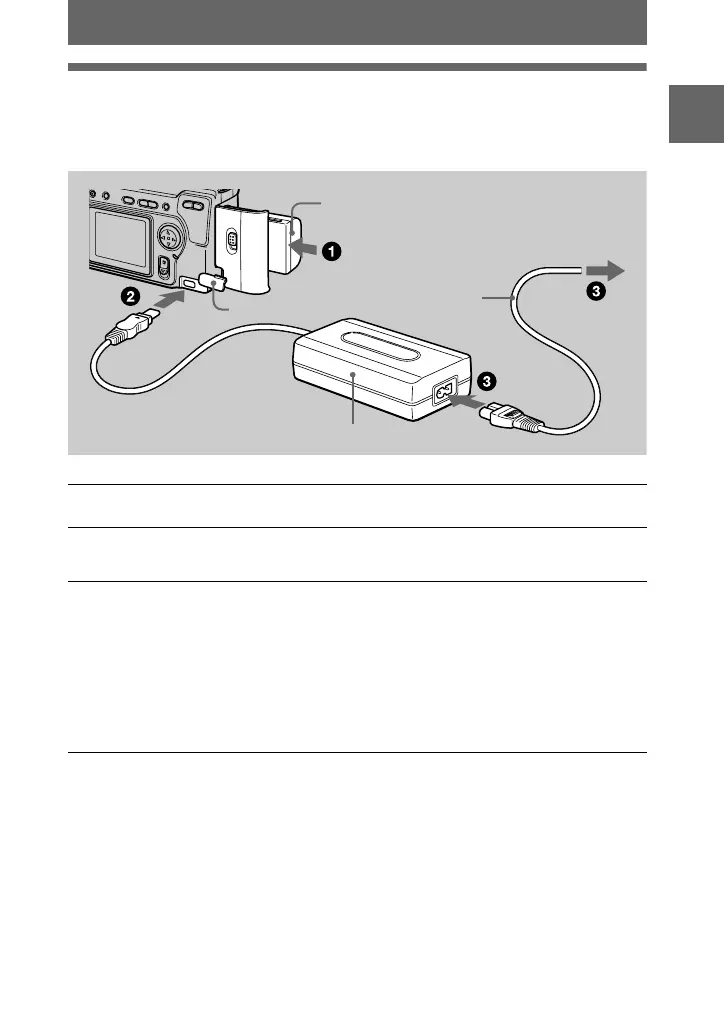
Insert the battery pack into your camera.
2
Open the DC IN jack cover and connect the DC connecting cable to
the DC IN jack of your camera with the
v
mark facing up.
3
Connect the power cord (mains lead) to the AC power adaptor and
then to a wall outlet (mains).
The CHARGE lamp in the display window flashes when charging begins.
When the CHARGE lamp goes off,
normal charge
is completed. For
full
charge
, which allows you to use the battery longer than usual, leave the
battery pack inserted for about one hour after normal charge is completed until
the battery remaining indicator and “FULL” is displayed alternately in the
display window.
AC-L10 AC power adaptor
DC IN jack cover
To the wall outlet (mains)
Battery pack (M series)
Power cord
(mains lead)


 To Next Page
 Loading...









