11
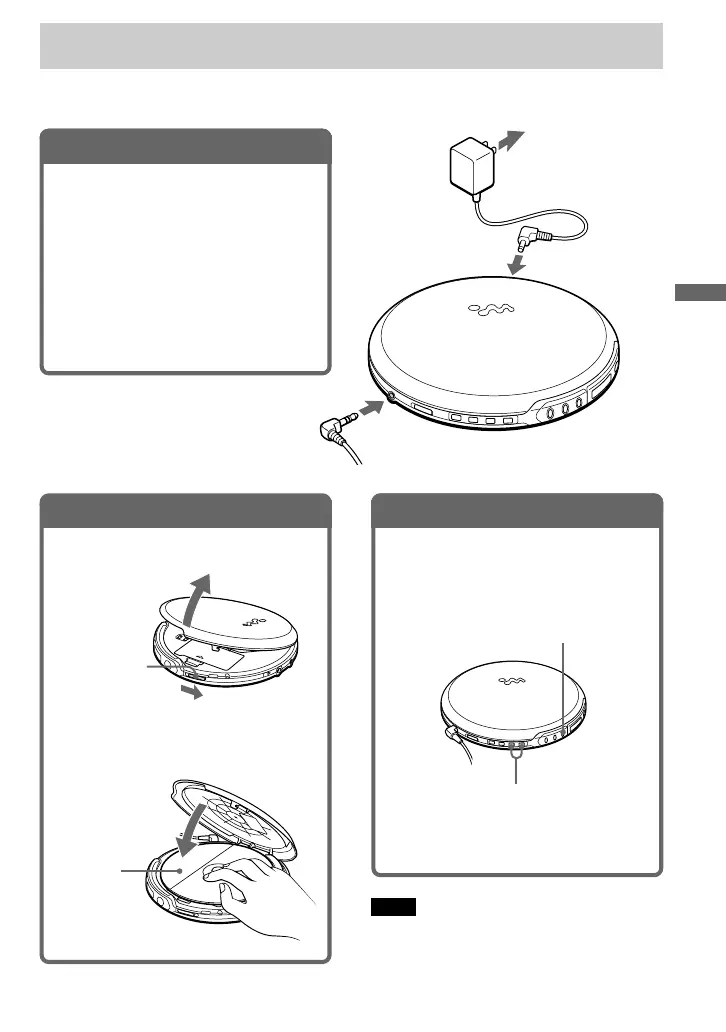
2. Insert an audio CD.
1 Slide OPEN to open the lid.
Label
side up
2 Fit the audio CD to the pivot and
close the lid.
OPEN switch
Playing an audio CD
You can also use alkaline batteries. (See “Connecting to a power source.”)
Note
When playing back an audio CD, it takes a while
before the sound is heard.
1. Connect your player.
1 Connect the AC power adaptor.
2 Connect the earphones.
Connect the earphones firmly. A
loose connection may cause noise
during playback.
For models supplied with the AC plug
adaptor
If the AC power adaptor does not fit the AC
outlet, use the AC plug adaptor.
Earphones
to an AC outlet
to DC IN
4.5V
to i (headphones)
AC power
adaptor
N >
VOLUME +/–
3. Play an audio CD.
1 Press N > (u for the wireless
remote commander).
2 Adjust the volume by pressing
VOLUME + or –.
To stop playing, press x.
The player is also turned off.
Playing an audio CD
(Continued)



 To Next Page