18
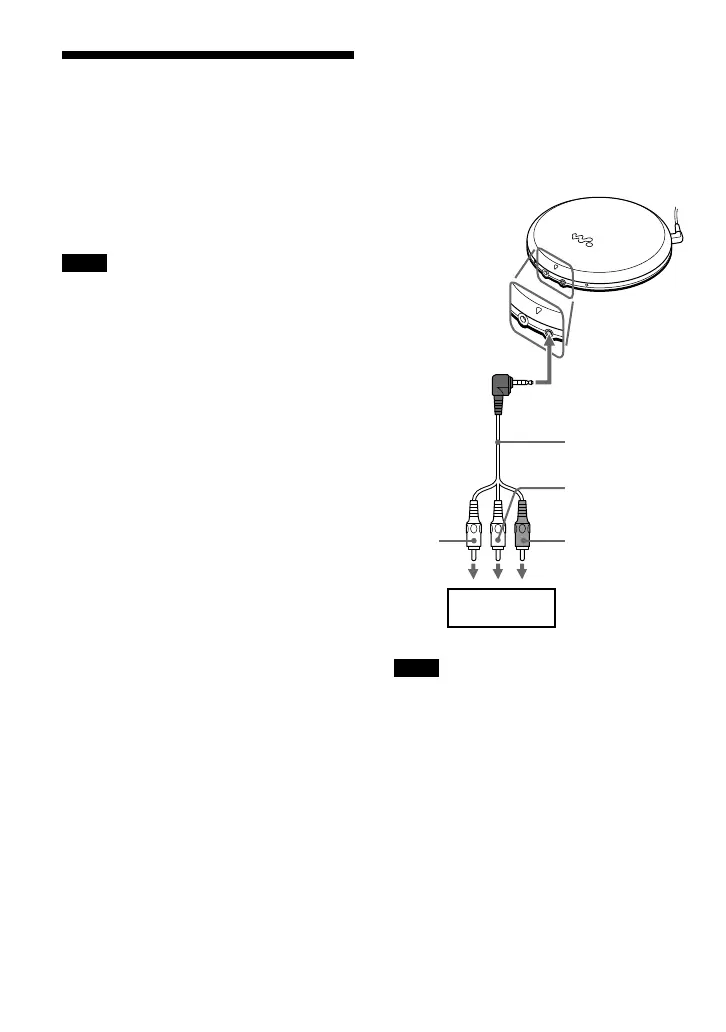
Connecting to other video
equipment
You can record a VIDEO CD on a video
tape. Refer to the instruction manual supplied
with other equipment for details.
Before making connections, turn off each
equipment.
Note
Before you play a disc, turn down the volume of the
connected equipment so as not to damage the
speakers.
To LINE IN or REC IN
Red
White
To AUDIO/
VIDEO OUT
Yellow
AV cable
VCR, etc.
Using other functions
Shock protection function
By using a memory buffer that can store
approximately 3 seconds of video data, the
shock protection function prevents the
pictures from skipping when you make a jolt
or bump to your player.
Note
Noise may appear on the screen if
– the player receives stronger continuous shock
than expected or
– a dirty or scratched VIDEO CD is played.



 To Next Page