Getting Started
19
GB
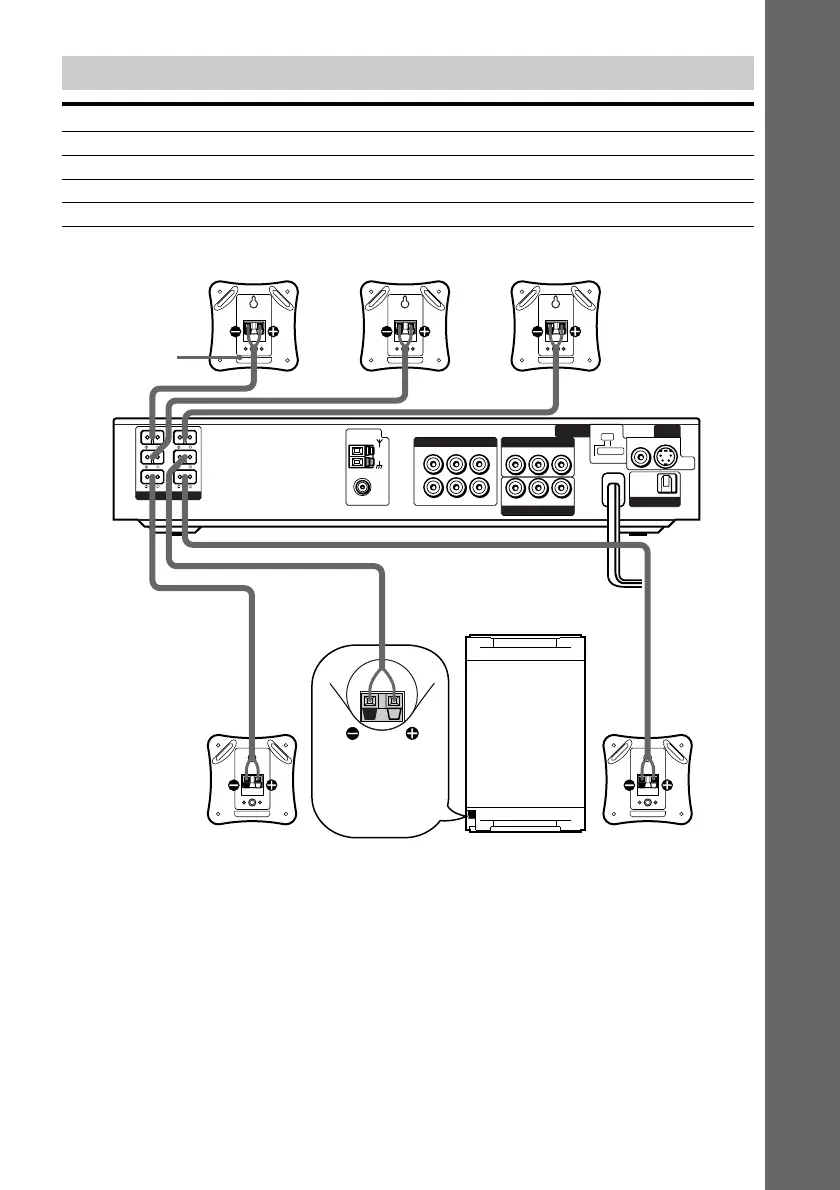
Terminals for connecting the speakers
Connect the To the
Front speakers SPEAKER FRONT L (white) and R (red) terminals
Rear speakers SPEAKER REAR L (blue) and R (grey) terminals
Center speaker SPEAKER CENTER (green) terminal
Subwoofer SPEAKER WOOFER (purple) terminal
WOOFER 3Ω
IMPEDANCE
USE
EXCEPT
WOOFER 3Ω
VIDEO 1
COMPONENT VIDEO OUT
VIDEO 2
VIDEO 2
MONITOR
OUT
FRONT
R
FRONT
L
REAR
R
REAR
L
CENTER WOOFER
COAXIAL
AUDIO OUT
AUDIO IN
LR
LR
LR
VIDEO OUT
VIDEO IN
VIDEO INAUDIO IN
YPB/CB PR/CR
AM
FM
75Ω
OPTICAL
DIGITAL
IN
S VIDEOVIDEO
DVD
ONLY
SPEAKER
INTERLACE
SELECTABLE
SCAN SELECT
COMPONENT
VIDEO OUT
Front speaker (R)
Rear speaker (L)Rear speaker (R)
Subwoofer
Center speaker Front speaker (L)
Color label
Turn over the
subwoofer to
connect the
speaker cord.
Note on placing speakers
Use caution when placing the subwoofer or a speaker stand (not supplied) that is attached with
the front/rear speakers on a specially treated (waxed, oiled, polished, etc.) floor, as staining or
discoloration may result.



 To Next Page