18
GB
Basic Operations
Depending on the DVD VIDEO or VIDEO CD,
some operations may be different or restricted.
Refer to the operating instructions supplied with
your disc.
1 Turn on your TV.
2 Switch the input selector on the TV to
this system.
3 Press "/1.
The system turns on.
Unless the system is set to “DVD,” press
FUNCTION to select “DVD.”
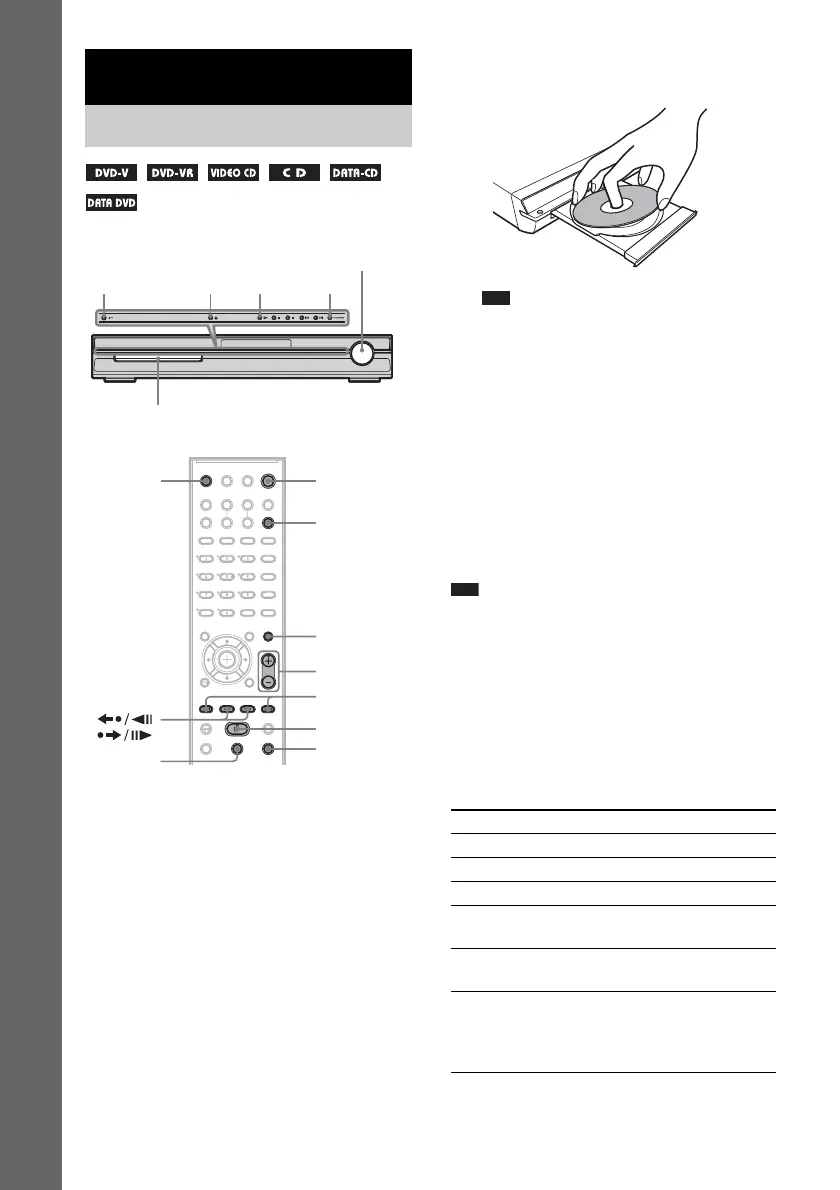
4 Press A.
5 Load a disc.
Place one disc on the tray, and then press A.
Note
• When you play an 8 cm disc, place it on the
inner circle of the tray. Be careful that the disc is
not skewed on the inner circle of the tray.
• Do not forcibly press the disc tray closed with
your finger, as this may cause malfunction.
• Do not place more than one disc on the tray.
6 Press H.
The system starts playback (continuous
play).
Adjust the volume on the unit.
The volume level appears on the TV screen
and in the front panel display.
Note
• Depending on the system status, the volume level
may not appear on the TV screen.
To save the power in standby
mode
Press "/1 while the system turns on. To cancel
standby mode, press "/1 once.
Additional operations
Basic Operations
Playing Discs
"/1
Disc tray
FUNCTION
Adjust the
volume
H
A
"/1
FUNCTION
x
H
X
./>
MUTING
VOLUME +/–
/
Z
To Press
Stop x
Pause X
Resume play after pause X or H
Go to the next chapter,
track, or scene
> (except for JPEG)
Go back to the preceding
chapter, track, or scene
. (except for JPEG)
Turn off the sound
temporarily
MUTING. To cancel,
press it again or
VOLUME + to adjust
the sound volume.



 To Next Page