Advanced Settings and Adjustments
73
US
Changing the password
1 Press DISPLAY while the system is
in stop mode.
The Control Menu appears.
2 Press X/x to select
[PARENTAL CONTROL], then press
.
The options for [PARENTAL CONTROL]
appear.
3 Press X/x to select [PASSWORD t],
then press .
The display for entering the password
appears.
4 Enter your 4-digit password using the
number buttons, then press .
5 Enter a new 4-digit password using the
number buttons, then press .
6 To confirm your password, re-enter it
using the number buttons, then press
.
If you make a mistake entering
your password
Press C before you press and input the
correct number.
D. C. A. C.* can set the appropriate surround
sound automatically.
* Digital Cinema Auto Calibration
Note
• Loud test sound is output when [AUTO
CALIBRATION] starts. You cannot turn the volume
down. Give consideration to children and neighbor.
• The A.CAL MIC jack is for the supplied calibration
mic only. Do not connect other mics as it may cause
damage to the system.
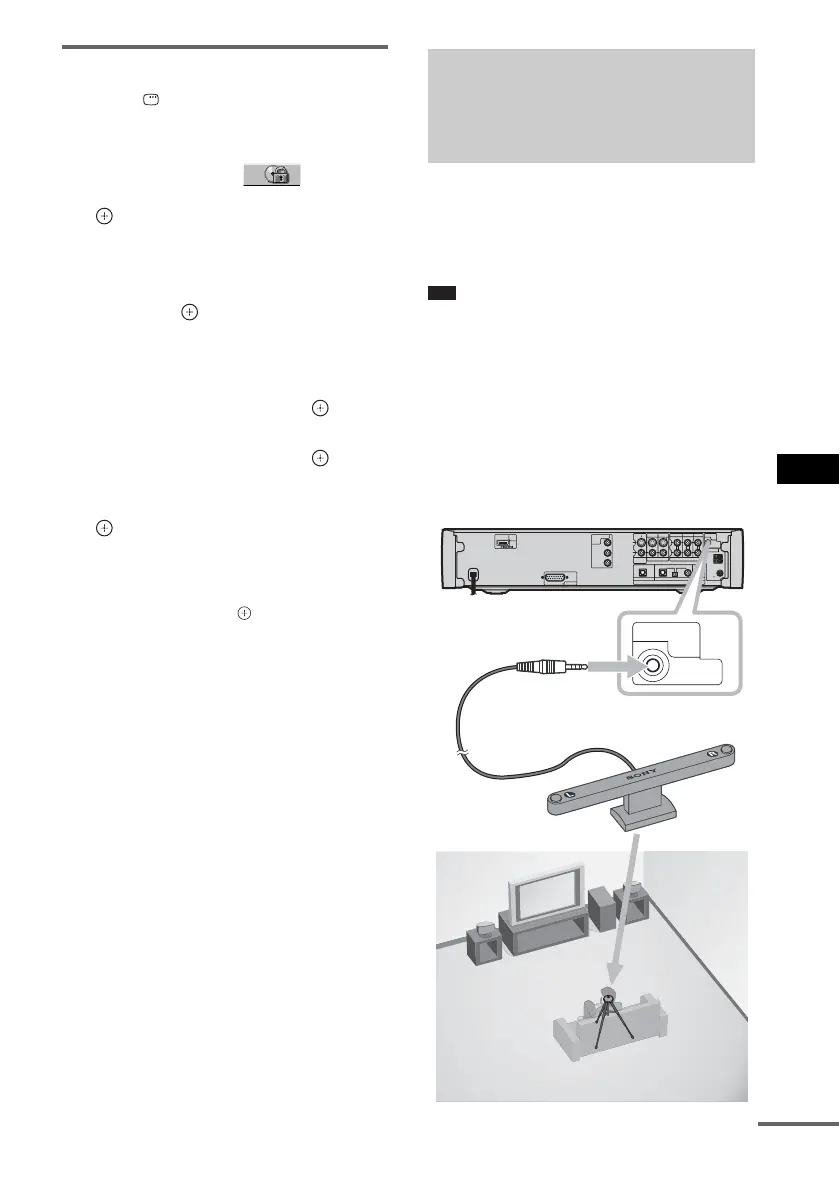
1 Connect the calibration mic to the
A.CAL MIC jack on the rear panel, and
set it up at the ear level using a tripod,
etc. (not supplied).
Calibrating the
Appropriate Settings
Automatically
(D. C. A. C*)
VIDEO1
VIDEO1
COAXIAL COAXIAL
ECM-AC1
75
COAXIAL
OPTICALOPTICAL
VIDEO1
S VIDEOY
P
B/CB
PR/CR
L
R
VIDEO
AUDIO IN
A.CAL
MIC
DIGITAL IN
ANTENNA
HDMI
OUT
VIDEO INMONITOR
OUT
COMPONENT
VIDEO
OUT
VIDEO2
VIDEO2
AM
FM
VIDEO2
TV
TV
IMPEDANCE USE 4
SPEAKER
ECM-AC1
A.CAL
MIC
Calibration mic
Side view
continued



 To Next Page