Additional Information
97
US
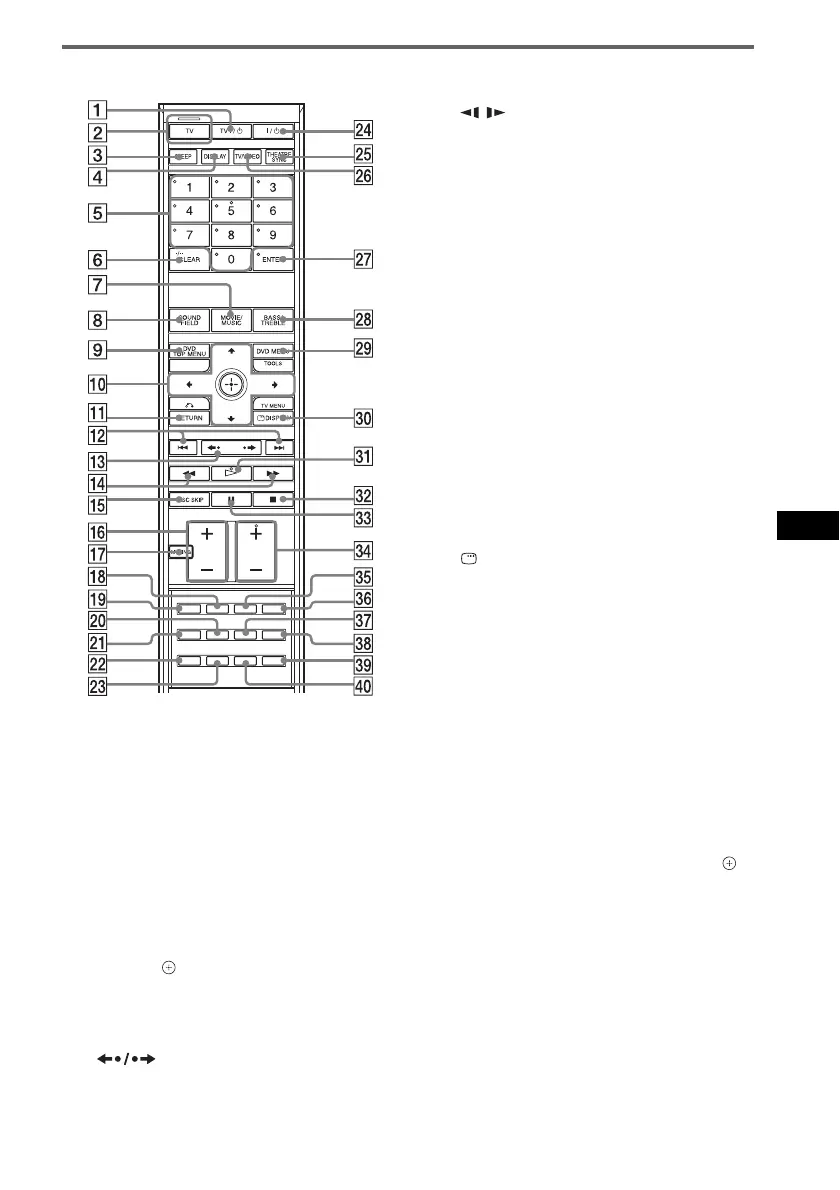
Remote control
A TV [/1 (on/standby) (66)
B TV button/TV mode indicator (66)
C SLEEP (68)
D DISPLAY (49, 64)
E Number buttons
2)3)
(63, 65, 70)
F CLEAR (40, 63, 67, 77)
-/--
3)
(66)
G MOVIE/MUSIC (35)
H SOUND FIELD (36)
I DVD TOP MENU (46)
J C/X/x/c/ (19, 21, 33, 40, 62, 70)
K O RETURN
3)
(41)
L ./> (31)
PRESET –/+ (63)
M (instant replay/instant
advance) (31)
c/C STEP (39)
N m/M (39)
/ (39)
TUNING –/+ (62)
O DISC SKIP (31)
P VOLUME +/– (21, 31, 63)
TV VOL +/–
3)
(66)
Q MUTING (31)
R AUDIO
2)
(47, 68)
S PICTURE NAVI (41)
T PROGRESSIVE (26)
U DIMMER (69)
V FM MODE (63)
W DIRECT TUNING (63)
X [/1 (on/standby) (19, 21, 31, 42, 63)
Y THEATRE SYNC (67)
Z TV/VIDEO (66)
wj ENTER
1)3)
(19, 21, 33, 40, 62, 70)
wk BASS/TREBLE (38)
wl DVD MENU (46)
TOOLS
3)
(66)
e; DISPLAY (20, 40, 70, 98)
TV MENU
3)
(66)
ea H (play)
2)
(21, 31, 42)
es x (stop) (32, 42, 70)
ed X (pause) (32)
ef FUNCTION +/–
2)
(21, 26, 31, 33, 62, 73)
TV CH +/–
3)
(66)
eg SUBTITLE (52)
eh ANGLE (52)
ej SA-CD/CD (53)
ek REPEAT (45)
el AMP MENU (33, 36, 69, 75, 103)
r; TUNER MENU (62)
1)
The ENTER button is the same function as the
button.
2)
The H ea, 5 5, AUDIO qk, and FUNCTION +/
– ef buttons have tactile dots. Use the tactile dots as
references when operating the system.
3)
These buttons change to the TV operation buttons
when the remote is in TV mode. The remote is in TV
mode when the TV mode indicator 2 lights up by
pressing the TV button 2.
With the cover opened.



 To Next Page