1-4E
DCR-HC28E_L2
E
E
E
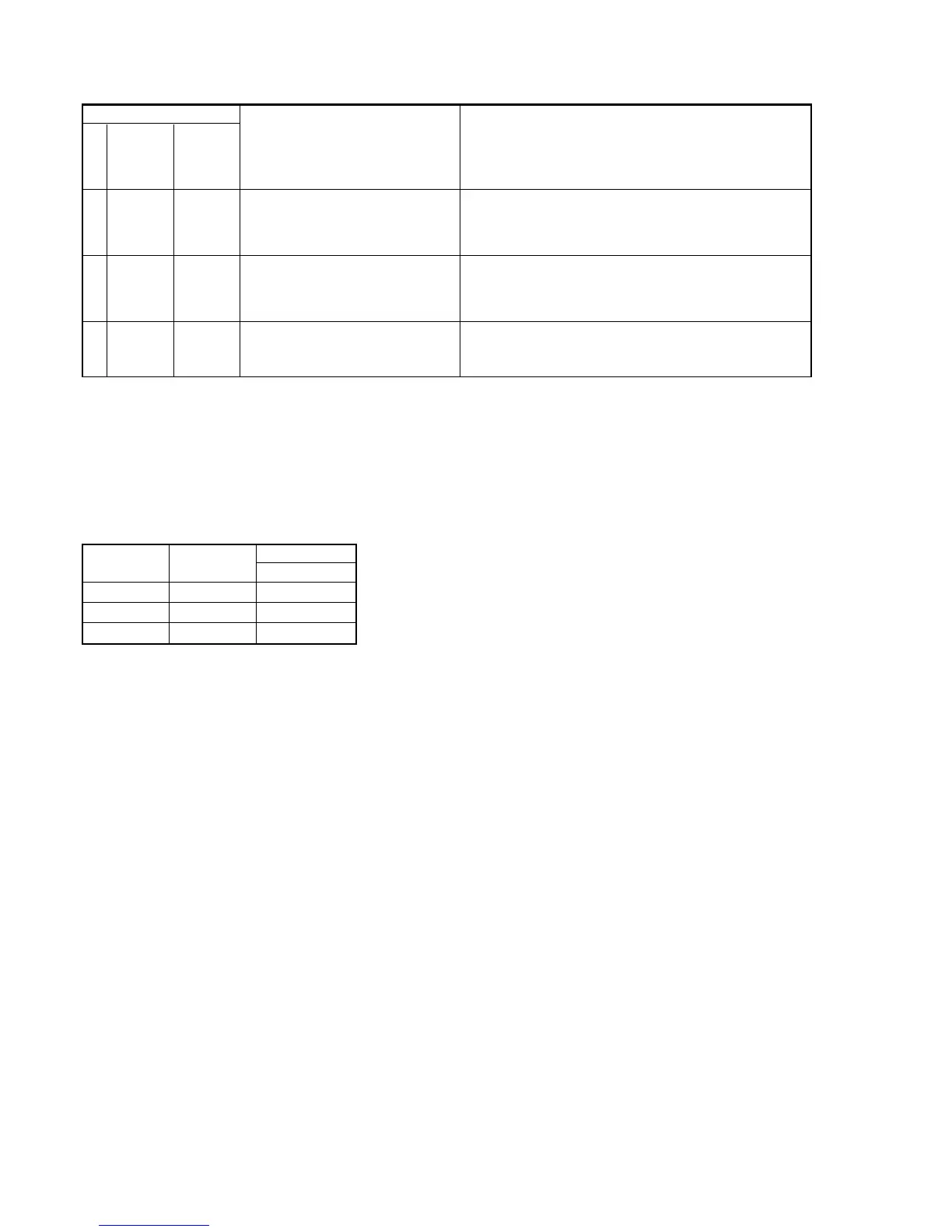
Block
Function
61
61
61
Detailed
Code
00
10
11
Symptom/State
Difficult to adjust focus
(Cannot initialize focus.)
Zoom operations fault
(Cannot initialize zoom lens.)
Focus lens initializing failure and zoom
lens initializing failure occur simulta-
neously.
Self-diagnosis Code
Repaired by:
Correction
Inspect the lens block focus reset sensor (Pin ql, of CN3101 of VC-
416 board) when focusing is performed when the touch panel is
operated in the focus manual mode and the focus motor drive circuit
(IC3101 of VC-416 board) when the focusing is not performed.
Inspect the lens block zoom reset sensor (Pin qg, of CN3101 of
VC-416 board) when zooming is performed when the zoom switch
is operated and the zoom motor drive circuit (IC3101 of VC-416
board) when zooming is not performed.
Inspect the flexible board for breakage or loose connection.
If not faulty, inspect the focus and zoom motor drive circuit (IC3101
of VC-416 board).
1-6. PRECAUTION ON REPLACING THE VC-416 BOARD
Exif Model Data Check
When you replace to the repairing board, the written data of repairing board also might be changed to original setting.
When the data has changed because of board replaceing etc, check the data setting (Exif Model Data) is right. If not, rewrite to the right value.
Exif Model Data
Writing Method:
1) Select page: 0, address: 01 and set data: 01.
2) Select page: C, address: D2 to D4, and set the Exif Model Data.
Note: To write in the non-volatile memory (EEPROM), press the PAUSE (Write) button each time to set the data.
3) Select page: 0, address: 01, and set data: 00.
Page
C
C
C
Data
DCR-HC28E
32
38
45
Address
D2
D3
D4








 To Next Page