48
Adjusting the white balance
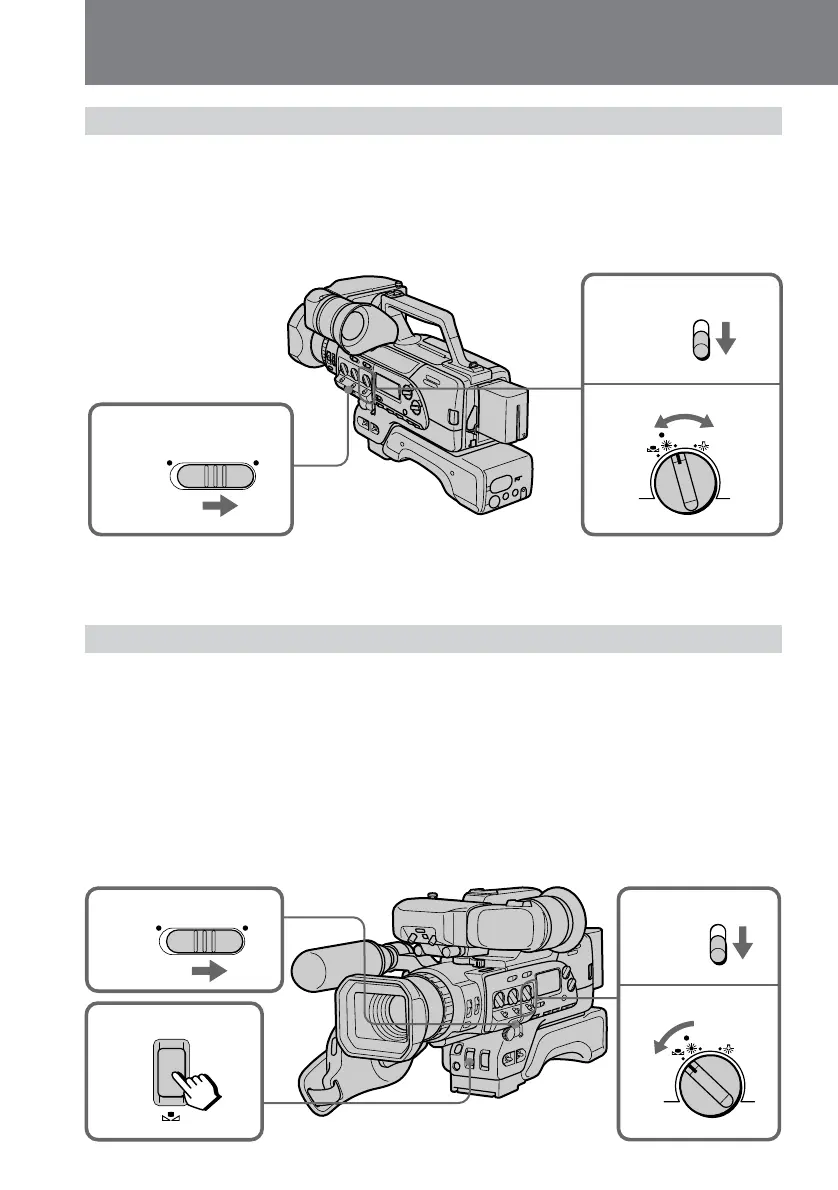
Adjusting white balance manually
(1) Set AUTO LOCK to OFF.
(2) Set AUTO/MANUAL under the WHT BAL dial to MANUAL.
(3) Turn WHT BAL to select a white balance.
Usually select e (indoor mode) or w (outdoor mode). To fix the white balance by
using one-push white balance, select ∑ and see “
Locking the white balance
setting”
.
1
2
3
5
WHT BAL
ON OFF
AUTO LOCK
AUTO
MANUAL
WHITE
BALANCE
1
2
3
ON OFF
AUTO LOCK
WHT BAL
AUTO
MANUAL
To return to automatic white balance mode
Set AUTO/MANUAL under the WHT BAL dial to AUTO.
Locking the white balance setting (One-push white balance mode)
When you set the white balance to one-push white balance mode, the setting is locked
and maintained even if lighting conditions change. In addition, if the lithium battery is
installed, the setting is saved for one hour if you remove the power source.
(1) While in Standby mode, set AUTO LOCK to OFF.
(2) Set AUTO/MANUAL under the WHT BAL dial to MANUAL.
(3) Turn WHT BAL to ∑. The ∑ indicator appears in viewfinder.
(4) Shoot a white object, such as paper, fully in the viewfinder.
(5) Press WHITE BALANCE ∑ on the front of the digital camcorder.
The ∑ indicator flashes rapidly. When the white balance has been adjusted and
stored in memory, the indicator stops flashing.




 To Next Page