Getting Started
17
Getting Started
Confirm Network Connection
Follow these instructions to confirm that your Internet Video Link receiver is
properly connected.
1 Press the DMe
x
button on your TV’s remote control to view the
connection status.
2
When you see the message “Configuration Successful,” press the
HOME
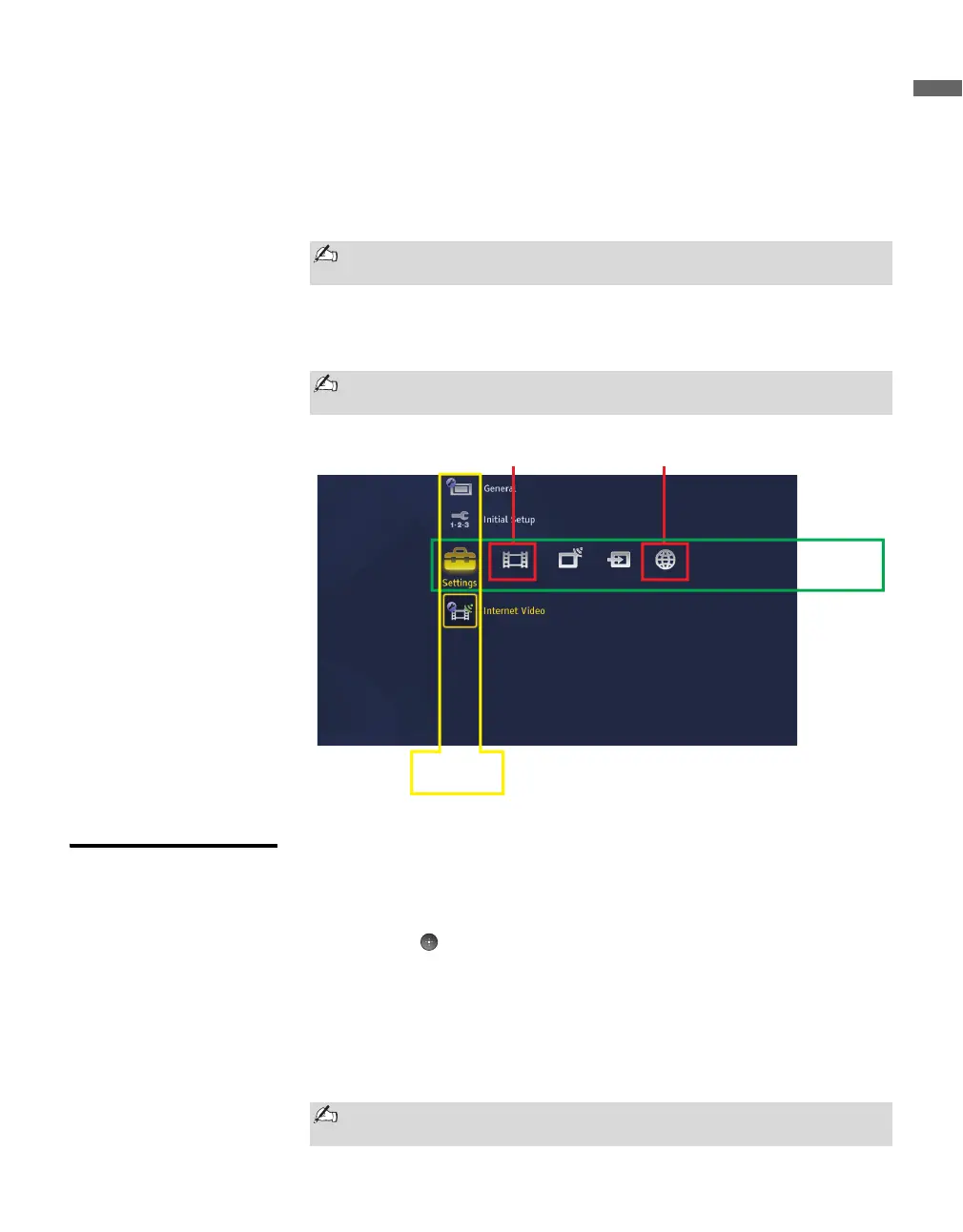
button on your TV’s remote control. These menu icons associated with
the receiver will appear on the
XMB
TM
(XrossMediaBar
®
).
Exiting Your
Receiver
There are several ways to exit the BRAVIA Internet Video Link and resume
watching your regular TV programming.
● Press the HOME button and scroll to TV. Highlight a channel to watch
and press . OR
● Change the TV’s input by pressing the INPUT button. This will change
the input and exit your receiver. OR
● Press the HOME button and scroll to External Inputs. Selecting any
input will exit your receiver.
● From My Page, press the DMe
x
button to toggle to previous input.
If “Feature available with DMeX module” appears on the screen, wait a
few moments and try again.
IMPORTANT: Do not press the INPUT button on the remote control to
access the BRAVIA™ Internet Video Link. It is available on the XMB
TM
.
Media
Category
Bar
Category
Object Bar
Video Menu
Network Menu
Unplugging the AC adapter with AC cord from the wall will disconnect
the receiver.



 To Next Page
 Loading...