DRC-BT15_U2 [US] 3-280-224-11(1)
10
US
Procedures of pairing
1 Place the Bluetooth
device within 1 m (3 ft)
of this unit.
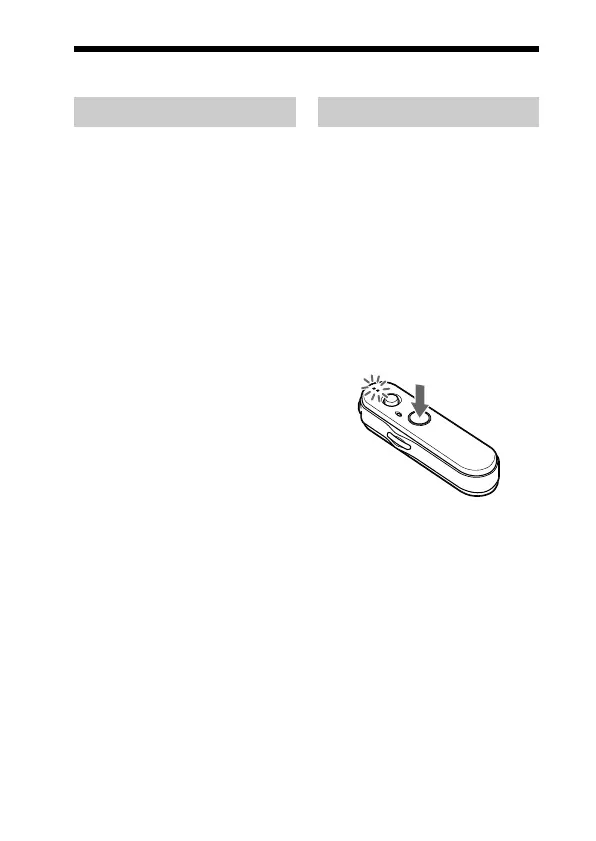
2 Press and hold the
POWER button for
7 seconds or more to
standby for pairing
while the unit is turned
off.
Notes
• After about 3 seconds, power is
turned on and the indicator (blue)
and indicator (red) flash together
twice. Keep the POWER button
pressed without releasing. The
indicator (blue) starts flashing.
When both indicators start flashing
together again, release the button.
This unit enters into pairing mode.
• If pairing is not established within
about 5 minutes, pairing mode will
be cancelled and this unit will turn
off. In this case, start over from
step 1.
Pairing
What is pairing?
Bluetooth devices need to be
“paired” with each other
beforehand.
Once Bluetooth devices are paired,
there is no need for pairing again,
except in the following cases:
• Pairing information is deleted
after repair, etc.
• This unit is paired with 9 or more
devices.
This unit can be paired with up to
8 devices; if a new device is
paired after 8 devices have been
paired, the device whose latest
connection time is the oldest
among the 8 paired devices is
replaced by the new one.
• When recognition of the unit by
the device to be connected is
deleted.
• This unit is initialized (page 26).
All pairing information is deleted.
01US03GET-BT15_U2.p65 23/10/07, 2:19 pm10
Black



 To Next Page