38
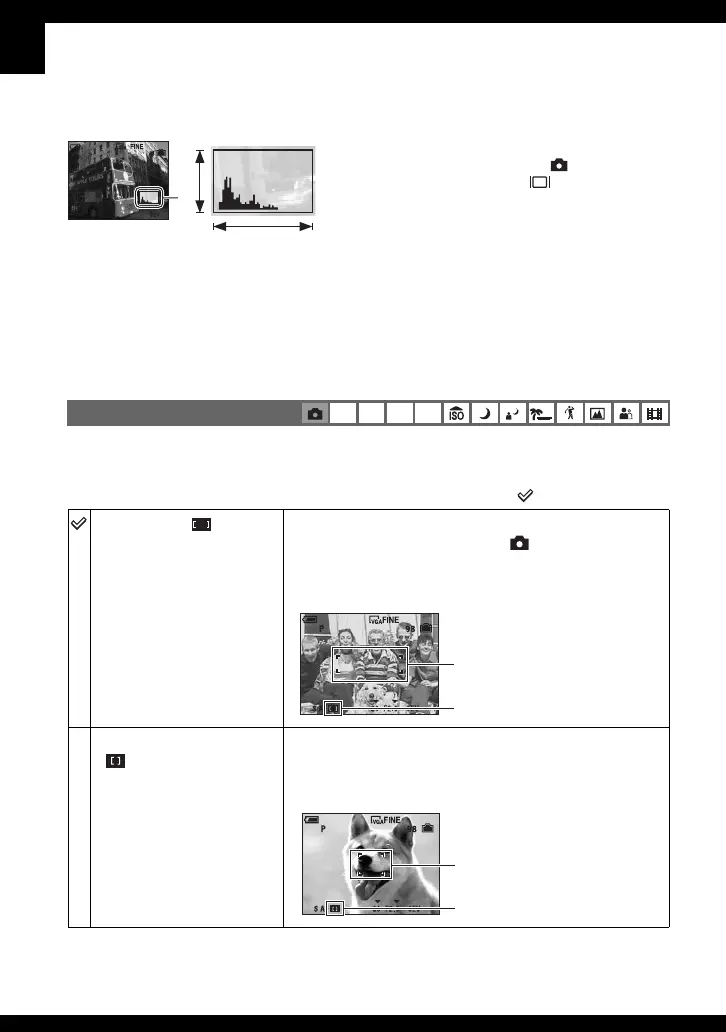
You can change the focus method. Press the FOCUS button repeatedly when it is difficult to
get the proper focus in auto focus mode.
( : The default setting)
Choosing a focus method
P S A M
Multipoint AF ( )
Focuses automatically on a subject in all ranges of the finder
frame. When the mode dial is set to , only Multipoint AF
is available.
• This mode is useful when the subject is not in the center of the
frame.
Center AF
()
Focuses automatically on a subject near the center of the
frame.
• Using this with the AF lock function lets you shoot in the
desired image composition.
z Using a histogram
A histogram is a graph showing the brightness of
an image. Set the mode dial to
, P, S, A or
Scene Selection, then press (Screen display
switch) repeatedly to display the histogram inside
the screen. The graph display indicates a bright
image when skewed to the right side, and a dark
image when skewed to the left side. Adjust the
exposure while checking it with the histogram.
A Number of pixels
B Brightness
• The histogram also appears when the mode dial is set to M, or playing back a single image, but you cannot
adjust the exposure.
BrightDark
A
B
AF range finder frame
AF range finder frame
indicator
AF range finder frame
AF range finder frame
indicator



 To Next Page
 Loading...