47
Using the menu
For details on the operation
1
page 43
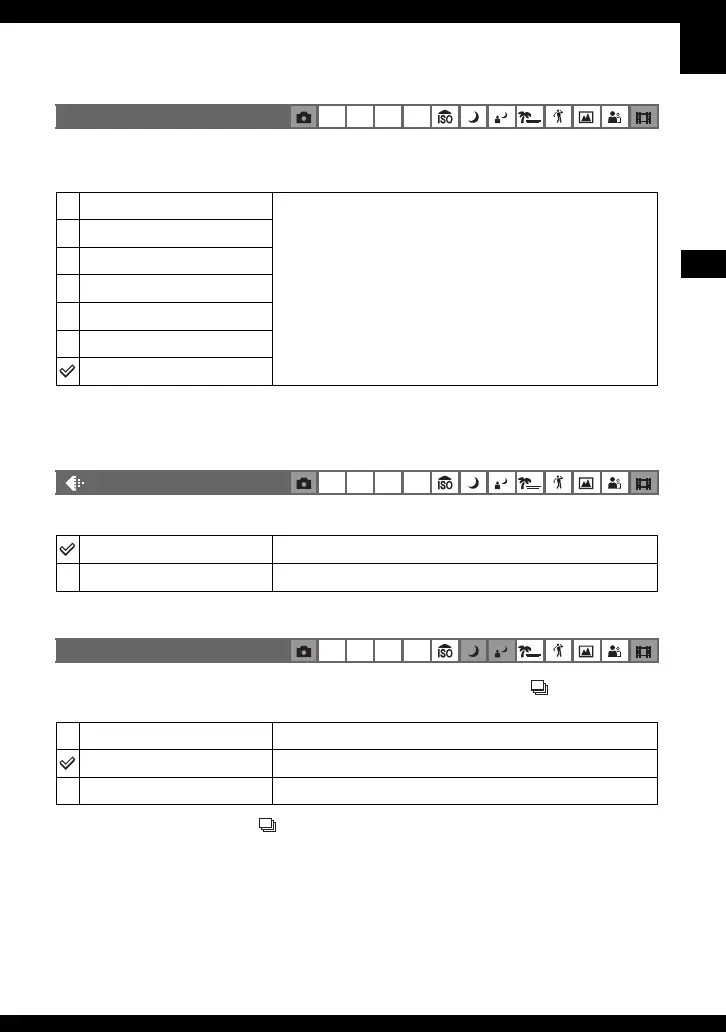
Selects a luminous sensitivity with units of ISO. The larger the number, the higher the
sensitivity.
• For details on the ISO sensitivity t page 15
• Note that the image tends to become noisier as the ISO sensitivity number increases.
• [ISO] is set to [Auto] in the Scene mode.
Selects the still image quality.
• For details on the image quality t page 16
Selects the bracket step value when the Exposure Bracket is selected with the /BRK button
(page 41).
• Select Exposure Bracket with the /BRK button first, set the desired setting for [Bracket Step]. When
you select a function other than Exposure Bracket, this function is unavailable (page 41).
ISO
P S A M
1000
Select a large number when shooting in dark locations or
shooting a subject moving at high speed, or select a small
number to obtain high image quality.
800
400
200
100
80
Auto
(P.Quality)
P S A M
Fine (FINE)
Records with high quality (low compression).
Standard (STD)
Records with standard quality (high compression).
BRK (Bracket Step)
P S A M
± 1.0EV
Shifts the exposure value by plus or minus 1.0EV.
± 0.7EV
Shifts the exposure value by plus or minus 0.7EV.
± 0.3EV
Shifts the exposure value by plus or minus 0.3EV.



 To Next Page
 Loading...