11
GB
[ Remote Control
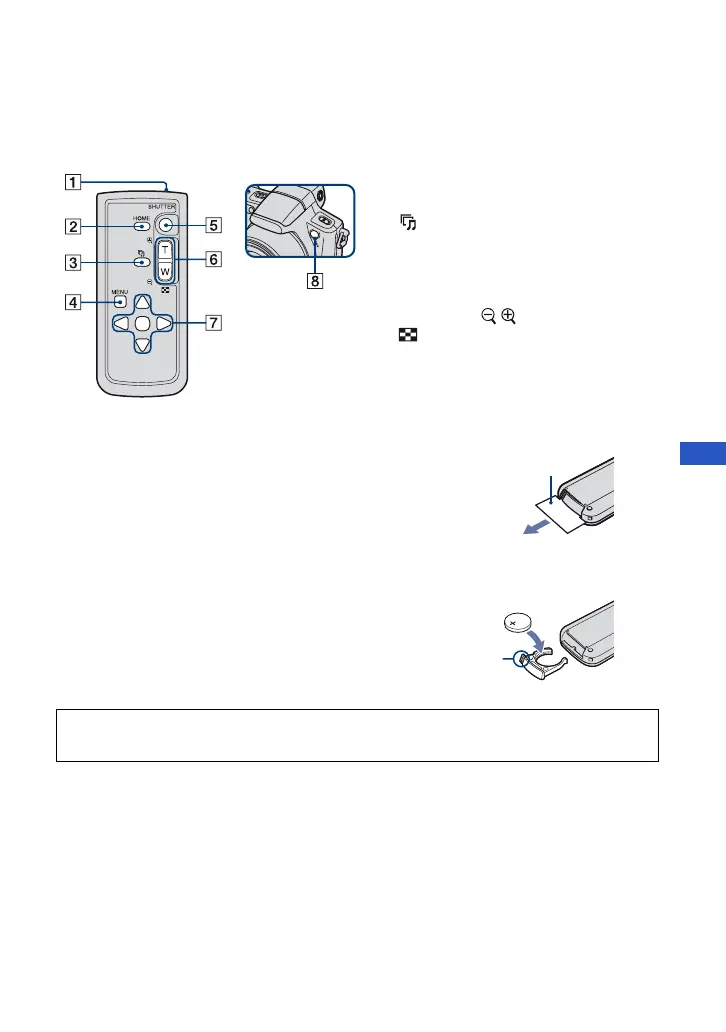
Using the Remote Control, you can easily operate the camera.
Note
To change the battery of the Remote Control
• When the lithium battery becomes weak, the operating distance of the Remote Control may shorten, or the
Remote Control may not function properly. In this case, replace the battery with a Sony CR2025 lithium
battery.
Use of another battery may present a risk of fire or explosion.
A Transmitter
B HOME button
C (Slideshow) button
D MENU button
E SHUTTER button
F for shooting: Zoom (W/T) button
for viewing:
/ (playback zoom)/
(Index) button
G Control button
H Remote sensor
Remove the insulation sheet before using the Remote Control.
Insulation sheet
1 While pressing on the tab, inset your fingernail into
the slit to pull out the battery case.
2 Place a new battery with the + side facing up.
3 Insert the battery case back into the Remote Control
until it clicks.
Ta b
WARNING
Battery may explode if mistreated. Do not recharge, disassemble or dispose of in fire.












 To Next Page