16
Shooting images easily
1Select the desired function from the mode dial.
When shooting still images (Auto Adjustment mode):
Select .
When shooting movies: Select .
2Hold the camera, with your elbows pressed against your body to steady it.
3Shoot with the shutter button.
When shooting movies:
Press the shutter button fully down.
To stop recording, press the shutter button fully down again.
• The shortest shooting distance is approximately 1 cm (13/32 inches) (W)/120 cm (3 feet 11 1/4 inches)
(T) (from the front of the lens).
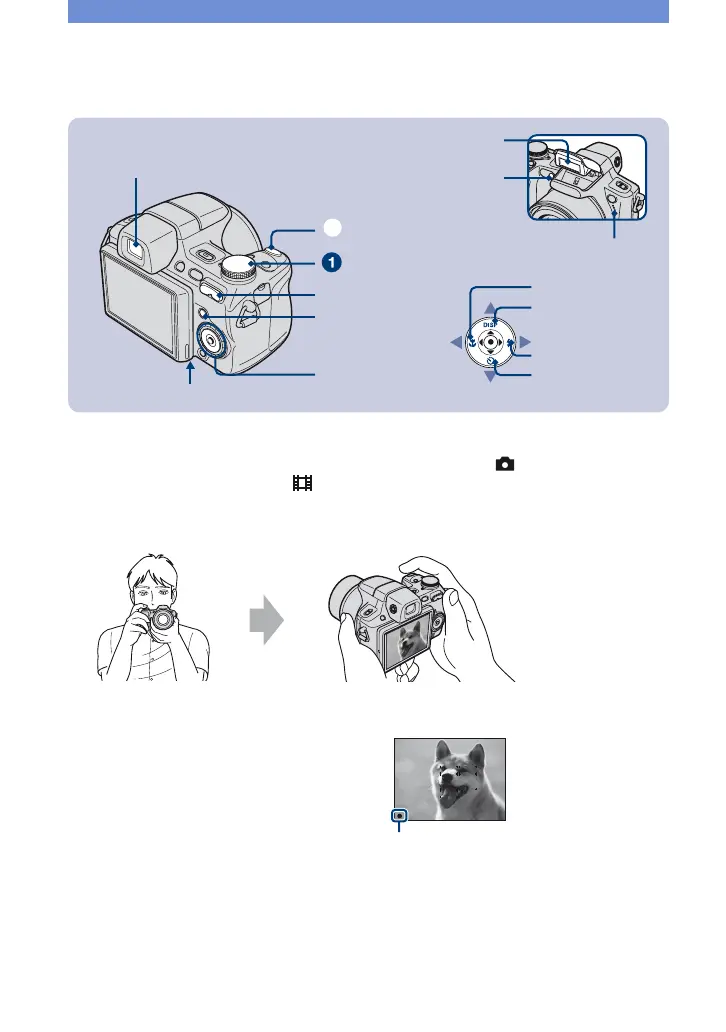
Tripod receptacle (bottom)
Shutter button
ɠ
W/T (Zoom) button
MENU button
Control button
Macro button
Self-timer button
DISP button
Flash button
Mode dial
Microphone
Flash
Finder
Self-timer lamp/
Smile Shutter lamp
Position the subject in
the center of the focus
frame.
When shooting still images:
1 Press and hold the shutter button
halfway down to focus.
The z (AE/AF lock) indicator (green)
flashes, a beep sounds, the indicator stops
flashing and remains lit.
2 Press the shutter button fully down.
AE/AF lock indicator












 To Next Page